

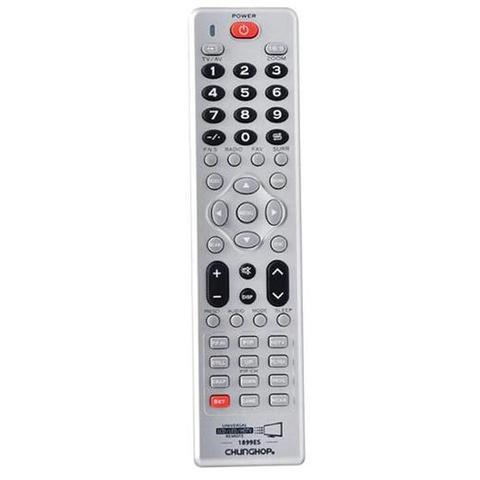

Chunghop Universal LCD LED HD TV Remote Control - Compatible With Many Brands Default Title
Out of stock at Ozdingo Shopping
Price last updated 5 months ago: check it at Ozdingo Shopping before you buy
We may earn a commission if you buy; it doesn't change your price. Check the price at Ozdingo Shopping before you buy. How we make money
Price history
Tracking since 11 May · 6 months
The price hasn't changed since we started tracking it. We'll show its history once it does.
About this product
- Brand
- Chunghop
- Store
- Ozdingo Shopping
- Category
- Electronics > Electronics Accessories > Remote Controls > TV Remote Controls
- SKU
- LCD_LED_HDTV_REMOTE
Universal Replacement TV remote compatible with Hisense TV's, and with many other brands.
The Multi-function remote controller can control most worldwide brands of LED/LCD HD TVs through Manual and Auto Searching. Simple to operate and a great replacement for your broken or lost remote.
Please note the remote does NOT work with the following types of TVs.
- Not compatible with S M A R T TVs
- Not compatible with U H D TVs
- Not compatible with P L A S M A TVs
- Not compatible with 3 D TVs
Specifications
- Simple to use and program
- 16:9 key for wide screen switching
- Specific HDTV navigation feature
- Code saver retains codes when changing batteries
- Ideal replacement for lost or defect remote controls
- Batteries 2 x AAA Batteries (NOT included)
- Remote Control Distance: about 8M (varies with model)
- Full Instructions Manual Included
- May not allow access to digital tv guide if available on original remote
This is Remote Compatible with:Acer, Aiwa, Amtran, Aoc, Aolinpu, Apple, Beijing, Benq, Cailing, Changcheng, Changhong, Chimei, Chuangjia, Conrowa, Cybex, Dawoo, Dell, Detron, Digitec, Dongda, Dongjie, Donglin, Feilu, Fujitsu, Fuli, Furi, Gangta, Goldstar, Haier, Haihong, Hitachi, Hkc, Hongmei, Huanglong, Huanyu, Huaqiang, Huijiaban, Huodateji, Imperialcown, Intel, Jiahua, Jialicai, Jian Sheng, Jinglipu, Jingxingban, Jingxingban, Jinxing, Jvc, Kanghua, Kangli, Kangwei, Konka, Kunlun, Lehua, Lg, Mantianxing, Meile, Mitsubishi, Mudan, Nec, Nikon, Norcent, Olevia, Olympic, Other Brand, Oulin, Panasonic(National), Panda, Pdlytron, Philips, Risheng, Rizhi, Samsung, Sanken, Sanling, Seye, Shanghai, Sharp, Sherwood, Shuyuan, Skyworthrgb, Songdian, Sony, Sumo, Sva, Tcl, Thtf, Tiangengban, Tiankeban, Tihong, Tobo\Tos, Toshiba, Victor, Warumaia, Xiahua, Xihu, Xinsida, Yajia, Youlanasi, Yousida
Please Note: This remote works 99% of the time as some TVs might not work. So please check your TV type and brand before you go ahead. Once received, please try all setup methods more than once as 1 of the codes will work, and if you still have any concerns, have no worries, please contact us and let us know as you might have the occasional TV that is not compatible.
Package Includes
Chunghop Universal LCD LED HD TV Remote Control Replacement.
Frequently Asked Question - FAQs
How do i reset the remote to restore to its original factory settings?
Press and hold the "Set" and "S" (double arrow) keys together for a about 5 seconds until the light blinks 3 times. The remote is now reset to factory settings.
My remote is not syncing with the TV what do i do? The remote comes with a 1 page easy setup instructions manual so please follow the instructions to the letter.
It is recommended to start with the "Brand Search Mode" if your TV brand is listed there.
If your brand is not there, please try one of the following by repeating until all the buttons work:
"One-Key Quick Search Mode" setup method. This will take a few minutes as it will go through all the codes 1 by 1
"Manually Search Mode" by looking at the codes sheet that came with the manual.
Whatever method you try please try and try again until the next code arrives whenever you see the VOLUME show on the screen, it means that is one of the codes that works.