

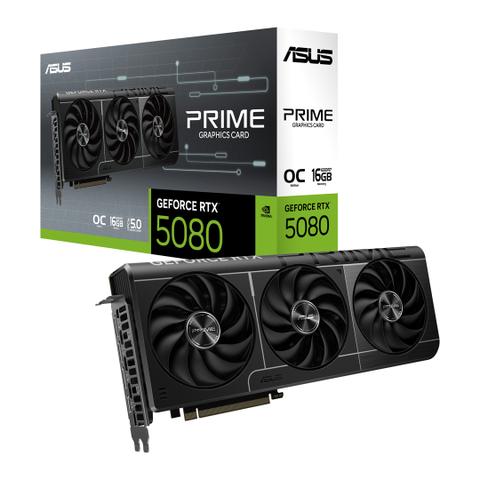

ASUS GeForce RTX 5080 Prime OC GDDR7 16GB
Buy at PC Case GearWe may earn a commission if you buy; it doesn't change your price. Check the price at PC Case Gear before you buy. How we make money
Price history
Tracking since today
The price hasn't changed since we started tracking it. We'll show its history once it does.
Available at 2 stores
Stores may pay us a commission when you buy; it doesn't affect the order or your price. Learn more
- PLE $3,199 Cheapest Out of stock Checked yesterday Buy
- PC Case Gear This page $3,299 Out of stock Checked todayBuy

About this product
- Brand
- ASUS
- Store
- PC Case Gear
- Category
- Electronics > Electronics Accessories > Computer Components > I/O Cards & Adapters > Video Cards & Adapters
- SKU
- PRIME-RTX5080-O16G
Specifications
- Colour
- Black
The ASUS GeForce RTX 5080 PRIME OC 16GB graphics card features a 2655MHz boost clock (default mode), 2685MHz boost clock (OC mode), 16GB GDDR7 256-bit memory interface, 30Gbps memory speed, PCIe 5.0, 1 x HDMI 2.1b, 3 x DisplayPort 2.1b, HDCP 2.3 support and OpenGL 4.6 support.
Features
ASUS PRIME GeForce RTX™ 5080 16GB GDDR7 OC Edition
Primed for Power
Experience Primal performance with the Prime GeForce RTX 5080, an SFF-ready graphics card featuring a 2.5-slot design for expansive compatibility, enhanced by a triple-fan setup for supreme airflow and Vapour chamber design for supreme cooling.
SFF-Ready 2.5 Slot Design
Compatible with small-form-factor builds
Axial-Tech Fans
Longer blades improve airflow and dispersion
Phase-Change GPU Thermal Pad
Optimal heat dissipation for GPU longevity
Vapour Chamber
Efficient heat transfer for lower GPU temps
Dual-Ball Fan Bearings
Up to twice the lifespan of sleeve bearings
Dual BIOS
Toggle between Performance or Quiet modes
GPU TWEAK III
Ultimate GPU tuning utility
MuseTree
Grow your dreams with AI magic

Perfect PSU Companion ROG Strix Platinum 1000W

Cooling
2.5-Slot Design
The Prime GeForce RTX 5080 features a 2.5 slot design with a carefully arranged layout for the shroud, heatsink, and heat pipes to let the three Axial-tech fans leverage chassis side-panel ventilation and deliver optimal thermal performance.
Axial-Tech Upgrades
Three tried-and-true Axial-tech fans feature a smaller hub that facilitates longer blades and a barrier ring to increase downward air pressure for lower temperatures, less noise, and higher performance.
0dB Technology
All three fans come to a standstill when GPU temperatures are below 50 Celsius, letting you play less demanding games or perform light tasks in relative silence. Fans start up again when temperatures are over 55 C, establishing a speed curve that balances performance and acoustics for work or play.

Dual Ball Fan Bearings
Different bearing types have unique pros and cons. Dual-ball bearings excel at durability and can last up to twice as long as sleeve bearing designs.

Vapour Chamber
A vapour chamber and heatsink soaks up heat from the graphics card, helping to ensure premium performance in a variety of scenarios.

Vented Backplate
Large backplate vents significantly enhance heat dissipation, helping to keep the GPU cooler during intense tasks. This additional airflow helps ensure optimal temperatures, boosting performance, longevity, and stability by defending against overheating and thermal throttling.
Max Contact Design
Max Contact is a special ASUS manufacturing process that effectively expands the surface area of the heat spreader that sits atop the GPU by 5%, compared to traditional designs. This improves temperatures by up to 2°C, in concert with an extensive heatsink array and powerful Axial-tech fans.
Phase-Change GPU Thermal Pad
By melting to effectively fill the gaps between the GPU and the thermal module, a premium phase-change GPU thermal pad provides superior thermal conductivity and enhanced heat dissipation, ensuring optimal performance and longevity for graphics cards under heavy loads.
Unmatched Reliability
ASUS GPU Guard & Bracket
ASUS GPU Guard applies adhesive to secure all four corners to reduce the risk of cracks, while a GPU bracket helps ensure uniform mounting pressure and extra stability.
Protective Backplate
The PCB is reinforced by a backplate that adds structural rigidity, helping to prevent flex and to protect components and trace pathways from damage.
Stainless Steel Bracket
The mounting bracket features grade 304 stainless steel, chosen for its strength and high resistance to corrosion.
Engineering

Dual BIOS
Do you prioritise low core temps or low noise levels? Performance mode lets the fans spin up to keep the card running cool all the time, and Quiet mode keeps the same power target and top-end settings while offering a less aggressive fan curve for quieter operation at moderate temperatures.

Auto−Extreme Technology
An automated manufacturing process that sets new standards in the industry by allowing all soldering to be completed in a single pass, ASUS Auto-Extreme technology reduces thermal strain on components and avoids the use of harsh cleaning chemicals, resulting in less environmental impact, lower manufacturing power consumption, and a more reliable product overall.
Perfect PSU for the GeForce RTX 50 Series
Patented "GPU-First" Intelligent Voltage Stabiliser
Pair with the ROG Strix Platinum Series PSU and enjoy reliable power for your graphics card. GPU-First enhances voltage stability by up to 45%, even during demanding gaming sessions and overclocking scenarios, helping to ensure peak performance for a more consistent gaming experience. Additionally, the integration of a GaN MOSFET boosts power efficiency by up to 30%.
Software
GPU Tweak Ill
The ASUS GPU Tweak Ill utility takes graphics card tuning to the next level. It lets you tweak critical parameters including GPU core clocks, memory frequency and voltage settings, with the option to monitor everything in real-time through a customisable on-screen display. Advanced fan control is also included along with many more features to help you get the most out of your graphics card.
MuseTree
Grow Your Dreams with Al Magic
MuseTree is an Al-powered image-generation app designed to spark your creativity. Effortlessly create and manage images and visual ideas, unlocking endless new inspirations. With its intuitive visual interface, generating stunning images has never been easier!
PC Power Supply Calculator
Use our wattage calculator to estimate how much power you’ll need to fuel your rig, and then pick a compatible ROG, TUF Gaming or Prime power supply for ultimate performance.