

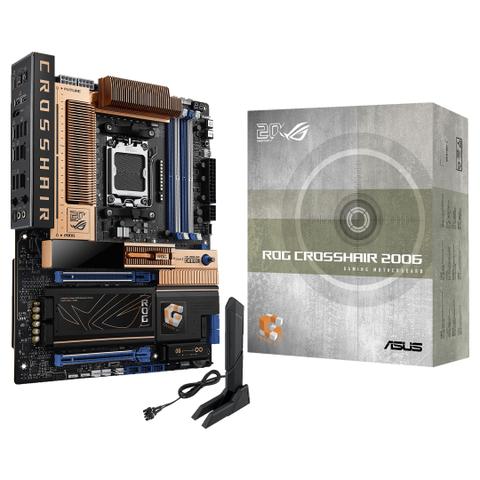

ASUS ROG Crosshair 2006 X870E WIFI7 DDR5 MotherBoard
In stock at PC Case Gear
Price checked today
We may earn a commission if you buy; it doesn't change your price. Check the price at PC Case Gear before you buy. How we make money
Price history
Tracking since today
The price hasn't changed since we started tracking it. We'll show its history once it does.
About this product
- Brand
- ASUS
- Store
- PC Case Gear
- Category
- Electronics > Circuit Boards & Components > Printed Circuit Boards > Computer Circuit Boards > Motherboards
- SKU
- ROG-CROSSHAIR-2006
The ASUS ROG Crosshair 2006 X870E WIFI7 DDR5 Motherboard is a powerhouse designed for AMD Ryzen 9000, 8000 and 7000 Series desktop processors, offering exceptional performance and reliability for gaming, content creation, and multitasking. With a 20th anniversary ROG motherboard retro copper design, 2-inch OLED display, DDR5 memory support, PCIe 5.0 slots, and five M.2 slots, it delivers a striking visual flair and lightning-fast data speeds. Featuring integrated WiFi 7 and Realtek 10G and 5G ethernet ports, robust power delivery, and enhanced durability in a ATX form factor, the ASUS ROG Crosshair 2006 WiFi Motherboard is the perfect solution for building a high-performance, future-ready PC.
Warning: This product contains a button battery
- If swallowed, a lithium battery can cause severe or fatal injuries with 2 hours.
- Keep batteries out of reach of children.
- If you think batteries may have been swallowed or placed inside any of the body, seek immediate medical attention.
Features
ROG Crosshair 2006
The ROG Crosshair 2006 celebrates the 20th anniversary of the very first ROG motherboard with a retro-inspired copper colour design and signature OLED animation. This flagship platform also offers advanced power delivery and cutting-edge memory technologies, blending heritage with modern performance.
Extreme Power & Performance
- Dual Procool II Power Connectors
- 20(110A) + 2(110A) + 2(80A) Power Stages
- Expansion Slots
2 x PCIe 5.0 x16 Slots - AMD AM5 Socket
For AMD Ryzen™ 9000 &0 & 7000 Series Desktop Processors - DDR5, 4 X DIMM
Max. 256GB
Dual Channel - 5 x M.2 Slots
1 x M.2 22110 (PCIe 5.0 x4)
1 x M.2 2280 (PCIe 5.0 x4)
2 x M.2 2280 (PCIe 4.0 x4)
1 x M.2 2230 (PCIe 5.0 x2
Comprehensive Cooling
- Integrated I/O Cover & VRM Heatsinks
- Heatsinks for Five M.2 Slots
Five M.2 Slots with backplates and thermal pads - Multiple 4-Pin PWM Fan Headers
Total Gaming Immersion
- SupremeFX 7.1 ALC4082 Audio Codec
ESS® ES9219 QUAD DAC
120 dB SNR stereo playback output
110 dB SNR recording input
Gold-plated audio jacks - Dolby Atmos
- 3 x 3-Pin Addressable Gen 2 RGB Headers
Full Connectivity
- 9 x USB 10Gbps Ports (6 x Type-A + 3 x USB Type-C®)
- BIOS FlashBack™ Button
- Clear CMOS Button
- 1 X HDMI™ Port
- 2 X USB4 ® (40Gps) Ports
- Realtek 5G Ethernet Port
- Realtek 10G Ethernet Port
- Wi-Fi 7
- Optical S/PDIF Out
- 2 x Gold-Plated Audio Jacks
- 1 x USB 20Gbps
USB Type-C® Front Panel Connector Supports QC4+ - 1 x USB 20Gbps
USB Type-C® Front Panel Connector - 4 x Sata 6Gb/S
Legacy, Redefined
Retro-Inspired Design
A predominantly copper aesthetic with touches of blue and white pays tribute to the very first ROG motherboard.
2-Inch OLED Display
With two 20th anniversary exclusive animations.
ASUS AIO Q-Connector
The ASUS AIO Q-Connector's cableless link between the motherboard and the AIO cooler eliminates the need for pump, fan, and LCD cables.
Personalisation
The ROG Crosshair 2006 includes LiveDash, a built-in 2-inch OLED panel that shows useful information and features customisable graphics. During the power-on, self-test (POST) phase, the OLED shows key stats in simple language using traditional POST codes. In normal operation, the panel can be programmed to show CPU frequency, device temperatures, or fan speeds. You can also personalise the default OLED GIF with a preferred image or animation.
*Supports custom animation uploads in 256x64 pixel monochrome format (up to 100KB).
- Default Animation
- 20th Anniversary Exclusive
- Hardware Monitor
- BIOS Update
- Customisation Content
Performance
Overclocking
Dynamic OC Switcher
Dynamic OC Switcher maximises CPU performance by letting you set current and temperature thresholds to automatically switch between a manual overclock for heavy multithreaded workloads and Precision Boost Overdrive for single-threaded tasks. The latest Overclocking Load Guard has an enhanced instantaneous current protection mechanism to prevent users from experiencing system crashes during overclocking.
Example:
If a user sets thresholds for current and temperature as shown, once CPU current exceeds 35A, the manual overclock engages until the temperature reaches 80°. At all other times, Precision Boost Overdrive will be used.
Core Flex
Core Flex empowers you to smash limits farther than ever before by letting you control clock, power, and thermals in creative new ways.
In its simplest form, you can maximise base clock during lighter loads and set breakpoints to gradually reduce CPU core frequency as temperature or current increases. But the system is extremely adaptable, supporting multiple user-controlled functions that can manipulate power, current, and temperature limits independently so that you can bend CPU performance to your will.
Examples:
Base Clock
- For this CPU, the base clock (BCLK) can be stably increased to give an extra boost during lightly threaded workloads.
- At Level 1, the BCLK is set to 104, and it remains at that frequency until the current reaches 35A.
- Then the BCLK drops down to 102, and stays in that Level 2 range up until 55A.
- From that point on, the CPU is using most or all of its threads, so the BCLK scales back to the default 100.
EDC
- By managing the Electrical Design Current (EDC) in tandem with the total current, this CPU can gain extra performance for short, demanding bursts.
- During lightly threaded workloads, below 35A, the Level 1 EDC is set to a low value, in this case 60.
- As more cores are needed, the EDC is set to 120, which was found by this user to be a sweet spot for performance.
- Once the CPU passes 70A, it is in multi-threaded territory, where it was found that a high EDC of 250 gave optimal performance.
PPT
- In order to let the CPU cool off if its temperatures go too high, this user constrains the Package Power Target (PPT) when thermals increase. Specifically the short-term value (“Fast”) is used.
- Until the CPU reaches 70°, it can run at full performance, so 350W is set to give plenty of overhead.
- At that point, the power limit reduces to 220W, to let the CPU start reducing heat.
- If it is still under sustained load and keeps getting hotter, then a more stringent 165W PPT is set at 85°.
Asynchronous Clock
For next-level frequency flexibility, the ROG Crosshair 2006 features a built-in clock generator that isolates CPU base clock from memory, PCIe, and the Infinity Fabric speed.
Drive CPU performance to it