

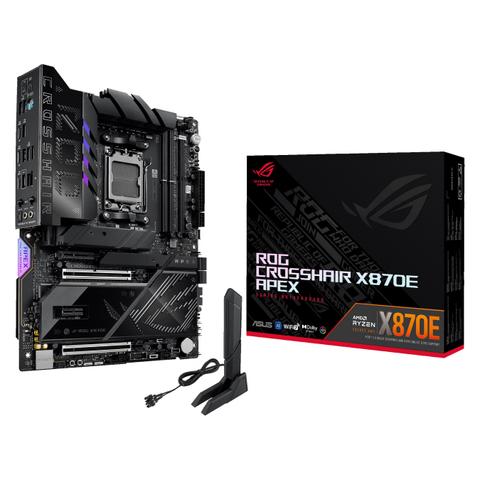

ASUS ROG Crosshair X870E Apex WiFi DDR5 Motherboard
In stock at PC Case Gear
Price checked today
We may earn a commission if you buy; it doesn't change your price. Check the price at PC Case Gear before you buy. How we make money
Price history
Tracking since today
The price hasn't changed since we started tracking it. We'll show its history once it does.
About this product
- Brand
- ASUS
- Store
- PC Case Gear
- Category
- Electronics > Circuit Boards & Components > Printed Circuit Boards > Computer Circuit Boards > Motherboards
- SKU
- ROG-CROSSHAIR-X870E-APEX
The ASUS ROG Crosshair X870E Apex WiFi DDR5 Motherboard is engineered for extreme overclocking, next-gen gaming performance and AI capabilities, supporting AMD Ryzen 9000, 8000, and 7000 Series processors on the AM5 socket. Boasting robust power delivery with a 18+2+2 power stage design and ultra-durable components, delivering stable power under heavy loads. The dual-channel DDR5 support enables ultra-high memory frequencies and an overclocking potential of over 9600 MT/s, while the integrated VRM heatsinks, backplates and high conductivity thermal pads as well as the ROG memory fan kit maintain optimal thermal performance. Featuring PCIe 5.0 support, dual M.2 Gen 5 slots, and USB 4.0 connectivity, it offers unmatched expandability and transfer speeds. Additional features include WiFi 7 and 5Gb Ethernet for ultra-fast networking, while AI-enhanced tuning, Q-Design DIY features, and ROG-exclusive software tools make setup and optimisation effortless. In a ATX form factor, the Crosshair X870E Apex redefines what a high-end ATX motherboard can achieve.
Warning: This product contains a button battery
- If swallowed, a lithium battery can cause severe or fatal injuries with 2 hours.
- Keep batteries out of reach of children.
- If you think batteries may have been swallowed or placed inside any of the body, seek immediate medical attention.
Features
ROG Crosshair X870E Apex
The AI PC-ready ROG Crosshair X870E Apex is built for world-record overclocking, courtesy of extensive BIOS features and the exotic cooling of the ROG-exclusive Memory Fan Kit. Beyond its overclocking prowess, it delivers comprehensive support for cutting-edge graphics cards and storage, making it the ultimate platform for AM5 AMD Ryzen™ performance enthusiasts.
- Teamed Power Solution
- Overclocking - Effortless performance boost
- AI Networking II
- AI Cooling II - One-click fan tuning
- DDR5 - Max. 128 GB, AEMP
- ROG Memory Fan Kit
- Extensive Gen 5 - x3 onboard M.2 Slots, and x2 PCIe 5.0 x16 Slots
- ROG DIMM.2
- WIFI 7
- EZ PC DIY
- USB4®
Extreme Power & Performance
- Dual Procool II Power Connectors
- 18(110A)+2(110A)+2(80A) Power Stages
- Expansion Slots
2 x PCIe 5.0 x16 Slots
1 x PCIe 4.0 x4 Slot
1 x PCIe 3.0 x1 Slot - AMD AM5 Socket
For AMD Ryzen™ 9000 & 8000 & 7000 Series Desktop Processors - DDR5, 2 X DIMM
Max. 128 GB
Dual Channel - 5 X M.2 Slots
3 x M.2 2280 (PCIe 5.0 x4)
2 x M.2 22110 (PCIe 4.0 x4) (via ROG DIMM.2 Card)
Comprehensive Cooling
- Integrated I/O Cover & VRM Heatsinks
- Heatsinks for three M.2 Slots - With backplates and thermal pads
- Multiple 4-Pin PWM Fan Headers - ROG DIMM.2 Card Heatsinks
- ROG Memory Fan Kit
Total Gaming Immersion
- Aura Lighting
- SupremeFX 7.1 ALC4080 Audio Codec
Savitech SV3H712 AMP
120 dB SNR stereo playback output
110 dB SNR recording input
Gold-plated audio jacks - Dolby Atmos
- 3 X 3-Pin Addressable GEN 2 RGB Headers
Full Connectivity
- BIOS Flashback™ Button
- Clear CMOS Button
- 1 x PS/2 keyboard/mouse combo port
- 2 X USB 5Gbps Ports - (2 x Type-A)
- 2 X USB4® (40Gbps) Ports
- 6 X USB 10Gbps Ports - (1 x USB Type-C® +5 x Type-A)
- Realtek 5Gb Ethernet Port
- Optical S/PDIF Out
- 2 X Gold-Plated Audio Jacks
- 1 X USB 20Gbps - USB Type-C® front panel connector supports QC4+
- 4 X SATA 6GB/S
- 1 X USB 20Gbps - USB Type-C® front panel connector
ASUS AI Intelligence
ASUS AI Cache Boost
Supercharge your large language model(LLM) workflows with AI Cache Boost. Exclusive to ASUS AMD 800 Series and 600 Series motherboards using AMD Ryzen™ 9000 Series Granite Ridge CPUs, this BIOS feature intelligently enhances cache efficiency, delivering up to 12.75% faster performance for your LLM tasks.
AMD Ryzen 99950X3D-RTX 4090-ROG Crosshair X870E Hero
Geekbench Al (Higher is better)
- Default: 51786
- Al Cache Boost - 54392: +5.03%
- Al Cache Boost & Turbo Game Mode - 56757: +9.60%
UL Procyon - Al Computer Vision Benchmark (Higher is better)
- Default: 1426
- Al Cache Boost - 1485: +4.14%
- Al Cache Boost & Turbo Game Mode - 1702: +19.0%
Topaz Video Al (Lower is better)
- Default: 153 sec
- Al Cache Boost - 148 sec: +3.27%
- Al Cache Boost & Turbo Game Mode - 145 sec: +5.23%
AMD Ryzen 7 9800X3D-RTX 4090-ROG Crosshair X870E Hero
UL Procyon - Al Computer Vision Benchmark (Higher is better)
- Default: 1490
- Al Cache Boost - 1680: +12.75%
ASUS AI Advisor
ASUS AI Advisor is an ASUS technical expert that's always available to answer your questions. Owners of compatible ASUS motherboards can interact with this AI-powered technology using natural language to learn more about their hardware. For DIY beginners, it can provide easy-to-understand explanations of one-click optimisation features like AI Overclocking and fan speed tuning, and for seasoned PC-building veterans, it can offer guidance and instructions on the latest features offered by ASUS. (Availability of ASUS AI Advisor may vary by region.)

AI Overclocking
Tuning is now faster and smarter than ever before.
ASUS AI Overclocking profiles the CPU and cooling to predict the optimal configuration and push the system to its limits. Predicted values can be engaged automatically or used as a launching ground for further experimentation.

AI Cooling II
Balance the thermals and acoustics of any build with a single click.
A proprietary ASUS algorithm slashes unnecessary noise while running a quick stress test, and then monitors CPU temperatures to dynamically adjust fans to optimal speeds.

AI Networking II
AI Networking II combines intelligent technologies to continuously optimise network performance, provide trustworthy and seamless connectivity, and unleash the full speed of WiFi 7(Features may vary by model.).
Traffic Monitor
Armoury Crate's Traffic Monitor tracks your current WiFi channel usage. Move to a less congested channel by clicking the “Channel Switch” button (The "Channel Switch" function requires pairing with an ASUS router. If not paired with an ASUS router, the channel change process can be performed in the "Router IP" section of the Traffic Monitor.) for improved network performance.