

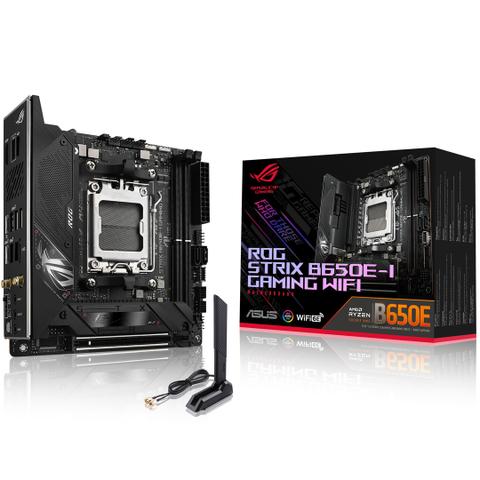

ASUS ROG Strix B650E-I Gaming WiFi DDR5 ITX Motherboard
In stock at PC Case Gear
Price checked today
We may earn a commission if you buy; it doesn't change your price. Check the price at PC Case Gear before you buy. How we make money
Price history
Tracking since today
The price hasn't changed since we started tracking it. We'll show its history once it does.
About this product
- Brand
- ASUS
- Store
- PC Case Gear
- Category
- Electronics > Circuit Boards & Components > Printed Circuit Boards > Computer Circuit Boards > Motherboards
- SKU
- ROG-STRIX-B650E-I-GAMING-WIFI
The ASUS ROG Strix B650E-I Gaming WiFi DDR5 Motherboard supports 5th Gen AMD Processors and AM5 CPU sockets, features up to 2 x DDR5 memory slots, PCI-E 5.0 compatible expansion slot, 2 x M.2 slots, 2 x SATA ports (6Gb/s), 8 x rear USB ports, 5 x front panel USB header ports, Intel 2.5Gb Ethernet, ASUS LANGuard, WiFi 6E, Bluetooth 5.2, ROG SupremeFX 7.1 HD ALC4080 audio codec and a mini-ITX motherboard form factor.
Warning: This product contains a button battery
- If swallowed, a lithium battery can cause severe or fatal injuries with 2 hours.
- Keep batteries out of reach of children.
- If you think batteries may have been swallowed or placed inside any of the body, seek immediate medical attention.
Features
ROG Strix B650E-I Gaming WiFi
AMD B650 mini-ITX motherboard with 10+2+1 power stages, DDR5 support, PCIe® 5.0 NVMe® SSD support, one PCIe 5.0 x16 Safeslot, USB 3.2 Gen 2 Type-C® connector, Onboard WiFi 6E, and Aura Sync RGB lighting.
Don’t be fooled by its flyweight frame; the Strix B650E-I packs walloping performance! With a jacked VRM and pumped with both DDR and PCIe 5, it’s a perfect partner for Ryzen 7000, particularly in stealthy SFF builds.
- AMD Socket AM5: Ready for AMD Ryzen™ 7000 Series desktop processors
- Robust Power Solution: 10+2+1 power stages with an 8-pin ProCool power connector, high-quality alloy chokes, and durable capacitors to support multi-core processors
- Optimised VRM Thermals: Thick heatsinks bolster a quiet cooling system that is bonded to the power stages with high conductivity thermal pads
- Next-Gen M.2 Support: PCIe® 5.0 M.2 slot cooled by a large heatsink to maximise performance and an additional PCIe 4.0 M.2 slot for more storage
- Abundant Connectivity: USB 3.2 Gen 2x2 Type-C® port and seven additional USB ports, PCIe 5.0 x16 SafeSlot, and HDMI® 2.1
- High-Performance Networking: On-board WiFi 6E (802.11ax), Bluetooth® 5.2, and Intel® 2.5G Ethernet with ASUS LANGuard
- Intelligent Control: ASUS-exclusive, AI Networking, and Two-Way AI Noise Cancellation to simplify setup and improve performance
- Immersive Gaming Audio: ALC4080 with Savitech SV3H712 amplifier, along with DTS® Sound Unbound and Sonic Studio III
- Unmatched Personalisation: ASUS-exclusive Aura Sync RGB lighting, including one RGB header and one addressable Gen 2 header
- DIY Friendly Design: 2 Q-Latch, Pre-mounted I/O shield and BIOS FlashBack™ button, and FlexKey button
- Intuitive Software: Easy-to-use UEFI BIOS dashboard, Armoury Crate to manage all ASUS devices from one place, and bundled 60-day AIDA64 Extreme trial subscription
- 10 + 2 + 1 power solution rated for up to 70A per stage
- Dynamic clocking to simultaneously maximise Ryzen gaming and compute performance
- Both the x16 slot and an on-board M.2 slot are PCIe Gen 5-ready
- 6400 MT/s+, AMD EXPO, DRAM IC profiles, and AEMP
- Faster-than-Gigabit WiFi that unlocks access to the low-interference 6 GHz band
- Easy installation for GPUs and SSDs, plus simple BIOS resets and updates
DIY-Friendly Features
M.2 Q-Latch
The innovative Q-Latch makes it easy to install or remove an M.2 SSD without the need for specific tools. The design employs a simple locking mechanism to secure the drive and neatly eliminate traditional screws.
BIOS FlashBack™ Button
BIOS FlashBack™ is a safe and simple way to update BIOS. Just drop the (UEFI) BIOS file onto a FAT32-formatted USB stick, plug it into the USB BIOS FlashBack port, and press the button. Updates can even be performed without having memory or a CPU installed.
FlexKey Button
At its default, FlexKey functions as a system reset button, but it can also be easily reassigned to quickly activate Safe Boot or enter the BIOS.
Q-LED
Four onboard LEDs indicate power status and identify problems with CPU, memory, graphics card, or boot device for quick diagnosis.
Specifications
Performance
- 8-Pin ProCool Power Connector
- AMD AM5 Socket for AMD Ryzen™ 7000 Series Desktop Processors
- Expansion Slots
1 x PCIe 5.0 x16 SafeSlot (x16) - 10 + 2 + 1 Power Stages
- DDR5 6400+ (OC)
2 x DIMM
Dual Channel - 2 x M.2 Slots
1 x M.2 2280 (PCIe 5.0 x4)
1 x M.2 2280 (PCIe 4.0 x4)
Cooling
- VRM Cooling Array
- M.2 with Backplate and Chipset Heatsinks
- AIO Pump Header
- 4-pin PWM Chassis Fan Header
Gaming Immersion
- SupremeFX ALC4080 Codec + Savitech SV3H712 AMP
Impedance sense
120 dB SNR stereo playback output
113 dB SNR recording input
SupremeFX shielding - Sonic Studio III + Sonic Studio Virtual Mixer +
- Sonic Suite Companion
- Sonic Radar III
- DTS® Sound Unbound™
- 3-Pin Addressable Gen 2 RGB Header
- 4-Pin Aura RGB Header
Connectivity
- 1 x HDMI® Port
- 2 x USB 2.0
- 5 x USB 3.2 Gen 2 Ports (4 x Type-A + 1 x USB Type-C® with DisplayPort Alt Mode)
- Intel® 2.5G Ethernet Port
- 1 x USB 3.2 Gen 2x2 Port (USB Type-C®)
- Wi-Fi 6E
- BIOS FlashBack™ Button
- FlexKey button
- Optical S/PDIF OUT
- 3 x LED-Illuminated Audio Jacks
- 1x USB 2.0 Header Supports Additional 2x USB 2.0 Ports
- 2 x SATA 6GB/S
- 1 x USB 3.2 Gen2
- USB Type-C® Front Panel Connector
- 1 x USB 3.2 Gen 1 Header
All-Round Performance
To keep up with the big boys, the ROG Strix B650E-I comes stacked with a beefy power solution and a quiet thermal array, giving it a nice share of headroom to push for faster frequencies. But the speed doesn’t stop there: memory, graphics cards, and storage can all be cranked to the max thanks to DDR5 and PCIe 5.0 support.
PCIe 5.0
Fully embracing the new standard, the Strix B650E-I offers end-to-end PCIe 5.0 support to give unfettered bandwidth for the fastest SSDs and graphics cards available. The x16 expansion slot is Gen 5-ready, and is protected with a SafeSlot retention bracket. The onboard M.2 slot is also geared for PCIe 5.0, allowing for blistering 16 GB/s read and write speeds, while the other slot delivers still-impressive 8 GB/s transfers over its PCIe 4.0 interface.
Overclocking
Dynamic OC Switcher
Lightly-threaded tasks get fantastic uplift using AMD Precision Boost Overdrive (PBO), but all-core frequencies can be pushed higher via traditional overclocking. The Dynamic OC Switcher automatically engages PBO or your preferred settings based on the CPU current or temperature, giving you the best of both worlds. Core Flex and PBO Enhancement can also be deployed to work in tandem with the Dynamic OC Switcher and further bolster performance.
Example
If