

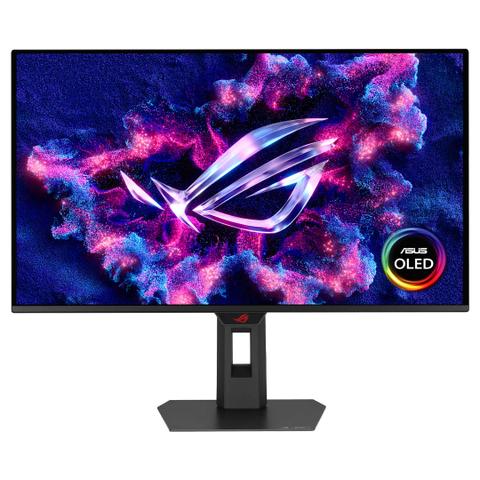

ASUS ROG XG27ACDMS QHD 280Hz QD-OLED HDR 26.5in Gaming Monitor
In stock at PC Case Gear
Price checked today
We may earn a commission if you buy; it doesn't change your price. Check the price at PC Case Gear before you buy. How we make money
Price history
Tracking since today
The price hasn't changed since we started tracking it. We'll show its history once it does.
About this product
- Brand
- ASUS
- Store
- PC Case Gear
- Category
- Electronics > Video > Computer Monitors
- SKU
- XG27ACDMS
Specifications
- Screen size
- 26.5"
- Resolution
- QHD (1440p)
- Refresh rate
- 280Hz
- Panel type
- OLED
The ASUS ROG Strix OLED XG27ACDMS features a 26.5inch QHD QD-OLED panel with a 280Hz refresh rate and a 0.03ms response time, delivering ultra-smooth visuals for competitive gaming. It boasts VESA DisplayHDR 400 True Black certification, 99% DCI-P3 colour gamut coverage, true 10-bit colour depth and a Delta E of less than 2, ensuring exceptional colour accuracy and HDR performance. It also features a fully adjustable stand with VESA 100mm support for flexble mounting options.
Features
ROG Strix OLED XG27ACDMS
One for All
ROG Strix OLED XG27ACDMS gaming monitor ― 27-inch (26.5-inch viewable) 1440p QD-OLED panel, 280 Hz, 0.03 ms, custom heatsink, Neo Proximity Sensor, ASUS OLED Care Pro, uniform brightness, G-SYNC® compatible, 99% DCI-P3, and DisplayWidget Center.
The ROG Strix OLED XG27ACDMS is a 27-inch, 280Hz QHD gaming monitor. With the addition of the Neo Proximity Sensor in the new ROG OLED Care Pro suite, the monitor transitions to a black screen when no user is detected, guarding against burn-in.
- 26.5-inch QHD (2560 x 1440) QD-OLED gaming monitor with 280 Hz refresh rate and 0.03ms response time
- New ASUS OLED Care Pro functions with Neo Proximity Sensor that precisely detects when the user is away, switching to a black screen to reduce the risk of burn-in
- VESA DisplayHDR™ 400 True Black compliance, 99% DCI-P3 gamut, true 10-bit colour, and Delta E < 2 colour difference for astonishing HDR performance, making it perfect for photo and video editing
- Exclusive ASUS DisplayWidget Center application allows users to easily access OLED Care Pro functions and adjust monitor settings using a mouse
- ROG Gaming A.I technology with AI-powered features to enhance users' gaming experience
- Extensive connectivity options include DisplayPort™ 1.4, HDMI® 2.1, and USB-C® with 15 W Power Delivery
- 3-year warranty

SuperSmooth Visuals
Designed for discerning gamers and professional creators, it offers a refresh rate of 280Hz and 0.03ms grey-to-grey (GTG) response time for supersharp and fluid visuals.
QD-OLED Technology
Incredible Motion Clarity
Exclusive ASUS Extreme Low Motion Blur technology reduces ghosting and motion blur.
Benefits of OLED
Advantages of OLED technology
The latest ASUS OLED panels offer extremely high contrast ratios to deliver the darkest black hues as well as the most vivid colours, helping create immersive visuals for gaming and for creative endeavors. Plus, an astounding 0.03 ms grey-to-grey response time ensures supersmooth, low-latency visuals.
- 1.5M :1 contrast ratio
- 0.03 ms response time
- 99% DCI-P3 gamut
- Delta E < 2
ASUS OLED Care Pro
Screen Protection
New ASUS OLED Care Pro technology provides a full set of customisable monitor settings to protect the OLED panel and ensure longevity. Plus, it includes the new Neo Proximity Sensor that detects your distance from the monitor and transitions to a black image when you’re away to safeguard the panel from burn-in. All settings can be easily managed via DisplayWidget Center.
Neo Proximity Sensor
The built-in Neo Proximity Sensor precisely detects your distance from the monitor. When you step away, the monitor transitions to a black image to protect against panel burn-in, and instantly restores onscreen content when you return. Detection distance can be customised to suit personal preference, ensuring maximum convenience and protection.
*Please ensure that the monitor sensor is properly angled and cleaned by using the included microfibre cloth before activating the detection function.
Pixel Cleaning
Recalibrates the screen when the monitor has been active for several hours―a process that takes just a few minutes and activates automatically when the monitor is turned off (Do not unplug the power cord during this time as it will interrupt the pixel-cleaning process.)
Screen Move
Pixel locations are slightly shifted periodically to help prevent burn-in, and users can choose between several movement levels.
Boundary Detection
Dynamically detects the boundary of the black bars and reduces the brightness and also slightly shifts the pixel of the near borders.
Screen Saver
Automatically dims the screen after two minutes of inactivity.
Logo Brightness Adjustment
Automatically detects static onscreen logos and reduces their brightness to correct for potential picture-quality issue.
Taskbar Detection
Dynamically detects the taskbar and reduces brightness around it to avoid burn-in.
Outer Dimming Control
Automatically identifies and adjusts the brightest areas of the screen to reduce the risk of burn-in.
Global Dimming Control
Dynamically adjusts the overall brightness of the display to reduce the risk of burn-in.
Target Mode
Dims the entire screen, except for a selected pinned window, which maintains its current brightness setting.
Worry-Free OLED Monitor
Built to Last
ROG OLED monitors are engineered to deliver stunning visuals for years to come. An innovative custom heatsink and a unique internal airflow improve cooling and reduce the risk of burn-in.
Your Monitor, Your Way
The XG27ACDMS monitor is a versatile powerhouse designed to excel in gaming, streaming, and content creation. Its high refresh rate, low response time, and vivid colours deliver a seamless, immersive experience. The wide viewing angles and built-in tripod socket make it perfect for streaming, while its exceptional colour accuracy and wide colour gamut ensure professional-grade content creation.

Futuristic, Cyberpunk-Inspired Aesthetic
The clean and elegant aesthetic of the XG27ACDMS underlines its premium status. There’s even a built-in tripod socket on top of the monitor to accommodate a camera for streaming setups.

Compact Stand Design
The base has a small footprint to free up space for the keyboard and mouse.

SuperSlim Frameless Design
The frameless panel facilitates immersive viewing.
DisplayWidget Center
Take your monitor to the next level with DisplayWidget Center, a powerful monitor management software designed to help you optimise, personalise, and fully utilise your display via a mouse — so there’s no need to access the OSD menu. Additionally, DisplayWidget Center notifies you of the latest firmware updates and includes a direct update option. You can also import or export display configurations for sharing.
- Customisable monitor settings
- Auto Firmware Update Notification
- Multiscreen Control
- OLED Protection