

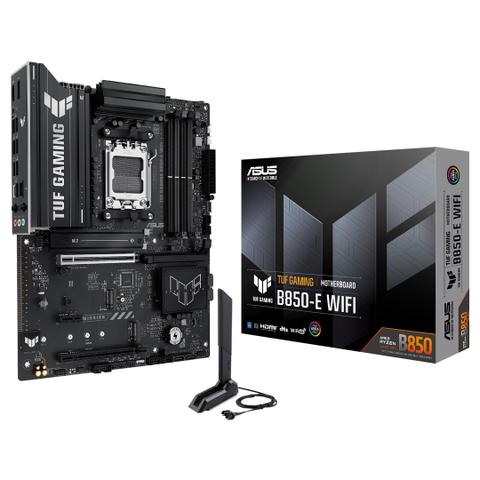

ASUS TUF B850-E WiFi Motherboard
In stock at PC Case Gear
Price checked today
We may earn a commission if you buy; it doesn't change your price. Check the price at PC Case Gear before you buy. How we make money
Price history
Tracking since today
The price hasn't changed since we started tracking it. We'll show its history once it does.
About this product
- Brand
- ASUS
- Store
- PC Case Gear
- Category
- Electronics > Circuit Boards & Components > Printed Circuit Boards > Computer Circuit Boards > Motherboards
- SKU
- TUF-GAMING-B850-E-WIFI
The ASUS TUF B850-E WiFi Motherboard features an AM5 socket with AMD B850 chipset supporting Ryzen 7000, 8000, and 9000 series processors, delivering reliable performance for gaming and content creation. It includes four DDR5 DIMM slots up to 256 GB, PCIe 5.0 and 4.0 expansion slots, triple M.2 storage support, Wi-Fi 6E, 2.5 Gb Ethernet and robust cooling solutions with military-grade components.
Warning: This product contains a button battery
- If swallowed, a lithium battery can cause severe or fatal injuries with 2 hours.
- Keep batteries out of reach of children.
- If you think batteries may have been swallowed or placed inside any of the body, seek immediate medical attention.
Features
TUF Gaming B850-E WiFi
ASUS TUF Gaming B850-E WiFi takes all the essential elements of the latest AMD Ryzen™ processors and combines them with game-ready features and proven durability. Engineered with military-grade components, an upgraded power solution and a comprehensive cooling system, this motherboard goes beyond expectations with rock-solid and stable performance for marathon gaming. TUF GAMING motherboards also undergo rigorous endurance testing to ensure that they can handle conditions where others may fail. This platform delivers the power and connectivity that advanced AI PC applications demand.
- 8+2+1 (80A) - Premium power stages with enlarged VRM heatsinks
- 8000+ MT/s, AEMP - Effortlessly apply to unleash performance
- Cooler by Design - For ultimate cooling control
- PCIe 5.0 for Graphics Card - Robust to handle new data-heavy tasks
- Empowering Connectivity - Front USB 20Gbps Type-C® & rear USB 10Gbps Type-C®
- Ultrafast Networking - WiFi 6E with ASUS WiFi Q-Antenna
- 2.5Gb Ethernet - Faster data transfer
- DIY Friendly - PCIe Slot Q-Release, Q-Antenna, M.2 Q-Latch, Q-LED & BIOS Flashback™ Button
- Aura Sync - Full RGB lighting control
Performance
- AM5 Socket for AMD Ryzen™ Desktop Processors
- Expansion Slots
1 x PCIe 5.0 x16 SafeSlot
1 x PCIe 4.0 x16 Slot (max @x1)
1 x PCIe 4.0 x1 - 8(80A)+2(80A)+1(80A) Power Stages
- 4 x DIMM
DDR5
Dual Channel
AEMP - 3 x M.2 Slots
1 x M.2 2280 PCIe 5.0 x4
1 x M.2 2280 PCIe 4.0 x4
1 x M.2 2242/2260/2280/22110 PCIe 4.0 x4
Cooling
- VRM Heatsinks
- Flexible M.2 Heatsink
- CPU / CPU OPT Fan Headers & AIO Pump Header
- Chipset Heatsink
- 4 x Chassis Fan Headers
Gaming Immersion
- Realtek Audio Codec Exclusive DTS Audio Processing
TUF Gaming Audio Cover
Audio Shielding
Dedicated Audio PCB Layers
Premium Audio Capacitors - 3 x Addressable RGB Gen 2 Headers
Connectivity
- DisplayPort HDMI™
- BIOS FlashBack™ Button
- 2 x USB 5Gbps
- 1 x USB 2.0
1 x USB 5Gbps - 2 x USB 2.0
- Realtek 2.5Gb Ethernet
2 x USB 10Gbps (1 x Type-A + 1 x Type-C®) - WiFi 6E
- 3 x Audio Jacks
- 1 x USB 20Gbps Type-C® Connector
- 1 x USB 5Gbps Header
- 2 x USB 2.0 Headers
Intelligent Control
AI Advisor
ASUS AI Advisor is an ASUS technical expert that's always available to answer your questions. Owners of compatible ASUS motherboards can interact with this AI-powered technology using natural language to learn more about their hardware. For DIY beginners, it can provide easy-to-understand explanations of one-click optimisation features like AI Overclocking and fan speed tuning, and for seasoned PC-building veterans, it can offer guidance and instructions on the latest features offered by ASUS.
* Availability of ASUS AI Advisor may vary by region.
**AI Advisor functions may vary by platform.
UEFI BIOS
The UEFI interface delivers easy-to-use configuration options for PC beginners, and advanced features for veterans.
The renowned ASUS UEFI BIOS provides everything you need to configure, tweak and tune your system. It offers intelligently simplified options for PC DIY beginners and comprehensive features for seasoned veterans.
BIOS Q-Dashboard
Simplify your motherboard configuration with BIOS Q-Dashboard. Its intuitive visual representation of hardware connections and corresponding BIOS settings takes the complexity out of setting up your system. Upgrade now, and discover the power of BIOS Q-Dashboard to easily and efficiently enhance your computing setup.
Advanced Mode
Advanced Tuning for Serious Tweakers
An intuitive Advanced mode offered via the UEFI lets you take complete control. A built-in search feature makes it easy to find options, and various advanced functions let you intelligently make nuanced adjustments so you can dial in performance just the way you want.
ASUS MyHotkey
This feature provides a fast, convenient way to update the BIOS and boot your OS, enhancing PC upgrades with streamlined efficiency for DIY users.
EZ Mode
Quick and Simple Setup
EZ Mode displays vital settings and stats and also offers guided wizards, drag-and-drop functionality and one-click application of important settings - all to help you get your rig up and running in no time.
Aura on/off Mode (Stealth)
Easily enable or disable Aura RGB lighting or every onboard LED, for a subdued aesthetic touch.
Intuitive Graphical Fan Control
Fine-tune individual fan settings simply by dragging a curve with the mouse.
ASUS DriverHub
Simplify driver management with automatic detection, one-click installation and update for smooth, efficient system performance.
ASUS DriverHub streamlines the installation and management of ASUS drivers and utilities to keep your hardware up-to-date and performing optimally. This standalone application automatically detects current driver versions and presents available updates in a list view. By default, it supports ASUS motherboards, and users are invited to install ASUS DriverHub after OS installation. Additionally, ASUS DriverHub offers one-click installation and update checks, making it easier for users to keep their systems running smoothly and efficiently.
ASUS GlideX
Enable seamless screen sharing and control across PCs, tablets, and smartphones via USB or WiFi, supporting multiple platforms.
ASUS GlideX is a cross-device, cross-platform screen-sharing, screen-control and operation solution for enhanced productivity across PCs, tablets and smartphones via USB or WiFi. Features include screen mirroring, screen extension, unified control with one keyboard and mouse, easy file transfers, and using mobile cameras as PC webcams. It is compatible with Windows, macOS, Android and iOS.
Power Saving
Leverage all-around energy efficiency settings to optimise power consumption.
All-Around Energy Efficiency
The Power Saving function contains several