

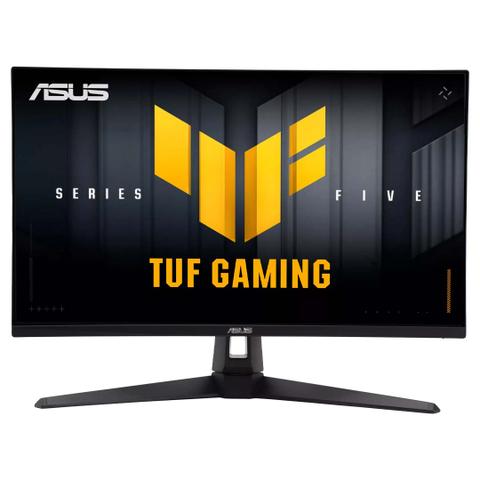

ASUS TUF VG27AQ5A QHD 210Hz FreeSync HDR IPS 27in Monitor
In stock at PC Case Gear
Price checked today
We may earn a commission if you buy; it doesn't change your price. Check the price at PC Case Gear before you buy. How we make money
Price history
Tracking since today
The price hasn't changed since we started tracking it. We'll show its history once it does.
About this product
- Brand
- ASUS
- Store
- PC Case Gear
- Category
- Electronics > Video > Computer Monitors
- SKU
- VG27AQ5A
Specifications
- Screen size
- 27"
- Resolution
- QHD (1440p)
- Refresh rate
- 210Hz
- Panel type
- IPS
The ASUS TUF Gaming VG27AQ5A monitor features a 27-inch Fast-IPS panel with QHD resolution (2560x1440) and a refresh rate up to 210Hz, delivering sharp, fluid visuals ideal for gaming. The monitor includes ELMB Sync, Adaptive Sync (FreeSync Premium/VESA AdaptiveSync) to reduce motion blur and tearing and is G-Sync compatible. It features an adjustable stand with tilt and VESA 100mm support, and connectivity via DisplayPort 1.4, 2x HDMI 2.0 ports and a USB-C service hub.
Features
TUF Gaming VG27AQ5A
Steadfast Durability, Immersive Gaming
TUF Gaming Series 5 - VG27AQ5A Gaming Monitor – 27-inch, QHD(2560x1440), 210Hz(OC), Fast IPS, ELMB SYNC, 0.3ms GTG (min.), Stereo speaker, DisplayWidget Center, Gaming AI.
The 27-inch TUF Gaming VG27AQ5A QHD gaming monitor featuring a IPS panel for blistering-fast 210 Hz (OC) gaming. ASUS Extreme Low Motion Blur Sync (ELMB Sync) and AMD FreeSync™ Premium, VESA AdaptiveSync technologies enables buttery-smooth gaming. In addition, it supports HDR and has a 95% DCI-P3 gamut to offer exceptional colours and contrast.
- 27-inch QHD(2560x1440) Fast IPS gaming monitor with 210Hz(OC) refresh rate designed for professional gamers and immersive gameplay
- ASUS Fast IPS technology enables a 0.3ms (GTG) response time(min.) for sharp gaming visuals with high frame rates
- ASUS Extreme Low Motion Blur Sync (ELMB Sync) technology enables ELMB and variable-refresh-rate technologies to work simultaneously to eliminate ghosting and tearing for sharp gaming visuals
- DisplayWidget Center enables easy monitor settings adjustments with a mouse
- FreeSync Premium delivers a seamless, tear-free gaming experience by enabling VRR (variable refresh rate) by default
Gaming Key Spec

210Hz (OC) Refresh Rate and 0.3ms (GtG) Response Time
With 210Hz(OC) refresh rate decimates lag and motion blur to give you the upper hand in first person shooters, racers, real-time strategy, and sports titles. This ultrafast refresh rate lets you play at the highest visual settings and lets you react instantly to what's onscreen — so you'll get that first strike in.

Adaptive-Sync
AMD FreeSync Premium and VESA AdaptiveSync technology ensure supersmooth, tear-free visuals with low latency.

Colour Performance
High Dynamic Range
TUF Gaming VG27AQ5A takes advantage of HDR technology to deliver more vivid colours and higher contrast levels compared to traditional monitors.
- 95% DCI-P3
- Multiple HDR modes
Exclusive Gaming Feature
ELMB Sync
ELMB Sync (Ideal for Fast-paced games , works better over 85Hz.) software that enables ELMB to work simultaneously with adaptive-sync technology to eliminate ghosting and tearing for extraordinarily sharp, high-frame-rate gaming.
Adaptive-Sync
Adaptive-sync technology delivers the smoothest, fastest and most breathtaking gaming visuals by eliminating screen tearing and choppy frame rates, and by minimising display stutter and input lag.
ELMB
ASUS Extreme Low Motion Blur (ELMB) technology provides a 1 ms GTG response time to eliminate smearing and motion blur. It makes moving objects appear even sharper, so gameplay is more fluid and responsive.
Variable Overdrive
Integrated ASUS Variable Overdrive technology allows the display to dynamically alter its overdrive setting as frame rates fluctuate, ensuring optimal results for any game. You choose how strong you want the overall effect to be, then let the monitor take it from there.
In-Game Enhancements
DisplayWidget Center
Intuitive Controls
DisplayWidget Center software upgraded the user interface so that users can easily change monitor settings via a mouse ― so there’s no need to access the OSD menu.

Shadow Boost
ASUS Shadow Boost technology clarifies dark areas of the game without overexposing brighter areas, improving overall viewing while also making it easier to spot enemies hidden in dark areas of the map.
GamePlus
The ASUS-exclusive, integrated GamePlus hotkey offers in-game enhancements that help you get more out of your game. This function is co-developed with input from pro gamers, allowing them to practice and improve their gaming skills.
- Sniper
- Crosshair
- Timer
- FPS Counter
- Display Alignment
- Stopwatch
GameVisual
ASUS GameVisual Technology has eight pre-set display modes to optimise visuals for different types of content. This unique feature can be easily accessed through a hotkey or the on-screen display settings menu.
Racing
Reduces input lag for real time racing and fast gaming experience.
MOBA
Enhances the colour of your opponents' health/mana bars, so that you can simultaneously respond and be the first to destroy the opposing team's main.
Cinema
Enhances contrast and colour saturation for lively, vivid visuals — ideal for viewing movies.
RTS/RPG
Enhances colour saturation and contrast sharpness to give you better, brighter colours and detailed visuals for real-time strategy (RTS) or RPG games.
FPS Mode
High contrast settings enhance the visibility even in dark scenes to clearly see your enemies.
sRGB
Ideal settings for viewing photos and graphics online.
Scenery
Provides a greater brightness range and introduces more contrast gradations. It tweaks colour saturation for greens and blues, making it ideal for viewing photos and videos that depict scenery.
Night Vision
Enhances dark scenery gaming experience by using night vision goggles mode.

Flicker-Free Technology
Flicker-Free technology reduces flicker to minimise eyestrain for improved comfort when you're embroiled in long gaming sessions.
Low Blue Light
ASUS Low Blue Light technology reduces the amount of potentially harmful blue light emitted by the display. Four different filter settings are available to control the amount of blue light reduction.
Engineering

Extensive Connectivity
A multitude of connectivity options, including two HDMI 2.0, plus DisplayPort™ 1.4 and Type-C for service port ensures wide compatibility with a variety of input sources.

Ergonomic Design
With