

Brand:Aten
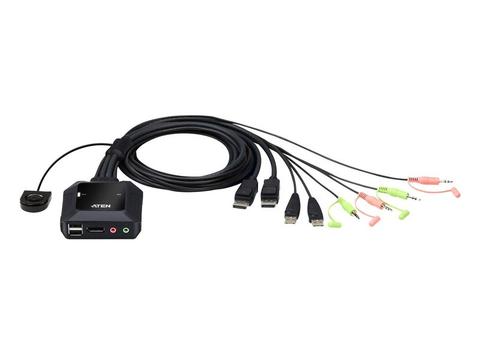
ATEN 2-Port USB DisplayPort Cable KVM Switch
At PC LAN In stock

Same price since 9 Nov
Unchanged since we started tracking
We may earn a commission at no cost to you. How it works
Price history
Tracking since 9 Nov · 9 days
The price hasn't changed since we started tracking it. We'll show its history once it does.
About this product
- Brand
- Aten
- Category
- Electronics > Electronics Accessories > Computer Components > Input Devices > KVM Switches
2-Port USB DisplayPort Cable KVM Switch with Remote Port Selector
CS22DP
- One KVM console controls two USB DisplayPort computers
- Superior video quality – up to 4096 x 2160 @ 30 Hz
- Multiplatform support – Windows, Mac, and Linux
- Bus-powered design
Overview

Having two computers running different projects at the same time can be a time saver, but having a KVM console set up to switch between computers via a pushbutton over one shared screen makes multitasking even more productive. Allow the CS22DP compact cable KVM switch to work its magic by de-cluttering your desktop workspace with a neat and space-efficient new look, and further enrich your operations with superb 4K audiovisual quality, making your desktop workflows more enjoyable

Superior AV Performance in Vivid 4K

The CS22DP empowers your desktop operations with 4K audiovisual enhancement by presenting visual content in outstanding precision.
Smooth Cross-Platform Integration

The CS22DP enables the integration of different computer systems (Windows, Mac and Linux) that are accessible from one KVM console via one-button switching with the remote port selector.
Flexible USB Peripheral Sharing

The console USB ports can be used for plug-n-play connection to compatible USB 2.0 peripheral devices to fulfill data-intensive desktop work requirement.
Plug in. Power on

The CS22DP supports USB hot-plugging and is bus-powered by the connected KVM sources via USB ports.
Applications

The CS22DP Cable KVM Switch allows for an ideal desktop setup in office, media design work and entertainment.
Features
The CS22DP 2-Port USB DisplayPort Cable KVM Switch is a control unit that allows access to two computers from a single USB and DisplayPort console (keyboard, video and mouse) with audio. With the CS22DP, users can quickly and effortlessly switch between two DisplayPort computers using a convenient remote port selector pushbutton.
The CS22DP supports multiplatform operations allowing users to switch between two PC’s running different operating systems. Moreover, the compact design allows for an efficient and tidy installation, providing an ideal space-saving solution for keeping the desk well-organized.
It’s fast and easy to set up the CS22DP. Users can simply plug the KVM cables into their respective ports on the CS22DP and on the computers. There is no need to install software or configure devices – just plug and play.
Note:
To connect a VGA/DVI/HDMI monitor to the DisplayPort console port, it requires a separate purchase of DisplayPort to VGA/DVI/HDMI adapter with its own power supply.
- One KVM console controls two USB DisplayPort computers
- Superior video quality – up to 4096 x 2160 @ 30Hz
- Computer selection via Remote Port Selector
- Multiplatform support – Windows, Mac, and Linux
- Supports microphone and speakers
- The console USB ports can be used for USB peripheral sharing1
- Supports USB hot-plugging
- DisplayPort 1.1 compliant; HDCP compliant2
- Compatible with widescreen LCD monitors
- Bus-powered
1. The CS22DP may require an external power supply via the USB Micro-B Power Port. For the USB Micro-B cable connecting to the USB Micro-B Power Port, it requires a separate purchase based on the type of the power supply you use.
2. For DisplayPort 1.4 compliant display device, make sure to configure the device setting to be compatible with DisplayPort 1.1 to avoid compatibility issue.
Specifications
Computer Connections · 2
Port Selection · Remote Port Selector
Connectors
Console Ports · 1 x DisplayPort Female
2 x USB Type A Female
1 x 3.5mm Audio Jack Female (Green)
1 x 3.5mm Audio Jack Female (Pink)
KVM (Computer) Ports · 2 x DisplayPort Male
2 x USB Type A Male
2 x 3.5mm Audio Jack Male (Green)
2 x 3.5mm Audio Jack Male (Pink)
Power (Optional) · 1 x USB Micro Type B Female
LEDs
KVM Port (On Line /Selected) · 2 (White)
Cable Length
KVM · 2 x 1.2 m
Remote Port Selector · 1.8 m
Emulation
Keyboard / Mouse · N/A
Video · 4096 x 2160 @ 30Hz
Power Consumption · DC5V:1.38W:28BTU
Environmental
Operating Temperature · 0 - 50°C
Storage Temperature · -20 - 60°C
Humidity · 0-80% RH, Non-condensing
Physical Properties
Housing · Plastic
Weight · 0.35 kg ( 0.77 lb )
Dimensions (L x W x H) · 8.34 x 8.42 x 3.04 cm
(3.28 x 3.31 x 1.2 in.)
Note · For some of rack mount products, please note that the standard physical dimensions of WxDxH are expressed using a LxWxH format.