

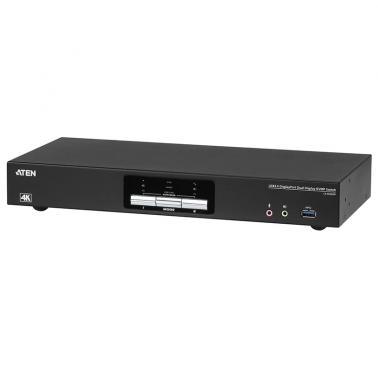
Aten 2 Port USB 3.0 4K Dual DisplayPort KVMP Switch (CS1942DP)
Buy at MSYWe may earn a commission if you buy; it doesn't change your price. Check the price at MSY before you buy. How we make money
Price history
Tracking since today
The price hasn't changed since we started tracking it. We'll show its history once it does.
Available at 3 stores
Stores may pay us a commission when you buy; it doesn't affect the order or your price. Learn more
- MSY This page $579 Cheapest In stock Checked todayBuy
- Umart $579 In stock Checked today Buy
- JB Hi-Fi $645 In stock Checked today Buy


About this product
- Brand
- Aten
- Store
- MSY
- Category
- Electronics > Electronics Accessories > Computer Components > Input Devices > KVM Switches
- SKU
- 50134
Specifications
- Colour
- Black
Aten 2 Port USB 3.0 4K Dual DisplayPort KVMP Switch (CS1942DP)The ATEN CS1942DP desktop KVM switch helps organize your desktop. Especially when managing a multimedia workstation at a large organization, CS1942DP provides you with instant access to two or four computers, all through a single USB keyboard, USB mouse and two DisplayPort monitors.Advanced video support provides a better-defined DisplayPort connection with video resolutions up to 4K (4096 x 2160 / 3840 x 2160 @ 60 Hz). Incorporating dual display capability, you are allowed to enjoy a wider screen and easily switch between two or four DisplayPort systems. In addition, featuring a built-in USB 3.1 Gen 1 hub, the CS1942DP delivers unprecedented data transfer rates up to 5 Gbps, allowing you to maximize multimedia operations.Engineered to meet the ever-increasing demand for dual display, ultra-fast data transmission rates, and lossless 4K video resolution, the CS1942DP is specifically designed for where multitasking is needed such as design, financial trading, and video post production.One USB keyboard and mouse controls two DisplayPort computers and share two USB peripheralsSupports Quad Display by connecting two Dual Display KVM switchesSupports superior video quality Up to 4K (4096 x 2160 / 3840 x 2160 @ 60 Hz)Computer Selection via front panel, hotkeys, mouse, and RS-232 commands2- Port USB 3.1 Gen 1 hub with SuperSpeed 5 Gbps data transfer ratesSupports DisplayPort Dual-Mode technology (DP++)1Supports MST (Multi-Stream Transport)2Supports Console keyboard emulation / bypass featureSupports Console mouse emulation / bypass featureIndependent switching of KVM, USB, and AudioMultilingual keyboard mapping supports English, French, Japanese, and German keyboardsDisplayPort 1.2 compliant; HDCP compliant3Supports HD audio4Power on detectionFirmware upgradableSPECIFICATIONS:GENERALComputer Connections2Port SelectionHotkey, Pushbutton, Mouse, RS-232 CommandsCONNECTORSConsole Ports2 x USB Type A Female2 x DisplayPort Female (Black)2 x 3.5mm Audio Jack Female (Green; 1 x front, 1 x rear)2 x 3.5mm Audio Jack Female (Pink; 1 x front, 1 x rear)KVM (Computer) Ports2 x USB3.1 Gen1 Type B Female (Blue)4 x DisplayPort Female (Black)2 x 3.5mm Audio Jack Female (Green)2 x 3.5mm Audio Jack Female (Pink)Daisy Chain Ports1 x RJ-45 FemalePower1 x DC JackUSB Hub2 x USB3.1 Gen1 Type A Female (Blue; 1 x front; 1 x rear)LEDSKVM3 (Orange)Audio3 (Green)USB Link3 (Green)SWITCHESSelected3 x PushbuttonStation Selection1 x Slide SwitchEMULATIONKeyboard / MouseUSBVideoUp to 4096 x 2160 @ 60Hz, 2560 x 1440 @ 144HzScan Interval1-99 seconds (default: 5 seconds)Power ConsumptionDC12V:3.48W:73BTUENVIRONMENTALOperating Temperature050CStorage Temperature-2060CHumidity0-80% RH, Non-condensingPHYSICAL PROPERTIESHousingMetalWeight1.54 kg ( 3.39 lb )Dimensions (L x W x H)33.50 x 15.66 x 4.40 cm(13.19 x 6.17 x 1.73 in.)NoteFor some of rack mount products, please note that the standard physical dimensions of WxDxH are expressed using a LxWxH format.OTHERSNotesAs is common with DisplayPort KVM switches, switching between KVM ports in an Extended Desktop setup may cause windows open on the extended desktop to be resized/repositioned back to a default configuration on the main display. This is due to the nature of the DisplayPort protocol and may require a manual readjustment.1.DisplayPort DualMode technology (DP++) does not require an active adapter for most single display setups. Active DisplayPort adapters are recommended if you are unsure of the video source's DP++ compatibility.2.MST (Multi-Stream Transport) requires either monitors that are capable of DisplayPort 1.2 daisy-chaining, or use of a powered DisplayPort MST Hub. A DisplayPort v1.1a display can be the last display in a DisplayPort v1.2 chain. The PC source must be DisplayPort 1.2 compliant3.For DisplayPort 1.4 compliant display device, make sure to configure the device setting to be compatible with DisplayPort 1.2 to avoid compatibility issue.4.HD audio through DisplayPort cannot be switched independently