

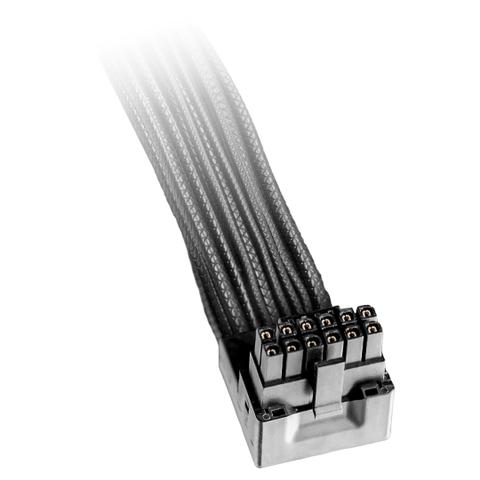

Be Quiet! 12VHPWR 90 Degree PCIe Cable
In stock at PC Case Gear
Price checked today
We may earn a commission if you buy; it doesn't change your price. Check the price at PC Case Gear before you buy. How we make money
Price history
Tracking since today
The price hasn't changed since we started tracking it. We'll show its history once it does.
About this product
- Brand
- be quiet!
- Store
- PC Case Gear
- Category
- Electronics > Electronics Accessories > Cables > System & Power Cables
- SKU
- BC073
(Special Price! Reduced to clear, was $27!) The 12V-2x6 / 12VHPWR 90 degree Cable (BC073) comes with an angled connector on one side for immaculate cable management with any ATX 3 be quiet! power supply. A perfect blend of aesthetics and function with single sleeves.
Features
12V-2X6 / 12VHPWR 90° Cable PCI-E
Power for the Next Generation
- 90° angled connector
- Rated for 600W
- Suitable for any graphics card with 12V-2x6 or 12VHPWR connector
- Elegant look with black rubberised individual cable sleeves
- Follows latest specifications for firm fit
- 3-years manufacturer’s warranty

Angled Connector
No More Worrying about Bend Radius
Thanks to the 90° angled connector, you can route the 12V-2x6 / 12VHPWR 90° Cable much closer to the graphics card. The usual recommended “do not bend before 40mm from the plug” rule for safe application and a tight fit no longer applies. This makes cable management much easier.

All-Black, Elegant Design
Single-Sleeved Cables for a Clean Setup
A perfect blend of aesthetics and function, the 12V-2x6 / 12VHPWR 90° Cable features single-sleeved wires offering high durability and flexibility.

Use Cable Correctly
For a Long Lifespan
Note: This cable may not work with all graphics cards. Please make sure that the 4 sense lines are on the correct side of the female connector. Make sure that the connector is firmly seated and flush with your graphics card.