

Brand:Contour
Contour Rollermouse RED Wired Roller Bar
At Mwave In stock

Same price since 29 Oct
Unchanged since we started tracking
We may earn a commission at no cost to you. How it works
Price history
Tracking since 29 Oct · 20 days
The price hasn't changed since we started tracking it. We'll show its history once it does.
About this product
- Brand
- Contour
- Category
- Electronics > Electronics Accessories > Computer Components > Input Devices > Mice & Trackballs
Specifications
- Colour
- RED
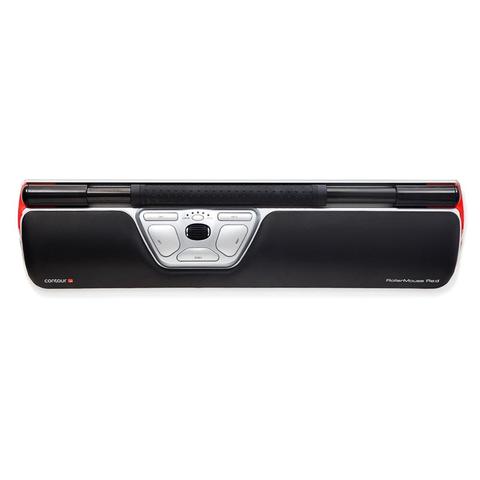
A RollerMouse is designed to sit in front of your keyboard and relies on patented Rollerbar to control the cursor. The RollerMouse can be used ambidextrously and encourages the use of both fingers and the thumbs to roll and slide your way to a healthier, more productive work experience. RollerMouse Red is best suited for users with small to average sized hands, adding the RollerMouse Red Plus will accommodate the users with larger hands.
- 8 key functions
- Rollerbar has extra padding for additional comfort and control
- Keyboard risers to customise the height and angle of keyboard
- Integrated and detachable wrist rest designed to keep your hands, wrists, and forearms flat
- USB Plug and Play installation and connection
- An optical sensor detects the cursor movement, making it easier to move the cursor
- Click Force Adjustment allows for the adjustment of the amount of pressure required to perform a mouse click
- Click Volume Adjustment
- Additional wrist support available with the RollerMouse Red Plus accessory
Central Positioning

While traditional mice sit to either the left or right of the keyboard, the RollerMouse Red, sits in front of the keyboard.
This placement eliminates the need for reaching for the mouse and will greatly reduce unnecessary muscle activity in your arms, shoulders, and neck.
The Rollerbar

RollerMouse products feature the patented Rollerbar to control the cursor on the screen. The textured Rollerbar, ensures better control of the device and increase comfort and accuracy.
This way of cursor control spreads the workload across the fingers and thumbs and is easily used ambidextrously.
Rollerbar usage removes the gripping and squeezing associated with handheld mice, reducing hand, wrist, and forearm strain.
Cursor Speed Selection

There are 10 different cursor speed settings that can be changed in a moment via a dedicated speed control button.
When finer cursor control is required the lower settings offer enhanced precision while the higher speeds provide much greater cursor movement when working across multiple screens.
Programmable Buttons

While a left click can be actioned by pressing down on the Rollerbar, there is also a cluster of 5 buttons and a scroll wheel beneath the Rollerbar.
The default programming of these buttons is for popular tasks but the functions can be changed via the Contour driver.
The placement of this cluster encourages ambidextrous use and discourages stretching outside the core work zone.
| Specification | Detail |
|---|---|
| Cursor speed Precision (dpi) | 800 | 1000 | 1200 | 1600 | 2400 |
| Connection | USB Cable |
| Width | 40cm |
| Height | 2.2cm |
| Depth | 10cm |
| Rollerbar accessibility | 28cm |
| Installation | Plug & Play |