

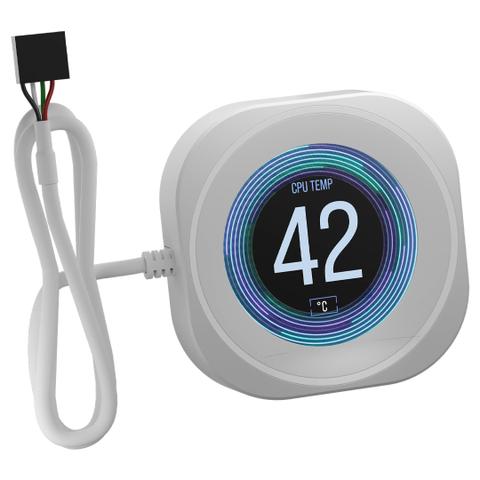

Corsair Nautilus RS LCD Screen Module White
- Black
- White
We may earn a commission if you buy; it doesn't change your price. Check the price at PC Case Gear before you buy. How we make money
Price history
Tracking since today
The price hasn't changed since we started tracking it. We'll show its history once it does.
Available at 3 stores
Stores may pay us a commission when you buy; it doesn't affect the order or your price. Learn more
- PC Case Gear This page $78 Cheapest In stock Checked todayBuy
- PLE $78 In stock Checked yesterday Buy
- Mwave $89 Out of stock Checked 3 days ago Buy


About this product
- Brand
- Corsair
- Store
- PC Case Gear
- Category
- Electronics > Electronics Accessories > Computer Components > Computer System Cooling Parts > All-in-One Liquid CPU Coolers
- SKU
- CW-9061030-WW
Specifications
- Colour
- White
The Corsair NAUTILUS RS LCD Screen Module features a 2.1 inch IPS display (480x480 resolution) capable of showing CPU temps, GIFs, memes or custom images via Corsair iCUE. It installs tool-free by snapping over the pump cap of any Nautilus RS or RS ARGB AIO CPU cooler and connects via a 9-pin USB 2.0 header.
Features

NAUTILUS RS LCD Screen Module AIO Cap Replacement - White
Includes
- A replacement for your pump cap with a custom 2.1 IPS LCD screen
- A display for CPU temperatures, animated GIFs, and more
- Easy tool-free installation with snap and latch design
- Powerful CORSAIR iCUE software control
- Five-year warranty

Brilliant IPS LCD Display
Take Control
Showcase CPU temperature, animated GIFs, memes, or your team’s logo on a crisp 480 x 480 IPS screen at 30 FPS with an ultra-bright 600cd/m² backlight and over 16.7 million colours. iCUE Software includes full in-app GIPHY integration, giving you access to thousands of your favourite memes and GIFs.
Display Screen Preview
- Aperture
- Concentric
- Custom 1
- Custom 2
- Custom 3

Easy Tool-Free Installation
Built to Perform
Simply snap and latch to replace your pump cap with the LCD Screen Module, then connect to a USB 2.0 header. No tools needed.

Install in Seconds
Simply snap and latch to replace your pump cap with the LCD Screen Module, then connect to a USB 2.0 header. No tools needed.

Take Control with iCUE
Control what is displayed on your LCD screen with CORSAIR iCUE software.
World-Class Support
Our award-winning service means you can enjoy your gear worry-free.