

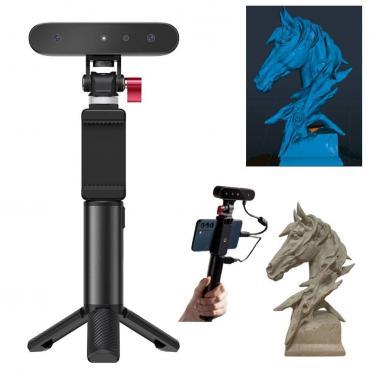
Creality 3D Scanner CR-Scan Ferret 3D Scanner for 3D Printing and Modeling, Portable Handheld Scanner with 30 FPS Quick Scan, 0.1mm Accuracy
Out of stock at MSY
Price checked today
We may earn a commission if you buy; it doesn't change your price. Check the price at MSY before you buy. How we make money
Price history
Tracking since today
The price hasn't changed since we started tracking it. We'll show its history once it does.
About this product
Why Choose SainSmart?Founded in 2011, SainSmart is a well-trusted reseller of Creality.We offer:One-year service from the date of purchase on all our products.Strict quality control and professional technical guidance, guide you through the journey of 3D Printing.Exclusive resources like tutorials and improved instruction, check out the description below for more.Creality CR-Scan FerretCost-effective scannerCreality Scan Android APP/ Windows/Software(: bit.ly/3ICD7inAffordableCompact designDual mode scanningASIC chipset up to 30FPSFull color scanningEasy operationOutdoor scanningLow power consumptionLow power consumptionThe 3D scanner can provide over 2 hours of continuous scanning using its charging handle. It can be powered with a 5V power bank. Start scanning and enjoy it anytime, anywhere. Product NameCR-Scan FerretAccuracy0.1mmResolution/Point Distance0.16mmSingle capture range560820mm@700mmWorking Distance150~700mmMinimum Scanning505050mmFrame Rate/Scan Speedup to 30 fpsLight SourceNIROutdoor ScanningSupport Scanning in Bright SunlightTracking ModeVisual TrackingColor TextureSupportOutput FormatOBJ / STL / PLYMachine Weight105gMachine Size1203026mmCompatible SystemAndroid 11 and above / Win 10(64 bit)/Win 11 (64-bit) / Mac OSNote: Purchase additional WiFi6 Wireless Bridge accessories to make the scanner compatible with Mac and iOSConnection ModeUSB 2.0/3.0HOW TO USE1. Make sure the scanned object is larger than 5050*50mm. After connecting the device, select the option matching your item.2. If the displayed distance is "perfect" and the item is tracked, the scan can be started.3. While scanning, if tracking is lost, backtrack to the previous scanned area and hold for a few seconds to resume tracking. Try to enable Exclude Base at the bottom left corner(Windows) or bottom right corner(Android) while scanning.4. For small objects, it is recommended to use a tool such as a turntable to scan 360 around the object at least 3 times.Tips: For Android phone users, please check whether the OTG function is turned on while connecting.If you are a novice, please scan patiently. I believe you will find the skills and succeed.Objects recommended for scanningIdeal for medium and large-sized object scanning. Recommended: Human faces, bodies, Sculpture, Carving, etc.Not suitable for transparent, reflective, through-holes, very thin objects. Nonstationary object: eg. moving animal.Oversized objects such as wall, rooms, etc. and ultra small object such as keys, coins scissors, gears, jewelleries or tiny electronic components, etc.