

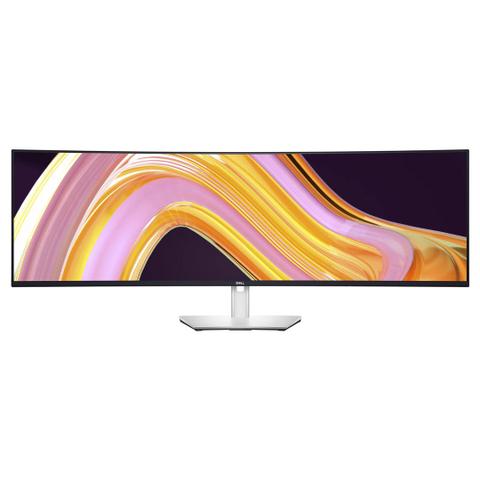

Dell UltraSharp U4924DW 5K DQHD IPS Curved 49in Monitor
In stock at PC Case Gear
Price checked today
We may earn a commission if you buy; it doesn't change your price. Check the price at PC Case Gear before you buy. How we make money
Price history
Tracking since today
The price hasn't changed since we started tracking it. We'll show its history once it does.
About this product
- Brand
- Dell
- Store
- PC Case Gear
- Category
- Electronics > Video > Computer Monitors
- SKU
- U4924DW
Specifications
- Screen size
- 49"
- Resolution
- 5K (5120×2880)
- Refresh rate
- 60Hz
- Panel type
- IPS
The Dell UltraSharp U4924DW 5K DQHD IPS Curved 49in Monitor features a 49inch dual QHD display with a 5120 x 1440 max resolution, 60Hz refresh rate, 5ms response time (GTG), IPS Black technology, ComfortView Plus, USB-C connectivity and RJ45 Ethernet port, 9W stereo speakers, height, swivel and tilt adjustable stand, and flexible mounting options including VESA 100mm support.
Features
Dell UltraSharp 49 Curved USB-C Hub Monitor - U4924DW
Experience uninterrupted productivity on a 49-inch dual QHD curved monitor with IPS Black panel technology that immerses you in a world of exceptional colour and contrast.
Experience No Gaps in Productivity
One Screen or Two
Obtain seamless, multi-screen productivity with two 27" QHD partition capabilities complemented with exceptional colour and contrast.
Vibrant Hues, Sharp Contrast
IPS Black Panel Technology
Enjoy deeper blacks with a 49-inch dual QHD monitor with IPS Black panel technology that delivers exceptional contrast (2000:1) across a wide viewing angle. Equipped with 100% sRGB, 100% REC.709, 98% DCI-P3 and 98% Display P3 colour coverage.
Curved Screen
Work comfortably with a curved screen that improves field of view and reduces reflection and eye fatigue.
Enhance Eye Comfort
ComfortView Plus is an always-on, built-in, low blue light screen that reduces potentially harmful blue light emissions without compromising colour.

Power Your Productivity
Streamline Your Workflow
A single cable USB-C transmits data and video signals while delivering up to 90W of power.
Fast and Stable Connection
Get up to 2.5GbE provided by RJ45 with PXE boot, Mac Address pass-thru and Wake on LAN features. RJ45 lock feature gives you the flexibility to lock the wired Ethernet to a chosen PC while continuing to work from dual PC inputs.
Connect
A wide variety of devices are connectable with USB-A and USB-C Gen2 downstream quick-access ports that deliver speeds up to 10Gbps and DP1.4, HDMI and USB-C upstream ports.

Starting is Easy
Quick Connect
Conveniently located USB-C (up to 15W power) and USB-A ports make it easy to plug in external devices, and built-in dual 9W speakers saves you the hassle altogether.
Dive Right into Your Project
The built-in power sync feature (The power sync feature on this Dell USB-C Monitor enables start up and wake-on-demand on compatible Dell PCs. Please check your Dell PC to ensure support of this feature.) wakes up and powers on your laptop.

Power of Two
Internal Multi-Stream Transport (iMST)
View your display across the full screen or split it into 2 x 27-inch QHD partitions with iMST. No external software or DisplayPort splitter needed.
Multitask Better
Connect to two PC sources and Auto KVM (keyboard, video, mouse) will seamlessly switch controls over to the second connected PC. Use KVM feature to control both PCs with a single keyboard and mouse. The KVM wizard makes setup a breeze.

Set for Comfort
Work comfortably all day long by tilting, swivelling and adjusting your monitor height to however best fits you.

Improved Dell Display Manager
Modern Intuitive User Interface
New modern user interface for ease of use and personalisation of features with Menu launcher.
Productive at Every Level
Easy Arrange allows you to easily tile multiple applications across one or more screens with 49 pre-set window partitions and the ability to personalise up to five windows, giving you improved multitasking abilities.
Stay Updated
Get automatic notification anytime for new updates on monitor firmware (Select models only.) and software.
Optimise Front of Screen Experience
Get uniform colour experience from your monitor seamlessly by matching the colour preset of the monitor (Select models only.) and the supported ICC profile.
Easy Setup and Sharing of Accessories
Setup a single keyboard and mouse to be shared easily between multiple PCs with USB KVM wizard (Select models only.). Quick access menu or hotkey allow convenient fast switching between PCs.
Easy Deployment
DDM is compatible with management tools such as SCCM / InTune and Command Line Interface scripts for easy IT integration and deployment with asset management.

Green Thinking. For Today and Tomorrow.
Environmental Standards
Meets the environmental standards such as EnergyStar®, and TCO Certified Edge, and is EPEAT® Gold registered (EPEAT registered where applicable. EPEAT registration varies by country. See www.epeat.net for registration status by country.).
Eco-Conscious Packaging
Dell monitors ship in boxes made with 100% renewable content that is also 100% recyclable (Applies to all Dell monitors launched since 2023. Made from FSC mix sources which is a mix of material from FSC certified forests, recycled content and/or FSC controlled wood. Based on internal analysis, August 2023.).
Energy Conservation
Save energy with PowerNap (Enabled by Dell Display Manager), a feature that dims or puts your monitor to sleep when it’s not in use.
Advanced Sustainability
Dell Technologies is committed to reducing environmental impact throughout the product lifecycle. Read more about their commitment to sustainability and their 2030 Social Impact goals here, and Dell's products' carbon footprints here.
Works with Devices on macOS®
Tested with devices on macOS, this USB-C monitor with P3 colour is compatible with Mac®devices. (Based on internal testing of select Dell monitors with USB-C or HDMI connection to devices on macOS, June 2024. Requires USB-C or HDMI connectivity. Some features may not be supported.)

Connectivity Options
Ports & Slots
1. Security lock slot (based on Kensington Security Slot™)
2. Power connector
3. 2x HDMI
4. DisplayPort
5. USB Type-C upstream port (Video + Data). Alternate mode with Display Port 1.4, Power Delivery up to 90 W
6. Audio line-out port
7. USB Type-C upstream port (data only, SuperSpeed USB 10 Gbps, USB 3.2 Gen 2)
8. 4x USB Type-A downstream ports (SuperSpeed USB 10 Gbps, USB 3.2 Gen 2)
9. RJ45 Ethernet port, 2.5GbE
10. Stand lock
11. 2x USB Type-C downstream ports (SuperSpeed USB 10 Gbps, USB 3.2 Gen 2)
12. USB Type-A downstream port with p