

Brand:OPC
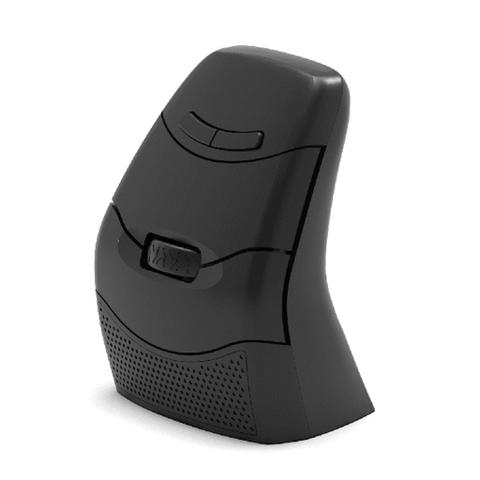
OPC DXT 3 Ergonomic Ambidextrous Vertical Wireless Mouse
At Mwave In stock

Same price since 29 Oct
Unchanged since we started tracking
We may earn a commission at no cost to you. How it works
Price history
Tracking since 29 Oct · 21 days
The price hasn't changed since we started tracking it. We'll show its history once it does.
About this product
- Brand
- OPC
- Category
- Electronics > Electronics Accessories > Computer Components > Input Devices > Mice & Trackballs
The design of the DXT3 Mouse enables the hand to work from a vertical relaxed position, reducing tension and twisting of the forearm. Designed for comfort and accuracy, the vertical design of the DXT3 allows users hands to adopt the best posture for computer mouse use. Switching between hands is easy, simply spin the mouse 180° and press a single button to change the hand orientation and functions.
Using the hand as it was designed
The design of the DXT3 enables the hand to work from a relaxed position reducing the tension on the soft tissues. In addition the vertical mouse design avoids extreme twisting of the forearm helping to increase comfort.
Accuracy and Productivity
Accuracy is key when using a computer mouse. The design of the DXT3 allows for natural movement of the hand and arm that ensures precise cursor movements. The shape of the DXT3 positions the hand in a comfortable posture for mouse use, utilising the precision grip. The precision grip, where the index finger and thumb work closely together, delivers accurate cursor control.
Limited Grip Force
The design of the DXT3 incorporates light click buttons and the shape allows users to lift the mouse up using the lip above the thumb. This feature allows for accurate positioning and reduced grip force.
Use with your Right or Left Hand
The unique DXT symmetrical design ambidextrous design allows for right and left hand usage at the press of a button. This unique feature allows the users to switch hands quickly and easily throughout the day.
This can be beneficial in avoiding overuse by one hand and arm as well as a means to accommodate graduated usage redistribution during rehabilitative therapy.
| Specification | Detail |
|---|---|
| Hand Sizes: | From 69mm upwards |
| DPI Adjustment: | 800, 1200, 1600 & 2400 |
| Hand Orientation: | Ambidextrous |
| Connection Method: | Wired via USB cable, Wireless via USB receiver |
| Charging Method: | Via USB C cable |
| Buttons: | 7 |
| USB Receiver Storage: | In the base of the mouse |