

Brand:EVGA
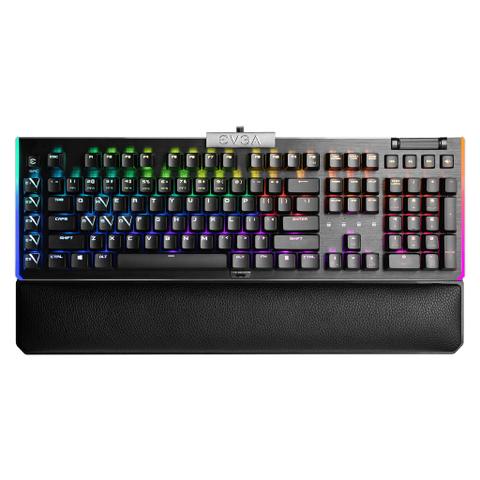
EVGA Z20 RGB Mechanical Gaming Keyboard - LK Light Strike Optical Switches
At Mwave In stock

Same price since 29 Oct
Unchanged since we started tracking
We may earn a commission at no cost to you. How it works
Price history
Tracking since 29 Oct · 23 days
The price hasn't changed since we started tracking it. We'll show its history once it does.
About this product
- Brand
- EVGA
- Category
- Electronics > Electronics Accessories > Computer Components > Input Devices > Keyboards
Specifications
- Colour
- Dark Gray


EVGA Time-of-Flight Sensing System
The Z20 keyboard features a ToF proximity sensor. This sensor detects user movement and triggers the system to be awake or to be sent to sleep.

4K Hz report rate
The Z20/Z15 Keyboard is powered by a 32-bit Arm Cortex-M33 core microprocessor to support a 4K Hz report rate. Offering the most advanced gaming keyboard experience, 4K Hz is 4x more responsive and inputs can be more precise.
LIGHT UP YOUR GAMING EXPERIENCE


Macro Control & Multimedia Function
Z20 DEDICATED MACRO KEYS
Five dedicated and programmable Macro E keys, customizable via the Unleash RGB software.

VOLUME SCROLL WHEEL & MULTIMEDIA KEYS
The dedicated volume wheel and media keys give you full control at your fingertips.

Z20 USB PASSTHRU & AUDIO JACK

ILLUMINATE
The EVGA Z20 keyboard brilliantly outshines the competition with fully customizable *Per-Key* RGB LEDs, and the left and right-edge RGB Lightbar can be customized to fit any colour scheme.
The Z Series LED backlighting can be configured via the EVGA Unleash RGB software, and multiple lighting effects can be instantly dimmed or brightened via the LED brightness function combination keys.
EVGA Unleash RGB Software

TOF
The ToF Panel allows you to set up the ToF function and lighting effects when approaching or leaving the keyboard.

General Settings
The General Function Settings Panel allows you to configure your default keys for Windows, Game Mode, and settings to use Character Repeat. If you need to clear out your settings at any time, simply click the Driver Reset button to return the Control Panel to its default state.

Lighting Effects
The Lighting Effect Panel allows you to control the Z20's seven pre-set modes and customize six different Set Zone lighting profiles. You can customise buttons to turn effects on and off, change the effects, or preview the lighting before saving it. Custom lighting profiles can be set to suit personal tastes with *per-key* customisation.

Key Assignment Settings
The Key Assignment panel gives you the freedom to remap your keys with both a primary and secondary assignment using the FN key.

Macro Editor
The Macro Editor panel gives you access to the Timer and Macro Manager, granting you extensive control over predicting in-game cooldowns and completing complicated patterns.

The Z20 keyboard features a ToF proximity sensor, which detects user movement and triggers the system to awaken or sleep.

The Z20 keyboard is equipped with Light Strike LK Optical Mechanical switches with a low 1.5 mm travel to actuation, generating 25% faster response time compared to traditional mechanical switches. Featuring switches with N-key rollover to ensure that you get exactly the type of feedback and experience you want.
Optical-Mech. Linear
Switch Colour: Dark Gray
Switch Type: Linear and Silent
Travel: 3.0 mm
Actuation: 1.5 mm
Actuation Force: 45 g
Operating Life: 100M
Key Debounce Time: < 0.5 ms
