

Brand:Kinesis Gaming
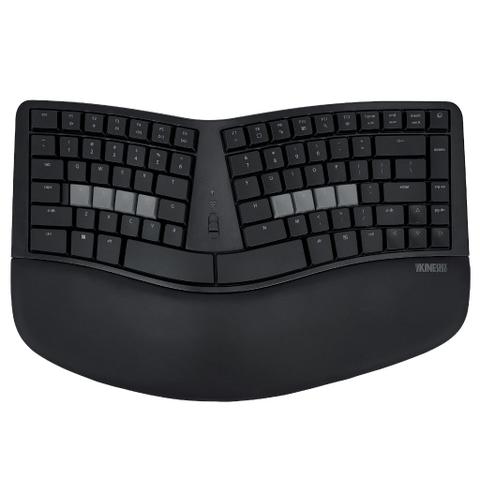
Kinesis mWave Fixed Split LP Ergonomic Mechanical Keyboard – Wired/Wireless
At Mwave In stock

Same price since 29 Oct
Unchanged since we started tracking
We may earn a commission at no cost to you. How it works
Price history
Tracking since 29 Oct · 21 days
The price hasn't changed since we started tracking it. We'll show its history once it does.
About this product
- Brand
- Kinesis Gaming
- Category
- Electronics > Electronics Accessories > Computer Components > Input Devices > Keyboards
With its tenkeyless layout, the base layer layout of the mWave features all the essential keys you need, including full-size function keys, arrow keys, and convenient navigation keys like Home/End and Page Up/Page Down, while eliminating unnecessary extras. An integrated keypad can be accessed using the Fn key to switch to the Fn layer, allowing for easy data entry without leaving the home row. Keypad actions are legended on the front of the keycaps. Additionally, the keyboard includes 12 multimedia actions for convenient control right at your fingertips.
Fully Programmable
The new Kinesis Clique Programming Engine makes custom programming your keyboard easy. Just connect your mWave to a desktop PC with the USB cable and launch Clique using a Chrome or Edge browser. You can reprogram your keyboard in real-time and save your changes directly to the keyboard with the click of a button.
Fixed Split Design
Split design positions hands closer to shoulder-width in proper typing form to reduce ulnar deviation. This alignment helps maintain a more natural posture, allowing the arms to rest comfortably at the sides rather than being stretched outwards.
Integrated Tenting
Tenting elevates the thumb side of the hand to reduce forearm pronation caused by flat keyboards. This adjustment helps to minimise forearm pronation, promoting a healthier alignment during typing.
Integrated Palm Support
Velvety smooth, washable palm support promotes neutral typing position to reduce wrist extension. When the palms are adequately supported, the wrists can remain in a more natural alignment, reducing wrist extension.
Compact Tenkeyless Layout
Tenkeyless layout with embedded keypad results in a smaller footprint for closer mouse placement. Keeping the mouse within easy reach encourages a more natural arm position, promoting better posture and reducing the risk of repetitive strain injuries.
Reduce finger strain
The mWave features Gateron Low Profile Mechanical Key Switches (KS-33 2.0). These low profile tactile mechanical switches feature a low actuation force and a full buffer zone for less bottoming out.
Negative Tilt
Attach the magnetic feet for a negative typing angle. A negative typing angle helps to keep the wrists in a more natural and neutral position. This alignment encourages users to maintain a more relaxed wrist posture.
Dual Connectivity and Multi Channel
Connect via USB wired or Bluetooth wireless. Pair up to 2 Bluetooth devices and switch between instantly. Use the 3 position Profile Switch to control which device the keyboard sends keystrokes to.
Tactile Home Row and Arrows
Find the home row and arrow keys without taking your eyes off the screen thanks to their unique sculpted shape. Sculpted keys are specifically designed to facilitate touch typing, the distinct shape of these keys provides tactile feedback, significantly improving typing speed and overall efficiency.
Available Backlighting
Connect the keyboard via USB to illuminate the key legends.
This feature is particularly valuable for those who may struggle to read the keys without adequate lighting, increasing productivity.
Specification · Detail
Supported OS · Windows, macOS, iOS/iPadOS, Linux, Android, Chrome
Connectivity: · Wired USB or Wireless Bluetooth
Technology: Bluetooth Low-Energy (BLE)
Multichannel: Switch instantly between 2 Bluetooth-enabled devices
Range: ~10m
Power Source: The mWave can be powered via the included USB cable or via its 2 included AA Batteries
Battery life: ~18 Months
Backlighting: Available whenever connected over USB
Switches · Gateron Low Profile Mechanical Key Switches (KS-33 2.0)
These new low profile switches provide the same great typing feel, travel, and durability. But without all the unnecessary height, maximizing ergonomics.
Tactile Feel
Low Force (55g)
Full Travel (3.0mm)
Buffer Zone (1.3mm)
Durable (60M Presses)
Fully Programmable with Clique · Fully Programmable with Clique Thanks to the new Kinesis Clique Programming Engine custom programming your keyboard has never been easier. Just connect your mWave to a desktop PC with the USB cable and launch Clique using a Chrome or Edge browser.
You can reprogram your keyboard in real-time and save your changes directly to the keyboard with the click of a a button.
No software to download, No drivers to install, No files to transfer, No firmware to flash, No account to create