

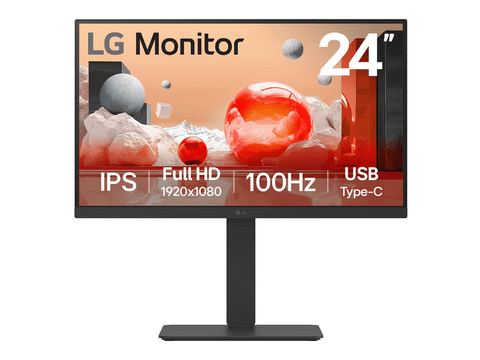

LG 24BA550-B 23.8" 100Hz Full HD Ergonomic IPS Monitor
In stock at PC LAN
Price checked today
We may earn a commission if you buy; it doesn't change your price. Check the price at PC LAN before you buy. How we make money
Price history
Tracking since today
The price hasn't changed since we started tracking it. We'll show its history once it does.
About this product
Specifications
- Screen size
- 23.8"
- Resolution
- Full HD (1080p)
- Refresh rate
- 100Hz
- Panel type
- IPS
23.8” Full HD IPS display
Accurate color at wide angles
LG Full HD (1920x1080) monitor with IPS technology delivers a clear and consistent color. It can provide accurate color reproduction and help users to view the screen at a wide angle.

*The images simulated to enhance feature understanding. It may differ from actual use.
*The keyboard and mouse are not included in the package.
Productivity
23.8” Full HD (1920x1080) IPS
100Hz refresh rate
CLI (Command Line Interface)Usability
LG Switch app
Built-in power and speaker
Various portsComfort & Trust
Ergonomic stand
Reader Mode & Flicker Safe
EPEAT & Energy Star
Versatile business monitors for various workspace
This versatile monitor can cover various works at many places, such as offices, public institutions, and customer service, with a clear IPS display and 3-side virtually borderless design.


*The images simulated to enhance feature understanding. It may differ from actual use.
Integrated power module
Fully use your desk
By providing built-in power, workstations can be designed with a streamlined and clutter-less layout. This allows for better space utilization and organization, creating a cleaner and more efficient work environment.

*The images simulated to enhance feature understanding. It may differ from actual use.
*The keyboard and mouse are not included in the package.
Multi ports
A variety of interface
The 24BA550 comes equipped with multiple ports, enhancing connectivity options for hardworking individuals. With its multiple ports, you can easily connect numerous devices for efficient desk setup.


HDMI 1.4

DisplayPort 1.2
*The images simulated to enhance feature understanding. It may differ from actual use.
*HDMI, DisplayPort cables are included in the package.
*The keyboard and mouse are not included in the package.

Built-in speakers
All set for virtual meetings
The 24BA550 comes with built-in speakers, eliminating the need for extra speaker installations when participating in web conferences or watching videos.
*The images simulated to enhance feature understanding. It may differ from actual use.
*The webcam is required for video conferences and is not included in the package (sold separately).

100Hz refresh rate
Smooth workflow
A fast 100Hz refresh rate provides a smooth loading in various programs. It helps to allow less screen stuttering and motion blur, elevating work productivity.
*The images simulated to enhance feature understanding. It may differ from actual use.
*This is compared to models with a refresh rate of less than 100Hz.

LG Switch app
Switch swiftly
LG Switch app helps to optimize the monitor for an efficient work environment. You can divide the display into six areas, manage the schedules, or launch a video call platform with a mapped hotkey effortlessly.
*The images simulated to enhance feature understanding. It may differ from actual use.
*To download the latest LG Swithch app, please visit LG.COM.
Ergonomic design
Easy and comfy
The 24BA550 supports tilt, swivel, pivot, and height adjustment options to make a comfortable workstation for those who spend extended hours in front of monitors. Also, our ergonomic stand facilitates communication with customers or colleagues by allowing for a downward height adjustment.

 One Click StandEasy installation
 Tilt / Height-5~21° / 150mm
 Swivel±45°
 PivotBi-direction
*The images simulated to enhance feature understanding. It may differ from actual use.
Visual comfort

Reader Mode
Reader Mode adjusts color temperature and luminance that helps to lessen eye fatigue and provide eye comfort while reading documents on a monitor.

Flicker Safe
Flicker Safe reduces invisible flickering on the screen, which helps reduce eye strain.
*The images simulated to enhance feature understanding. It may differ from actual use.
*Above feature may vary depending on real use conditions that the user is using.

CLI (Command Line Interface)
Advanced management for monitors
LG business monitors offer CLI (Command Line Interface), a software for efficient device management. IT managers can update firmware and adjust settings like video mode, brightness, and response time in batches via the server program.
*The images simulated to enhance feature understanding. It may differ from actual use.
*The CLI (Command Line Interface) functionality is available only for features supported by the purchased monitor, and the supported feature scope may vary depending on the model.
Display
Size
23.8 -inch
Resolution
Full HD (1920 x 1080, 16:9)
Panel Type
IPS (Anti-Glare)
Brightness (Min.) [cd/m²]
200 cd/m²
Brightness (Typ.) [cd/m²]
250 cd/m²
Color Gamut (Typ. / Min.)
sRGB 95% (CIE1931)
Refresh Rate (Max.)
100 Hz
Borderless Design
3-side Virtually Borderless Design
Feature
Picture Mode
Custom, Reader, Photo, Color Weakness, Cinema, Game
Features
Flicker Safe, Reader Mode, Color Weakness, Super Resolution+, Auto Input Switch, Smart Energy Saving
SW Application
LG Switch
YES
Connectivity
D-Sub (V Frequency / Max. Resolution at Hz)
YES (1ea, 48~75Hz / 1920 x 1080 at 75Hz)
HDMI
YES (1ea, ver. 1.4)
DisplayPort
YES (1ea, ver. 1.2)
USB
1 x SuperSpeed USB 5 Gbps upstream
2 x SuperSpeed USB 5 Gbps downstream
2 x USB 2.0 downstreamH/P Out
3-pole (Sound Only
Sound
Speaker
2W x 2
Power
Type
Built-in Power
AC Input
100~240V (50/60Hz)
Power Consumption (Sleep Mode / DC Off)
Less than 0.3W
Stand
Adjustments
OneClick Stand, Tilt (-5~21º) / Height (150 mm) / Swivel (±45°) / Pivot (Bi-Direction)
Wall Mountable
YES (100 x 100 mm)
Standard
EPEAT® Registered (USA / Germany)
BRONZE
LCA Verified
YES
TCO Certified
YES
ENERGY STAR® Certified
YES