

Brand:Lian Li
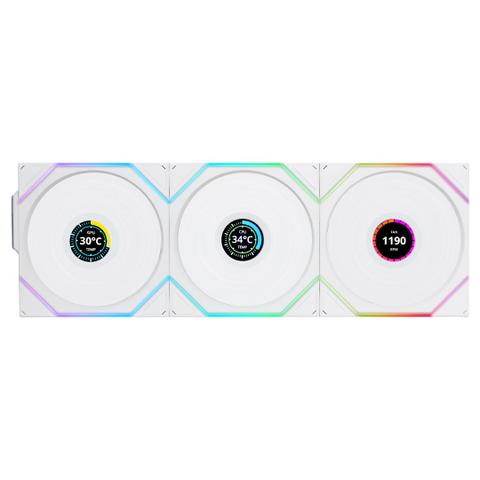
Lian Li UNI FAN TL LCD 120mm Reverse Blade Fan – White, 3-Pack
Lowest available price PC Case Gear In stock

PC Case Gear's price unchanged since 8 Nov
Unchanged since we started tracking
Cheapest of 6 stores
Compare all

We may earn a commission at no cost to you. How it works
Price history
Tracking since 8 Nov · 12 days
The price hasn't changed since we started tracking it. We'll show its history once it does.
Available at 4 stores
Stores may pay us a commission when you buy; it doesn't affect the order or your price. Learn more
| Retailer | Price | Availability | Updated |
|---|---|---|---|
| Cheapest $179 | In stock | Today | |
| $219 | In stock | Yesterday | |
| $219 | In stock | Yesterday | |
| $249 | In stock | 13 Nov |

Show 2 unavailable offers Hide 2 unavailable offers
| Retailer | Price | Availability | Updated |
|---|---|---|---|
| $219 | Out of stock | Yesterday | |
| $249 | Out of stock | Yesterday |

About this product
- Brand
- Lian Li
- Category
- Electronics > Electronics Accessories > Computer Components > Computer System Cooling Parts > Computer Case Fans
Specifications
- Colour
- White
The Lian Li TL120 Uni Fan Wireless LCD Reverse 120mm features wireless synchronisation, reverse blade design, dual-zone ARGB lighting, and a customisable 1.6 inch LCD screen. These three 120mm fans offer adjustable speeds of 350-1900 RPM, optimal airflow, and seamless control via L-Connect 3 software, ensuring efficient cooling and a visually stunning PC build. Set of 3 fans.
Features
UNI Fan TL Wireless
- L-Wireless Sync supported (required for use)
- UNIFAN interlocking system for streamlined cable management
- Available in two versions: LED and LCD (mixable in a single cluster)
- Two light zones for an enhanced visual experience
- Full software control for fan speed, lighting effects, and LCD screen display via L-Connect 3
- Noise-optimised and performance-orientated fan.
- LCP (liquid crystal polymer) fan blades are used for tight tolerance.

UNI Fan TL Wireless Series - Revolutionary Wireless ARGB Fan
The UNI FAN TL Wireless and TL LCD Wireless feature LIAN LI’s innovative wireless sync technology, utilising a 2.4GHz wireless signal to control lighting effects and fan speed to further improve the PC building experience while delivering efficient cooling, dazzling lighting, and quiet operation.
- Mix and Match
- 1.6" LCD Screen
- L-Wireless Controller
- LCP Fan Blades
- Dual Zone Lighting Effect
- Aluminium Centre
Available in Two Variations Two Orientations Two Colours
UNI FAN Wireless Series includes both LCD and LED versions. Both are available in black and white, with options for standard and reverse blade configurations meeting the diverse needs of users.
Wireless Transmission, Easy Installation
By adopting 2.4GHz wireless technology, the UNI FAN TL Wireless Series eliminates the need for traditional hub connections, significantly simplifying the installation process and enhancing user experience.
Innovative L-Wireless Controller
Instead of using the traditional connection method, the L-Wireless Sync Controller controls both lighting and fan speeds without connecting the cable to the controller.
The fans can be powered via a 4-PIN fan header on the motherboard or a SATA power cable.
For the LCD versions, a USB 2.0 9-PIN cable connection to the motherboard is required to set the LCD screen.

Connect to Motherboard USB Type A Port.

Connect to the 9-Pin Port on Motherboard.
Note: To synchronise the fan speed with the motherboard, please use the second connection method and ensure that the PWM cable from the controller is connected to the motherboard for proper functionality.
The LCD and non-LCD versions use different receivers. For mixed clusters, use the LCD version receiver.
Each fan group requires connection to either a 12V PWM header or a 1-to-3 SATA splitter cable.
- UNI FAN TL Wireless: PWM cable powers the LED and motor.
- UNI FAN TL LCD Wireless: PWM cable powers the LED and motor; USB cable transmits LCD signals and provides LCD power.

The cable length can be shortened with the organiser on the receiver.

The transmission logic between the USB port and the LCD has been optimised, enabling the use of an additional USB splitter cable to the USB 2.0 or 3.0 port on the motherboard:
- USB splitter cable without SATA for additional power (e.g., LIAN LI USB 2.0 1-to-3 HUB): Supports up to 6 TL LCD wireless fans.
- USB splitter cable with SATA for additional power (e.g., LIAN LI Edge hub): Supports up to 9 TL LCD wireless fans.
- Furthermore, a single motherboard can support up to 20 UNI FAN TL LCD wireless fans.

LIAN LI Edge Hub
Note: To synchronise the fan speed with the motherboard, please use the second connection method and ensure that the PWM cable from the controller is connected to the motherboard for proper functionality.
One Controller for All
The L-Wireless Controller supports UNI FAN TL Wireless, UNI FAN SL Wireless, Strimmer Wireless, and more future products.
Note: UNI FAN TL Wireless Series’ receiver is compatible with the UNI FAN SL Wireless series.
The L-Wireless Controller can transmit signals to up to 10 channels.
Each group of wireless fans occupies one channel, while each Strimmer Wireless uses an additional channel.
When all 10 channels are connected to the UNI FAN TL (non-LCD) wireless, the L-Wireless Controller can manage up to 40 fans at a time.
In the future, the L-Wireless Controller will also be compatible with more LIAN LI wireless devices. With this controller, you can create a stunning and streamlined LIAN LI ecosystem that combines beauty and simplicity!
Personalised Remix, Style on Display
UNI FAN TL Wireless and TL LCD wireless now can be mix-matched into a group, offering versatile configurations and empowering creativity.
L-Wireless Controller Configurations:
A Group of 4 Fans:
- LCD x 2 + LED x 2
- LCD x 3 + LED x 1
- LED x 4
A Group of 3 Fans:
- LCD x 3
Practical and Stylish LCD Screen
The UNI FAN TL LCD Wireless carries forward the legacy of the world’s first LCD-equipped fan. It features a 1.6” circular LCD screen with 60Hz refresh rate (upgraded from 30Hz) that integrates seamlessly with LIAN LI’s L-Connect 3 software, offering exceptional customisability.
- 1.6" LCD
- 60HZ Refresh Rate
- 400x400 resolution
- 500 nits brightness
- sRGB 24-Bit
- IPS Type Display
Performance Detail at A Glance
Monitor CPU and GPU temperature and load with new built-in animated hardware sensors displayed directly on the screen. For clusters of 3 LCD fans, multiple data points can be displayed simultaneously.
Compared to TL LCD V1 (wired version), CPU usage while using the sensor is significantly reduced.
CPU Load Test:
- Number of TL LCD: 6
- CPU Model: i7-12700F
- Test System: Windows 10 22H2
Upload Your Style
Achieve a completely personalised system style by uploading MP4/GIF/JPG/PNG files to customise the LCD screen.

Combination of Performance and Aesthetics
The UNI FAN TL Wireless uses LCP material for fan blades, a copper centre shaft, and FDB bearings with 9 tightly aligned blades (0.65mm gap), ensuring a striking look without compromising on performance.
1. Aluminium Logo
Add an aesthetic touch
2. Liquid-Crystal Polymer (lCP) Fan Blade
Ensure tolerance for high-speed operation
3. Metal Bearing Shell
To securely hold the impeller to the shaft
4. Magnetic Frame
To provide extra support for fan blades
5. Stator
To provide a rotating magnetic field that generates momentum
6. Brazz Nut
To Prevent oil leaks
7. Fluid Dynamic Bearing (FDB)
To effectively reduce the internal friction for improved durability
8. Copper Shielding
To reinforce the shaft and ensure stability at high-speed operation
9. Thicker Fan Frame
28mm thick fan frame helps deliver more airflow and static pressure
10. Rubber Pads
To reduce vibrations and maintain extremely low noise levels
The UNI FAN TL Wireless offers performance on par with the UNI FAN P28, the top performer in the UNI FAN lineup.
Sophisticated Continuous RGB Lighting
Each UNI FAN TL Wireless series fan has 26 LEDs with a wide infinity mirror on the 2 sides of the fan frame that wraps around the edges of the anti-vibration pad.
Seamless Software
Able to set different fan speeds for each fan cluster to optimise different scenarios of use providing flexibility for radiator or case fan needs with L-Connect 3.
L-Connect 3 offers a variety of features, such as grouping, naming, and sorting fans for more intuitive management, providing diverse functionality and user-friendly design.
Note: If the PWM cable connects to the motherboard, switch the corresponding fan header to PWM mode in the BIOS. This step is unnecessary when using a PWM-SATA adapter.