

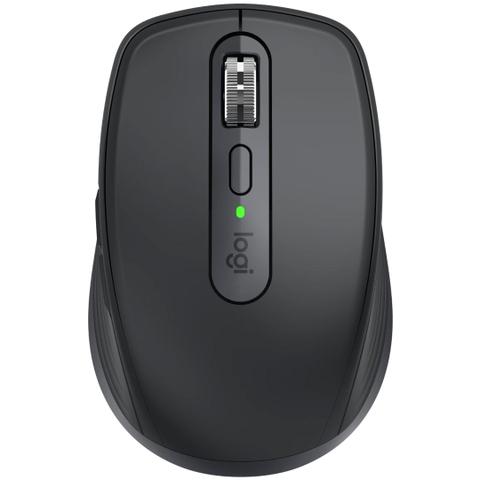

Logitech MX Anywhere 3S Wireless Mouse Graphite
Buy at PC Case GearWe may earn a commission if you buy; it doesn't change your price. Check the price at PC Case Gear before you buy. How we make money
Price history
Tracking since today
The price hasn't changed since we started tracking it. We'll show its history once it does.
Available at 2 stores
Stores may pay us a commission when you buy; it doesn't affect the order or your price. Learn more
- PC Case Gear This page $109 Cheapest In stock Checked todayBuy
- JB Hi-Fi $139 In stock Checked yesterday Buy

About this product
- Brand
- Logitech
- Store
- PC Case Gear
- Category
- Electronics > Electronics Accessories > Computer Components > Input Devices > Mice & Trackballs
- SKU
- 910-006932
Specifications
- Colour
- Graphite
The Logitech MX Anywhere 3S Wireless Mouse is a compact mouse that lets you work wherever the work takes you. It features a Darkfield high precision optical sensor with a DPI range of 200-8000, Magspeed scroll wheel with dual modes (ratchet and hyper-fast scroll), can be connected to up to 3 devices via Bluetooth on Windows, macOS, ChromeOS, or Linux, USB-C quick charging (up to 70 days of battery life on a full charge), and can be configured via the Logi Options software.
Features
Master Series MX Anywhere 3S Compact Wireless Performance Mouse
Master Your Flow. Anywhere.
Experience the performance and versatility of MX Anywhere 3S, an iconic compact mouse, now with an 8K DPI track-on-glass sensor and quiet clicks.
Experience ultimate versatility with remarkable performance. An advanced compact mouse that lets you work wherever the work takes you. Now with next-level precision and responsiveness thanks to 8K DPI any-surface tracking and quiet clicks.

Tracks Everywhere, Goes Anywhere
Keep your movements as smooth as your workflow. MX Anywhere 3S is equipped with an 8K DPI optical sensor that tracks anywhere – even on glass24 mm minimum glass thickness. — meaning you can work seamlessly at the desk, cafe, or even on the couch.
High DPI tracking means you can cover more ground with subtle movements – perfectly suited for work on the go or in small spaces so you hit the right pixel every single time with less effort. Adjustable in Logi Options+.
Deeper Flow with Quiet Clicks
MX Anywhere 3S introduces quiet clicks - so you can stay in your flow and master any project with less distractions and more focus.
The Quiet Click buttons offer a soft, satisfying click feel – but with less click noise(than MX Anywhere 3). You’ll get the same performance, precision, and reliability you’ve come to expect.

Scroll 1,000 Lines Per Second
Introducing MagSpeed scroll wheel: Logitech’s fastest, quietest, and most precise scrolling experience ever.
Scroll through 1,000 lines per second with hyper-fast mode which is up to 90% faster (Compared to regular Logitech mouse without an electromagnetic scroll wheel). And Ratchet mode is 87% more accurate (Compared to Logitech Master 2S mouse with Logitech Options installed and Smooth scrolling enabled) so you can truly stop on a pixel.

Work Comfortably from Anywhere
Turn most surfaces into your desk – whether that be at the cafe, the office, or at home. Logitech designed the MX Anywhere 3S to be thrown in your bag and easily cleaned after months of use. With a compact, low-profile design contoured for the shape of your hand, you’ll be comfortable for hours no matter where you work. Silicone side grips mean it’s always soft to the touch.

Multi-Device, Multi OS
MX Anywhere 3S is compatible with all major operating systems (Device basic functions will be supported without software for operating systems other than Windows and macOS) right out of the box - works with Windows, macOS, Linux (Device basic functions will be supported without software for operating systems other than Windows and macOS), ChromeOS (Device basic functions will be supported without software for operating systems other than Windows and macOS), iPadOS (Device basic functions will be supported without software for operating systems other than Windows and macOS), and Android (Device basic functions will be supported without software for operating systems other than Windows and macOS).
Easily pair MX Anywhere 3S via Bluetooth® Low Energy with up to three devices and switch between them at the push of a button. Bluetooth makes it easy to connect and frees up your USB ports for other devices.
Not into Bluetooth? MX Anywhere 3S is compatible with Logi Bolt USB receiver (sold separately) (The mouse is not compatible with other Logitech USB receivers.).

USB-C Quick Charging, Long-Lasting
Charge while you work with the included USB-C charging cable.
- 70 days on a full charge
- 3 hours of use from 1 minute charge
- USB Type C
Multi Computer, One Flow
Pair your MX Anywhere 3S with Logi Options+ app to work on multiple computers and cross-OS with the Flow feature (Requires Logi Options+ app, available for Windows and macOS).
Simply connect your computers and move the cursor to the edge of the screen to work across them. Your mouse flows with you, not only across computers, but between Windows® and macOS operating systems (Requires Logi Options+ app, available for Windows and macOS). Effortlessly transfer text, images, and files – just copy on one and paste to the other.
Customize and Optimize Your Workflow with Logi Options+'
Do more with your MX Anywhere 3S with the Logi Options+ app. Effortlessly take control of your workflow with the Logi Options+ app, designed to transform how you work. With Options+ you can work across devices and operating systems using the Flow feature, set tracking speed, customize individual buttons, and use ready-made app-specific customizations to optimize nearly every aspect of your workflow (Requires Logi Options+ app, available for Windows and macOS).
Default
- Magspeed Wheel - The scroll wheel automatically shifts from line-by-line scrolling to free-spinning when you scroll faster
- Mode Shift Button - Click to manually toggle between
- Ratchet and Free-Spin modes
- Side Button Forward - Move forward with perfectly-placed button
- Side Button Back - Move back with perfectly-placed button
Photoshop
- Middle Click - Pan (Hold & Move)
- Redo
- Undo
Video Editing
- Middle Click - Pan (Hold & Move)
- Redo
- Undo
Browser
- Middle Click - Open link in a new tab
- Redo
- Undo
Video Calls
- Start / Stop Video
- Mute/Unmute Mic
Word & Powerpoint
- Middle Click - Autoscroll
- Scrolling - Vertical Scrolling with Left/right Button Click
- Redo
- Undo
Excel
- Middle Click - Pan (Hold & Move)
- Scrolling - Vertical Scrolling with Left/right Button Click
- Redo
- Undo