

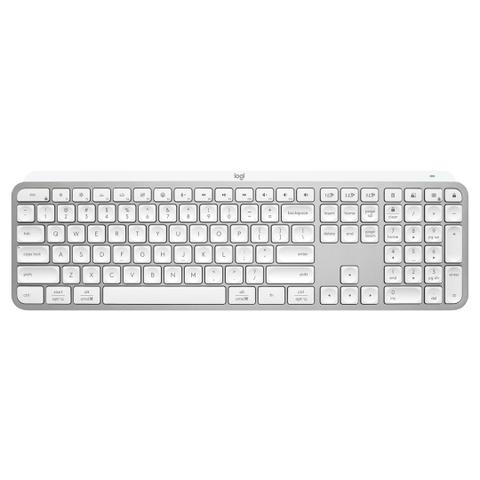

Logitech MX Keys S Bluetooth Keyboard Pale Gray
In stock at PC Case Gear
Price checked today
We may earn a commission if you buy; it doesn't change your price. Check the price at PC Case Gear before you buy. How we make money
Price history
Tracking since today
The price hasn't changed since we started tracking it. We'll show its history once it does.
About this product
- Brand
- Logitech
- Store
- PC Case Gear
- Category
- Electronics > Electronics Accessories > Computer Components > Input Devices > Keyboards
- SKU
- 920-011564
Specifications
- Colour
- Gray
Experience a new level of flow state with MX Keys S High-performance keyboard, engineered for comfortable, fast, fluid typing, with smart illumination, and programmable keys. Easy-Switch feature supporting up to 3 devices, USB-C charging, and is compatible with Windows, macOS, Linux, iOS and Android operating systems.
Features
Master Series MX Keys S Advanced Wireless Illuminated Keyboard
Master Your Flow
Meet MX Keys S and MX Keys Mini – Low-profile productivity keyboards with fingertip-shaped keys designed to improve typing speed and precision.
Experience a new level of flow state with MX Keys S and MX Keys Mini.
High-performance keyboards, engineered for comfortable, fast, fluid typing, with smart illumination, and programmable keys.
Choose between the full-size MX Keys S that features an integrated numpad or the space-saving minimalist MX Keys Mini.
- Rechargeable Li-Po (1500 mAh) battery
- Full charge lasts up to 10 days with predefined settings or up to 5 months with backlighting off
- Connect via Bluetooth low energy technology or the Logi Bolt USB Receiver (The keyboard is not compatible with other Logitech USB receivers)
- Easy-switch keys to connect up to three devices and switch between them at the push of a button
- Hand proximity sensors that turn the backlighting on
- Ambient light sensors that adjust backlighting brightness
- USB-C rechargeable. Full charge lasts 10 days – or 5 months with backlighting off (Battery life may vary based on user and computing conditions.)
- On/Off power switch
- Caps Lock and Battery indicator lights
- Compatible with Logitech Flow enabled mouse
- 10 meters wireless range (Wireless range may vary depending on operating environment and computer setup)

Fast Fluid Precise Typing
Turn your thoughts into reality faster and stay in the flow with the efficiency, stability, and precision of MX Keys S and MX Keys Mini.
Type with more precision and speed with spherically-dished keys that match the shape of your fingertips, minimizing the chances of a mistype, while increased key stability reduces noise. The rounded edges provide satisfying feedback — no matter where you strike the key.

Introducing Emoji, Dictation, and Mic Mute / Unmute Keys
Smarter Fn Keys (Requires Logi Options+ app, available for Windows and macOS) now give you the power to send emojis, mute and unmute your mic, and activate talk to text.
Tap Mic Mute / Unmute to mute and unmute your mic for flawless video calls
The Emoji key opens up your emoji window for a perfectly timed reaction 🥰 🤣 or 🔥

More Comfort. Deeper Focus
When you’re in the flow state, the last thing you need is discomfort getting between you and the work.
MX Keys S and MX Keys Mini are crafted with a low-profile design and an optimum keyboard angle that encourages better wrist posture and reduces strain on the joints.
The minimalist form factor of MX Keys Mini aligns your shoulders and allows you to place your mouse closer to your keyboard for less hand reaching – for better posture and improved ergonomics.

Smart Illumination Made Smarter
Day or night, MX Keys S and MX Keys Mini are here for you whenever inspiration sparks.
For those burning the midnight oil, the keyboard includes proximity sensors that magically light up the keys the moment your hand's approach. The backlit keys automatically adjust to suit changing lighting conditions and fade when you leave the desk — saving power for those moments of inspiration. With Logi Options (Requires Logi Options+ app, available for Windows and macOS), you now have more flexibility on MX KEYS S with adjusting backlighting duration and brightness.
Do More with Logi Options+
Logi Options+ allows you to customize the entire F-row to any function you need.
Easily switch the F-row priority between regular F-key functions, special functions like Smart Actions, or personal app-specific customizations (Requires Logi Options+ app, available for Windows and macOS.).
Default
- Brightness Up / Brightness Down
- Backlighting Up / Backlighting Down
- Dictation
- Emoji Menu
- Mute / Unmute Mic
- Media Controls
- Volume Controls
- Easy Switch (1-3)
- Calculator
- Screen Snip
Photoshop
- Copy
- Paste
- Zoom In / Zoom Out
Video Editing
- Copy
- Paste
- Zoom In / Zoom Out
Browser
- New Browser Tab
- Close Browser Tab
Video Calls
- Mute / Unmute Mic
- Media Controls
- Volume Controls
Word & Powerpoint
- Dictation
- Next / Previous
Excel
- Dictation
- Next / Previous
Automate Repetitive Tasks with Smart Actions
The world can’t wait for your ideas, so Logitech have made sure you won’t waste any time unleashing them.
Smart Actions on the Logi Options+ App gives you the power to skip repetitive actions by automating multiple tasks with a single keystroke so you can streamline your workflow (Requires Logi Options+ app, available for Windows and macOS). It’s like macros with a little magic. Logitech have even included ready-made customizable Smart Actions that automate common tasks so you do even less. You’re welcome.

Multi-Device, Multi OS
MX Keys S and MX Keys Mini are compatible with all major operating systems right out of the box and the dual key layout has been optimized for both Mac and Windows® users– works with Windows, macOS, Linux® (Device basic functions will be supported without software for other systems than Windows and macOS), ChromeOS™ (Device basic functions will be supported without software for other systems than Windows and macOS), iPadOS (Device basic functions will be supported without software for other systems than Windows and macOS), iOS (Device basic functions will be supported without software for other systems than Windows and macOS), and Android™ (Device basic functions will be supported without software for other systems than Windows and macOS) operating systems..
Easily pair MX Keys S