

Brand:mbeat
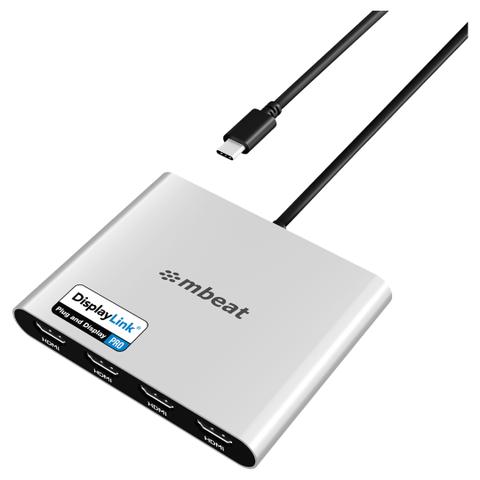
mbeat USB-C Quad 4K HDMI DisplayLink Adapter with PD Pass-through
Best price PC Case Gear In stock

PC Case Gear's price unchanged since 8 Nov
Unchanged since we started tracking
Cheapest of 5 stores
Compare all

We may earn a commission at no cost to you. How it works
Price history
Tracking since 8 Nov · 10 days
The price hasn't changed since we started tracking it. We'll show its history once it does.
Available at 5 stores
Stores may pay us a commission when you buy; it doesn't affect the order or your price. Learn more


About this product
- Brand
- mbeat
- Category
- Electronics > Electronics Accessories > Adapters > Audio & Video Cable Adapters & Couplers
The mbeat USB-C Quad 4K HDMI DisplayLink Adapter (MB-DLA-CQ4H) is an incredibly powerful, compact connectivity hub allowing users to expand any compatible laptop into an elite four screen setup. With intensive digital workflow in mind, it leverages advanced DisplayLink PRO technology to bypass standard native hardware limitations, enabling stable, software-driven extended desktop output across Windows, macOS, ChromeOS, and Android platforms. This proves exceptionally valuable for Apple Silicon Macbooks (M1, M2, and M3 series), effortlessly circumventing their single external display restriction to unlock true quad monitor capabilities, perfect for professional trading, live dashboard monitoring, data analysis, and advanced content creation. By providing four HDMI 2.0 ports, it maintains perfectly stabilised 4K visual output on each screen running at a smooth 60Hz refresh rate, delivering expansive screen real estate for parallel application use. To ensure uninterrupted performance during these high-demand tasks, the adapter features an integrated USB-C Power Delivery 3.0 pass-through port capable of supplying up to 90W of continuous charging directly to your host device, drastically reducing desk clutter and eliminating the need for extra bulky chargers. After a straightforward, one-time DisplayLink driver installation, users can quickly customise their screens and deploy consistent plug-and-display functionality in cross-platform environments, establishing a highly durable foundation for uncompromised workstation productivity.
Features

USB-C Quad 4K HDMI DisplayLink® Adaptor with PD Pass-Through
The mbeat USB-C Quad 4K HDMI DisplayLink® Adaptor with PD Pass-Through enables true quad 4K extended displays from a single USB-C connection, removing native display limitations across Windows, macOS, ChromeOS, and Android devices. Powered by DisplayLink® technology, it delivers stable multi-monitor performance, up to four 4K@60Hz HDMI outputs, and up to 90W USB-C PD pass-through charging. Compact yet powerful, it transforms laptops or desktops into a four-screen workstation built for data analysis, content creation, professional trading, and intensive multitasking.
- Universal USB-C Quad 4K/60Hz HDMI adaptor for extended multi-display setups.
- Compatible with Windows, macOS, ChromeOS, and Android devices.
- Powered by DisplayLink® technology for smooth, reliable quad-monitor output.
- Supports Mac M1, M2, and M3 for true four-screen extended desktops.
- USB-C PD pass-through charging up to 90W for continuous laptop use.
Universal OS Compatibility
Designed for cross-platform environments, the adaptor supports Windows, macOS, ChromeOS, and Android. With a one-time DisplayLink® driver installation, users can deploy consistent quad-display setups across shared workspaces, mixed-device offices, and legacy systems lacking native multi-display support.

Powered by DisplayLink® Technology
Standard USB-C DP-Alt Mode connections are constrained by hardware bandwidth and often limited to mirroring or one external display. DisplayLink® technology overcomes these constraints by enabling reliable, software-driven quad extended desktops, ensuring stable performance and productivity across a wide range of devices.

Ultra HD Quad 4K@60Hz HDMI Output
Drive four external HDMI monitors at up to 4K resolution and 60Hz refresh rate for a true extended desktop experience. Expanded screen real estate supports complex workflows such as live dashboard monitoring, video editing, graphic design, financial analysis, and parallel application use, allowing faster more efficient work.

Mac M1/M2/M3 Quad Extended Display Support
Apple Silicon Macs are natively limited in external display output. This adaptor removes that restriction, enabling quad extended monitors from a single USB-C connection. The result is a desktop-class, four-screen workspace for advanced professional and creative workflows.

USB-C PD Pass-Through Charging Up to 90W
The integrated USB-C Power Delivery pass-through port provides up to 90W charging, allowing your laptop to remain powered while driving four 4K displays. This reduces cable clutter, removes the need for additional chargers, and supports uninterrupted performance during high-demand tasks.

Display Setup Guide
Configuring Dual Extend or Mirror Display.

Quick & Easy 3-Step Driver Setup
1. Download DisplayLink Manager
- Go to: synaptics.com/products/displaylink-graphics
- Official driver from Synaptics
2. Install for Your Device
- Choose Your OS and Complete Installation
- Works with Windows, macOS, ChromeOS & Android
3. Enable Permissions
- System Preferences → Privacy & Security
- Turn on Screen Recording for DisplayLink
- Required for Full Multi-Display Functionality