

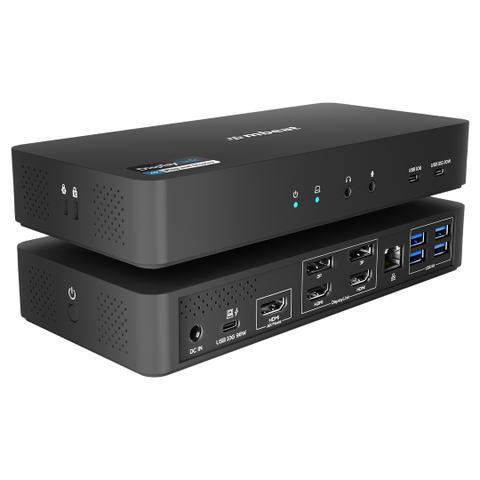

mbeat USB-C Triple 4K Display Docking Station
Buy at PC Case GearWe may earn a commission if you buy; it doesn't change your price. Check the price at PC Case Gear before you buy. How we make money
Price history
Tracking since 2 days ago
The price hasn't changed since we started tracking it. We'll show its history once it does.
Available at 2 stores
Stores may pay us a commission when you buy; it doesn't affect the order or your price. Learn more
- PLE $399 Cheapest In stock Checked yesterday Buy
- PC Case Gear This page $425 In stock Checked 2 days agoBuy

About this product
- Brand
- mbeat
- Store
- PC Case Gear
- Category
- Electronics > Electronics Accessories > Computer Accessories > Laptop Docking Stations
- SKU
- MB-DOCK-HDL18
The mbeat USB-C Triple 4K Display Docking Station expands compatible USB-C laptops with support for up to three 4K displays at 60Hz. Featuring up to 96W Power Delivery pass-through, dual 10Gbps USB-C ports, four USB-A ports, Gigabit Ethernet, audio connectivity, and a 135W power supply, the docking station delivers a complete desktop-class workstation allowing for enhanced multitasking, through a single connection.
Features

USB-C Triple 4K Display Docking Station
The mbeat USB-C Triple 4K Display Docking Station is built for professionals who demand more from their laptops. Combining one native USB-C DP-Alt HDMI output with two DisplayLink® DP/HDMI outputs, it enables triple 4K/60Hz external displays on macOS and Windows devices. Whether you're a video editor, financial analyst, coder, or multitasking power user, this dock transforms a laptop into a desktop-class workstation, expanding productivity and workflow efficiency across multiple screens.
- Unlock triple 4K/60Hz displays on Mac and Windows for a true desktop-class workstation.
- Enjoy extended desktop mode on M1/M2/M3 Macs with DisplayLink® technology.
- Connect and power devices with dual 10Gbps USB-C ports, four USB-A ports, and 20W fast charging.
- Keep your laptop running with up to 96W PD passthrough and an integrated 135W power supply.
- Built for professionals with Gigabit Ethernet, audio jack, K-Lock, and a sleek, durable design.

Triple 4K/60Hz External Displays
Expand your workspace across three 4K monitors at 60Hz. One HDMI port uses native DP-Alt, while the other two use DisplayLink® 4K technology, allowing seamless multitasking and a fully extended desktop environment.

DisplayLink® Extended Desktop
Overcome the Mac M1/M2/M3 mirroring limitation with DisplayLink. A one-time driver installation enables true extended desktops on both Mac and Windows, providing plug-and-play multi-monitor functionality for professional workflows.
High-Speed USB Expansion
Stay connected with 2 x USB-C 10Gbps ports (one with 20W PD charging) and 4 x USB-A 5Gbps ports, keeping external drives, accessories, and peripherals running at full speed while reducing desk clutter.

All-in-One Power Convenience
The 135W power supply powers the dock, delivers up to 96W PD passthrough to your laptop, and 20W charging to phones or tablets. One integrated adaptor powers all your devices, creating a clean, efficient workspace without additional chargers.

Professional Design & Real-World Benefits
Featuring a K-Lock slot, power button, Gigabit Ethernet, and audio jack, this dock is tailored for creatives and professionals. Ideal for multitasking, coding, editing, trading, and presentations, it delivers a stable, high-performance workstation in a single, compact solution.

Display Setup Guide
Configuring Triple vs. Dual Displays.

Quick & Easy 3-Step Driver Setup
1. Download DisplayLink Manager
- Go to: synaptics.com/products/displaylink-graphics
- Official driver from Synaptics
2. Install for Your Device
- Choose Your OS and Complete Installation
- Works with Windows, macOS, ChromeOS & Android
3. Enable Permissions
- System Preferences → Privacy & Security
- Turn on Screen Recording for DisplayLink
- Required for Full Multi-Display Functionality