

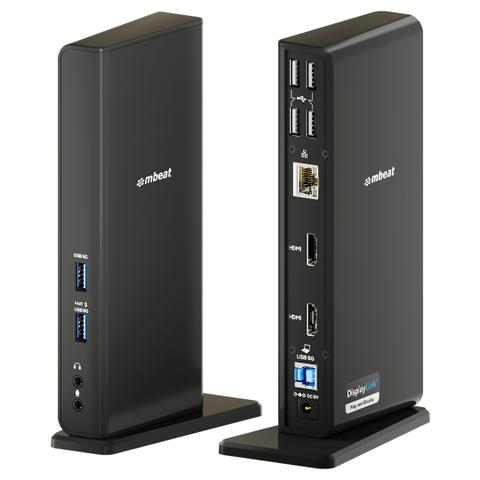

mbeat USB-C/A Dual HDMI DisplayLink Docking Station
Buy at PC Case GearWe may earn a commission if you buy; it doesn't change your price. Check the price at PC Case Gear before you buy. How we make money
Price history
Tracking since today
The price hasn't changed since we started tracking it. We'll show its history once it does.
Available at 2 stores
Stores may pay us a commission when you buy; it doesn't affect the order or your price. Learn more
- PC Case Gear This page $215 Cheapest Checked todayBuy
- PLE $219 Out of stock Checked yesterday Buy

About this product
- Brand
- mbeat
- Store
- PC Case Gear
- Category
- Electronics > Electronics Accessories > Computer Accessories > Laptop Docking Stations
- SKU
- MB-DOCK-DLD20
The mbeat USB-C/A Dual HDMI DisplayLink Docking Station expands compatible USB-C and USB-A laptops with dual Full HD HDMI displays, Gigabit Ethernet, audio connectivity, and six USB ports through a single connection. Powered by DisplayLink technology, the docking station supports extended desktop functionality on Windows, as well as Mac M1, M2 and M3 systems, providing a versatile workspace solution for productivity and multitasking.
Features

USB-C/A Dual HDMI DisplayLink® Docking Station
Unlock the full potential of your laptop with the mbeat Dual HDMI DisplayLink® Docking Station, designed for Mac M1/M2/M3, Windows laptops, and legacy USB-A PCs, all of which can enjoy true extended desktops. Featuring DisplayLink®, a leading display solution, this dock ensures seamless connectivity and productivity with dual 1080p full HD monitors. After a simple one-time DisplayLink® driver installation, your dock becomes plug and display, making setup effortless and reliable.
- Works with Mac M1/M2/M3, Windows, and legacy USB-A PCs via DisplayLink® technology.
- Supports dual monitors in extended mode for Mac and Windows devices.
- Connects two Full HD 1080p monitors at 60Hz for productivity.
- Works with legacy USB-A and modern USB-C laptops via the included cable.
- Consolidates USB devices, Gigabit Ethernet, and audio through one dock.
Universal Compatibility with DisplayLink®
Works seamlessly across Mac (including M1/M2/M3), Windows laptops, and older USB-A laptops/PCs. DisplayLink® , a leading display solution, requires a one-time driver installation, after which the dock becomes plug and display. This enables extended desktops, multiple monitors, and smooth connectivity for virtually any device, making it ideal for users with mixed environments or legacy hardware.

Extended Desktop for Mac M1/M2/M3
Unlike standard USB-C DP-Alt, DisplayLink® technology allows Mac M1/M2/M3 laptops to use dual monitors in extended view, not just mirrored screens. This unlocks your workflow for coding, graphic design, content creation, or multitasking, transforming a single-screen Mac setup into a professional multi-display workstation.

Dual HDMI 1080p Connection
Connect two monitors at 1080p@60Hz for expanded workspace efficiency. Full HD remains the standard in offices, classrooms, and homes, offering high-quality dual-screen productivity at a budget-friendly price. Perfect for users who want dual monitors without investing in expensive 4K setups.

Supports USB-A & USB-C Laptops
The included 1m USB B-to-C/A cable ensures compatibility with older USB-A laptops/PCs as well as modern USB-C devices. Legacy laptops can now support dual displays and modern peripherals, extending the usability of older hardware while providing a flexible, future-proof workspace solution.
All-in-One Productivity & Connectivity
Consolidate USB peripherals, Gigabit Ethernet, audio input/output, and more through a single cable. Ideal for Mac users, remote workers, students, content creators, and IT enthusiasts, this dock reduces desk clutter, simplifies your setup, and boosts overall productivity, making it a versatile hub for nearly any workspace.

DC Power for Dock & Devices
Charges Dock & Phone | Laptop Requires Own Charger.
*DC powers dock & phones only; laptop needs separate charger.

Display Setup Guide
Configuring Dual Extend or Mirror Display.

Quick & Easy 3-Step Driver Setup
1. Download DisplayLink Manager
- Go to: synaptics.com/products/displaylink-graphics
- Official driver from Synaptics
2. Install for Your Device
- Choose Your OS and Complete Installation
- Works with Windows, macOS, ChromeOS & Android
3. Enable Permissions
- System Preferences → Privacy & Security
- Turn on Screen Recording for DisplayLink
- Required for Full Multi-Display Functionality