

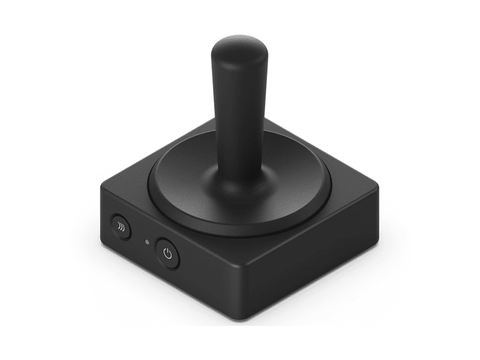

Microsoft Surface Adaptive Joystick Button
Out of stock at PC LAN
Price checked today
We may earn a commission if you buy; it doesn't change your price. Check the price at PC LAN before you buy. How we make money
Price history
Tracking since today
The price hasn't changed since we started tracking it. We'll show its history once it does.
About this product
Create custom inputs without a keyboard
Replace or augment traditional keyboards with the adaptable wireless buttons and wired switches that put you in control, allowing you to easily create your own custom inputs. Composed of a central adaptive hub that can pair with up to four wireless buttons and standard wired connections to let you design the setup that works best for you.
Slide 1 of 4. Augment traditional keyboards
Skip Features of Microsoft Adaptive Hub and Buttons
Augment traditional keyboards
Increase your productivity through a hub and wireless buttons that let you create custom inputs to simplify complex tasks on a PC or phone.
End of Features of Microsoft Adaptive Hub and Buttons section
Accessible by design
A fully customizable experience, Microsoft adaptive accessories empower you to fit your needs. Unlock your potential, remove barriers, and increase productivity with the easy-to-use system that adapts and grows with you.
Plug and play and go
The slim, lightweight design is easy to mount and use anywhere. Connect wirelessly to Microsoft Adaptive Hub along with up to three other Microsoft Adaptive Buttons.
3D printing that works for you
Choose from 3D-printable designs from Microsoft that fit your needs.Footnote*
Easy to set up and learn
Microsoft adaptive accessories are designed for easy assembly and simple attachment of your 3D-printed components. Plus, an in-box QR code links to content on how to use the accessories.
Empowering people with limited mobility
Create inputs that work for you. Use and navigate your apps your way and get it done. Activate a sequence macro, such as select>copy>paste, with the push of a single button.
Tech Specs
Dimensions
Length: 2.2 inch (55 mm)
Width: 2.2 inch (55 mm)
Height: 2.6 inch (65 mm)
Weight
0.12 pounds (0.053 kg)
Colors
Black
Connections
Bluetooth® 5.1
USB 2.0 full speed (USB-C® receptacle)
Bluetooth® features
Pairing over USB or Sync button
LED indicators
1 white/amber dual-color LED indicator for power status and pairing.
Certification
Bluetooth® 5.1
Port
USB-C® receptacle (USB 2.0 full speed)
Required
Microsoft Adaptive HubFootnote2
Accessibility
Disability Answer Desk Support | Microsoft Accessibility
Compatibility
Operating system:
Requires: Windows 10/11.
To use with companion devices running MacOS, iOS, Chrome, and Android, configure using the Microsoft Accessory Center on your Windows PC.
Requires: Microsoft Adaptive Button requires Microsoft Adaptive Hub.
Rechargeable battery
Rechargeable Li-polymer battery
Capacity: 579mAh
Battery life indicator
Amber LED to show low battery mode and charge mode.
White LED to show battery is 100% charged.
Buttons/controls
Power button
Sync button
8 configurable buttons
Microsoft Accessory Center
Customize your control settings and assign the programmable button (available only on Windows)
What’s in the box
QR code, USB-C® charging cable, safety and warranty documents
Warranty
1-year limited warrantyFootnote1
Other Adaptive Accessories
Microsoft Adaptive D-pad Button
Microsoft Adaptive Dual Button
Microsoft Adaptive Mouse
Microsoft Adaptive Mouse Tail and Thumb Support
- [1] Microsoft’s Limited Warranty is in addition to your consumer law rights.
- [2] Microsoft Adaptive Joystick Button requires Microsoft Adaptive Hub. Each component of Microsoft Adaptive Accessories sold separately.