

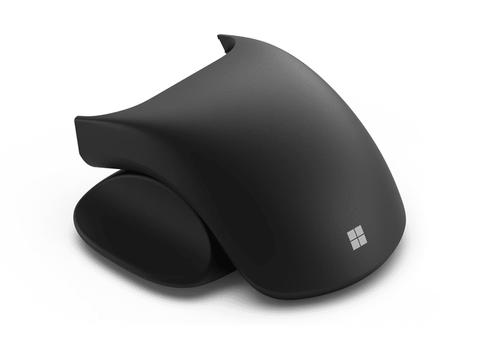

Microsoft Surface Adaptive Mouse Tail & Thumb Support
In stock at PC LAN
Price checked today
We may earn a commission if you buy; it doesn't change your price. Check the price at PC LAN before you buy. How we make money
Price history
Tracking since today
The price hasn't changed since we started tracking it. We'll show its history once it does.
About this product
Microsoft Adaptive Mouse Tail and Thumb Support
Attach this mouse tail and thumb support to Microsoft Adaptive Mouse (sold separately) to make a mouse that truly works for you.¹ Together, these three components create a solution that’s incredibly light and portable. The thumb support accessory goes where you want it to, switching sides for left or right handedness.
Find accessibility resources, contact us via text-based chat, phone, or videophone, or get help in American Sign Language.
Further customize your Microsoft Adaptive Accessories. Mouse tails and button toppers can be replaced with your choice of 3D-printable designs from Microsoft.
Create a mouse unique to you
Explore the adaptable mouse you can personalize with a Microsoft Adaptive Mouse Tail and Thumb Support, or download 3D-printable designs from Microsoft,¹ ² ³ to make a mouse that truly works for you. This versatile mouse was created for people who have difficulty using a traditional mouse, and anyone who wants to increase their PC productivity.
Slide 3 of 3. Attach, detach, or switch sides
Skip Features of Microsoft Adaptive Mouse, Mouse Tail, and Thumb Support
Attach, detach, or switch sides
The thumb support accessory goes where you want it to, easily switching sides for left or right handedness.
End of Features of Microsoft Adaptive Mouse, Mouse Tail, and Thumb Support section
Accessible by design
A fully customizable experience, Microsoft adaptive accessories empower you to fit your needs. Unlock your potential, remove barriers, and increase productivity with the easy-to-use system that adapts and grows with you.
Plug and play and go
Microsoft Adaptive Mouse is light and portable for smooth navigation. Attach and detach mouse tails with the click of a button. Connect wirelessly via Bluetooth to up to three devices, or via USB-C®.
3D printing that works for you
Choose from 3D-printable designs from Microsoft that fit your needs. ² ³
Easy to set up and learn
Microsoft adaptive accessories are designed for easy assembly and simple attachment of your 3D printed components. Plus, an in-box QR code links to content on how to use the accessories.
Empowering people with limited mobility
Microsoft Adaptive Mouse empowers you to navigate more confidently and works wherever a mouse works. Compatible with Windows 10/11, MacOS, iOS, Chrome, and Android. Configure using the Microsoft Accessory Center on your Windows PC.⁴
Specifications
Dimensions
Length: 80.8 mm (3.2 inch)
Width: 70.5 mm (2.8 inch)
Height: 39.1 mm (1.5 inch)
Weight
0.0437 kg (0.10 pounds)
Required
Microsoft Adaptive MouseFootnote1
Other Adaptive Accessories
Microsoft Adaptive Hub
Microsoft Adaptive D-pad Button
Microsoft Adaptive Dual Button
Microsoft Adaptive Joystick Button
Accessibility
Disability Answer Desk Support | Microsoft Accessibility
What’s in the box
QR code, safety and warranty documents