

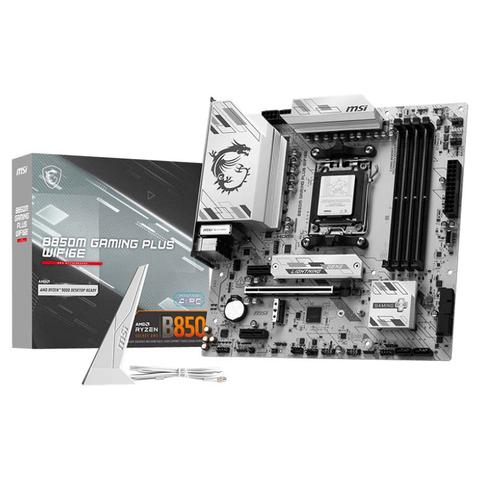

MSI B850M Gaming Plus WIFI6E mATX Motherboard
In stock at PC Case Gear
Price checked today
We may earn a commission if you buy; it doesn't change your price. Check the price at PC Case Gear before you buy. How we make money
Price history
Tracking since today
The price hasn't changed since we started tracking it. We'll show its history once it does.
About this product
- Brand
- MSI
- Store
- PC Case Gear
- Category
- Electronics > Circuit Boards & Components > Printed Circuit Boards > Computer Circuit Boards > Motherboards
- SKU
- B850M-GAMING-PLUS-WIFI6E
The MSI B850M Gaming Plus WIFI6E Motherboard features the AMD B850 chipset with AM5 socket supporting Ryzen 7000, 8000, and 9000 series processors. It includes four DDR5 DIMM slots with AMD EXPO overclocking profiles, two M.2 slots including PCIe 5.0, 2.5 Gb Ethernet, onboard WiFi 6E, and Bluetooth 5.3. Additional features include HDMI and DisplayPort outputs, USB-C and USB-A ports, RGB headers, EZ DIY features such as EZ M.2 clip II, and a compact micro-ATX form factor for gaming or productivity builds.
Warning: This product contains a button battery
If swallowed, a lithium battery can cause severe or fatal injuries with 2 hours.
Keep batteries out of reach of children.
If you think batteries may have been swallowed or placed inside any of the body, seek immediate medical attention.
Features
B850M GAMING PLUS WIFI6E
The B850M GAMING PLUS WIFI6E is crafted to offer extensive connectivity, versatile tools, and a premium Wi-Fi solution for gamers seeking a comprehensive experience. Featuring the advanced Wi-Fi 6E, 2.5G LAN, PCIe 5.0 M.2 solution, and exclusive EZ DIY features, it is ready for 24/7 non-stop gaming optimised for AMD Ryzen™ 9000 series processors.
- Supports AMD Ryzen™ 9000 / 8000 / 7000 Series Desktop Processors
- Supports DDR5 Memory, Dual Channel DDR5 8200+ MT/s (OC)
- Ultra Performance: 10+2+1 Duet Rail Power System with P-PAK, dual 8-pin CPU power connectors, Core Boost, Memory Boost, 6-layer PCB made by 2oz thickened copper PCB
- Frozr Guard: Extended Heatsink, MOSFET thermal pads rated for 7W/mK, additional choke thermal pads and M.2 Shield Frozr are built for high performance system and non-stop experience
- High-speed Connectivity: 2.5G LAN with Wi-Fi 6E Solution - The premium solution for professional and multimedia use, delivering secure, stable, and high-speed networking and data transmission
- Lightning Fast Game experience: PCIe 4.0 slot, Lightning Gen 5 x4 M.2, Front USB Type-C
- EZ DIY: EZ M.2 Clip II, EZ-Conn Design and EZ Antenna
- Audio Boost: Reward your ears with studio grade sound quality for the most immersive gaming experience
Ready for AI PC
MSI motherboards are designed with advanced hardware and technology, well-supporting the demanding computing usage of gaming and AI. Moreover, MSI also introduce AI to MSI Center and BIOS, making everything more effortless than before.
AI Engine
Provides several categories for you to sync the applications you want to perform and automatically optimising them to create a comfortable environment.
AI LAN Manager
Optimises networking performance and minimises latency, providing a seamless online experience.
Frozr AI Cooling
Automatically adjusts fan duty to make sure the system stays in cool, stable and high performance.
AI Boost
AI Boost is an MSI exclusive feature. It overclocks NPU to improve higher AI performance.
Performance & Thermal
Optimal Efficiency
- Extended Heatsink
- M.2 Shield Frozr
- Pump Fan Support
- Core Boost
- Heatsink with 7W/mK Thermal Pad
- 6-Layer PCB with 2oz
Connectivity
High-Speed Transmission
- 2.5G LAN
- Wi-Fi 6E Solution
- Dual M.2 Connectors
- Latest DDR5 Memory
- Front USB Type-C
- Lightning Gen 5 M.2 Slots
EZ DIY
Effortless Assembly
- Clear CMOS & Flash BIOS Button
- Pre-installed I/O Shield
- EZ Antenna
- EZ Conn Design
- EZ Debug LED
- Steel Armour
- EZ M.2 Clip II
One Finger
EZ M.2 Installation
EZ M.2 CLIP II
MSI's exclusive EZ M.2 CLIP II makes M.2 installation seamless. Insert the SSD card into the slot and press it down to lock it in place with the clip. As fasten the SSD, flick the clip outwards and then the SSD is removed. The process is smooth, and you don't need to use your tools like before. One finger can give you perfect DIY experience.
EZ M.2 CLIP II Remover
Introducing MSI's EZ M.2 CLIP II Remover, a handy tool designed to simply switching or repositioning the EZ M.2 CLIP II on your motherboard. This tool allows users to effortlessly detach the EZ M.2 CLIP II from the motherboard and reattach it to any desired M.2 slot. It is included in the accessory kit that comes with MSI motherboards.
EZ Button
Flash BIOS Button
Flash the BIOS with only a connected power supply by following a few steps. CPU and memory not required.
Clear CMOS Button
Restore the BIOS to the default settings - helpful in 99% of the cases to successfully boot again.
One Hand

Pre-Installed I/O Shield
The Pre-Installed I/O Shield offers a streamlined and hassle-free installation experience by eliminating the need to manually fit the I/O shield during motherboard setup. With its built-in design, it ensures proper alignment and a secure fit, providing both protection and convenience while enhancing the overall durability of your build.
EZ Mounting
MSI motherboards circuitry ensure the case standoff keep out zones are pure and clean. Moreover, the protective paint is printed around each screw hole to prevent parts from being scratched or damaged to the motherboard.
- Avoid Collision Notification
- Keep Out Zone
- Double ESD Protection
One Step
EZ Antenna
MSI EZ Antenna makes the process effortless by simply attaching fasteners to the motherboard without rotation.
EZ Conn-Design
The MSI exclusive JAF_1 header allows MPG EZ120 ARGB fan to operate with a single cable. Alternatively, the JAF_1 header can be converted into additional ARGB Gen 1 and fan headers by using a dedicated 1-to-2 EZ Conn-cable, streamlining and optimising the entire building process.
- Additional ARGB header
- Additional FAN header
Driver Utility Installer
Once connected to the internet, MSI Driver Utility Installer will detect and present suitable drivers and utilities automatically, you can download and install with just a few clicks.
*Please ensure to connect the internet, or the Driver Utility Installer won't launch automatically.
*MSI Driver Utility Installer will be ready in Windows 11 build 22H2.
One Glance
EZ Debug
EZ Debug LED
Onboard LEDs will indicate the source of the problem so you know exactly where to look to get up and running again.
EZ Memory Detection LED
This LED lights up when it detects faulty memory in slots, eliminating guesswork from troubleshooting.
EZ Identify
Header with Different Colour
To better differentiate between pin headers for