

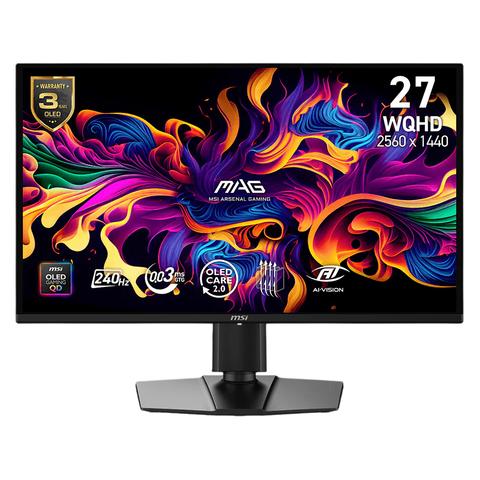

MSI MAG 274QP QD-OLED X24 WQHD 240Hz G-Sync HDR 26.5in Monitor
In stock at PC Case Gear
Price checked today
We may earn a commission if you buy; it doesn't change your price. Check the price at PC Case Gear before you buy. How we make money
Price history
Tracking since today
The price hasn't changed since we started tracking it. We'll show its history once it does.
About this product
- Brand
- MSI
- Store
- PC Case Gear
- Category
- Electronics > Video > Computer Monitors
- SKU
- MAG-274QP-QD-OLED-X24
Specifications
- Screen size
- 26.5"
- Resolution
- QHD (1440p)
- Refresh rate
- 240Hz
- Panel type
- OLED
The MSI MAG 274QP QD-OLED X24 monitor features a 26.5inch QD-OLED panel with 2560x1440 resolution, a 240Hz refresh rate and a 0.03ms response time for outstanding speed and contrast. The monitor combines OLED level black depth with quantum dot colour performance, making it a strong choice for fast gaming and high impact visual quality. The adjustable stand and modern connectivity also make the display easy to integrate into premium gaming setups.
Features
MAG 274QP QD-OLED X24
Visualise your victory with the MAG 274QP QD-OLED X24 gaming monitor. Equipped with the latest 3rd-gen QD-OLED panel and features a blazing-fast 240Hz refresh rate, it delivers an elevated gaming experience like never before. The 26.5-inch high-performance display offers a lightning-fast 0.03ms (GtG) response time, ensuring ultra-smooth, crystal-clear visuals. Certified by VESA for ClearMR 13000, it guarantees stunning image quality and reduced motion blur. OLED Care 2.0 technology helps prevent burn-in, extending the panel’s lifespan.
MSI's mainstream MAG series epitomises stability and durability and is built to withstand the most intense gaming sessions. The entire lineup features robust construction with metallic-like hardness and excellent heat dissipation, ensuring stability for all critical gaming components.
- MSI QD-OLED Panel – With stunning image quality and fast response time.
- Fastest 0.03ms GtG response time and 240Hz refresh rate.
- QD Premium Colour – Ensures the colour meets the market standard – Delta E≤2.
- Crystal-Clear Motion – VESA ClearMR 13000 certified.
- MSI OLED Care 2.0 – Reduced the risk of OLED image sticking / burn-in.
- Console Mode – Optimised for seamless compatibility with gaming consoles like PS5 and Xbox Series X|S.
- 3-Year Burn-In Warranty – Including coverage for OLED burn-in.
Smarter 24-Hour OLED Refresh
Protection without Disruption
The panel refresh cycle has been extended from 16 to 24 hours, reducing interruptions during gameplay or work. Users will only see a reminder 30 minutes before the refresh, ensuring minimal disruption. The refresh still activates automatically when the monitor enters standby or powers off, maintaining full OLED protection without compromising your experience.
AI Navigator

AI Crosshair
The aim dot automatically changes colour, making it visible at any time. If the colour of the aim dot overlaps with the background colour, it will be problematic for aiming.

AI Vision
The new Al Vision technology can not only reveal details in dark areas but also enhance overall brightness and saturate colours, bringing brightness to your day.
MSI QD-OLED
Advantage
This MSI monitor is VESA ClearMR 13000 certified, offering 99% DCI-P3 colour coverage, ΔE <= 2 colour accuracy, and exceptional motion clarity-for vibrant, true-to-life visuals and ultra-smooth gameplay.
- 0.03ms GtG Response Time
- 1500000:1 Contrast Ratio
- DCI-P3 99%
- ΔΕ≤2
- VESA CERTIFIED ClearMR 13000
Panel

Eye Care - See Clearly, See Comfortably
Anti-Flicker and Less Blue Light technologies provide a very comfortable viewing experience by reducing the amount of flicker and displaying lower levels of blue light. You can game for longer periods without experiencing eye fatigue.

G-SYNC Compatible
G-SYNC Compatible support ensures smoother, tear-free gaming by syncing the monitor's refresh rate with the GPU. It reduces screen tearing, stuttering, and input lag for a more fluid experience, especially in fast-paced games. Additionally, it fully supports future hardware, allowing gamers to maximise the performance of cutting-edge GPUs. This ensures seamless compatibility and optimal visual quality, letting users take full advantage of new features like ray tracing and variable refresh rates.

AMD FreeSync Premium - Tear Free, Stutter Free Fluid Gaming
Gaming shouldn’t be a choice between choppy gameplay and broken frames. With the MSI gaming monitor, you’ll experience fluid, artefact-free performance. Enjoy tear-free and stutter-free gameplay with added support for HDR.
*Note: FreeSync technology requires both a monitor and an AMD Radeon™ graphics card with FreeSync support. Visit https://www.amd.com/freesync for complete details. Confirm compatibility with your system manufacturer before purchase.
Gaming Assistance
Aspect Ratio Options
Supports a variety of aspect ratios, allowing for selection between 24.5" imagery. Choose the size you want at your leisure, and elevate your gaming experience to the utmost.
*The 24.5" aspect ratio function supports WQHD resolution at up to 240Hz.

Firmware Update
MAG 274QP QD-OLED X24 can update the firmware, which is simple and easy to use. This allows users to update the firmware on their own at any time when the latest version is released by MSI. This ensures that the screen is always in the best-optimised state.
Optix Scope
The built-in aim magnifier provides multi-stage zooming with shortcut keys to quickly switch the magnification. The screen can maintain the magnification regardless of the weapon used.
Confidence Guaranteed
MSI OLED monitors are designed for long-lasting, breathtaking visuals. The custom heatsink design and advanced graphene film improve heat dissipation, while dedicated software to reduce the chances of burn-in over time.
OLED Care 2.0
MSI OLED Care 2.0 includes several functions designed to prevent static images or elements from remaining on the screen and to adjust peak brightness levels when not necessary.
Pixel Shift
Pixel Shift moves the screen's pixels at regular intervals, ensuring that images are not displayed in the same position, thereby preventing static image retention.
Panel Protect
By doing Pixel Refresh, which is automatically activated if the screen is active for more than 4 hours.
Static Screen Detection
When the system detects that there are static images on the screen for a set period, it will automatically reduce brightness.
Boundary Detection
After a certain number of seconds, the boundary protection adjusts the luminance of the boundary between two images or image and background.
Taskbar Detection
When the system detects the TaskBar displayed on the desktop, it auto