

Brand:MSI
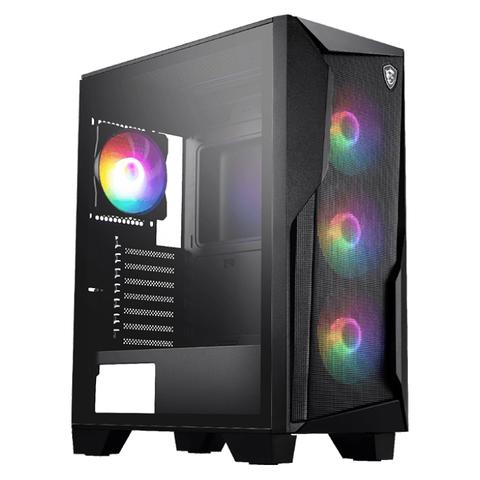
MSI MAG Forge 130A Airflow Mid Tower Case
At PC Case Gear In stock

Same price since 8 Nov
Unchanged since we started tracking
We may earn a commission at no cost to you. How it works
Price history
Tracking since 8 Nov · 10 days
The price hasn't changed since we started tracking it. We'll show its history once it does.
About this product
- Brand
- MSI
- Category
- Electronics > Electronics Accessories > Computer Components > Desktop Computer & Server Cases
The MSI MAG Forge 130A Airflow Mid Tower Case features a mesh front panel and tempered glass side panel with four pre-installed 120mm Auto-RGB fans (3x front and 1x rear) delivering optimal cooling performance and vibrant lighting. Including support for graphics cards up to 330mm in length, CPU coolers up to 160mm in height, and compatibility with ATX, Micro-ATX and Mini-ITX motherboards. This mid-tower case provides exceptional airflow with dual magnetic dust filters for easy maintenance and component protection from dust build up.
Features
MAG Forge 130A Airflow
Create Your Own Lighting Battle Station with the MAG Forge 130A Airflow
MSI's mainstream MAG series epitomises stability and durability and is built to withstand the most intense gaming sessions. The entire lineup features robust construction with metallic-like hardness and excellent heat dissipation, ensuring stability for all critical gaming components.
- Auto RGB Fan: The radiator fan features a vibrant default Rainbow RGB effect for a dynamic and colourful display.
- Pre-Installed Fan Included: Includes pre-installed fans for optimal cooling and performance.
- Magnetic Filter: The magnetic dust filter ensures improved airflow and protects internal components from dust accumulation.
- Optimised Air Flow: This case supports up to 8 system fans installation and provides the whole system with ventilation for better stability.
- Tempered Glass: Premium-grade 3 mm thick tempered glass guarantees window durability and viewing capability.
Auto RGB Showroom
The On/Off button on the front panel allows you to quickly turn on or off the pre-installed auto-RGB fans connected to the control board.
Heat Dissipation

Optimised Airflow
The MAG FORGE 130A AIRFLOW is equipped with a mesh on its front panel to provide optimal airflow for system cooling.
DIY Friendly

Tempered Glass Window
The MAG FORGE 130A AIRFLOW reveals your gaming components with a 4 mm tempered glass window that is durable and provides an excellent view of your system.
Dust Filter

Dust Protection
The case has 2 dust filters on top and bottom sides, protecting internal components from dust accumulation.
1. Top | Magnetic Filter
2. Bottom | Removable Filter

1-6 Fan Control Board
The fan control board supports up to six 12V Auto-RGB fans, controlled via an LED On/Off button. It provides stable power through a SATA connection and allows for easy cable management.
EZ to Install

The uni-front-panel cable is easy for users to connect to MSI motherboards.

The tool-free EZ release panel on the side makes the PC building process quick and hassle-free.
Hardware Compatibility
Hardware Support
Components Compatibility
- Motherboard Support: Regular: ATX / Micro-ATX/Mini-ITX
- CPU Cooler Max. Height: < 160 mm
- GPU maximum length: < 330 mm
- Power Supply Max. Length: ≤ 160 mm or ≤200 mm (without 3.5" HDD tray)
Storage You Need
Configure your own storage layout and install up to 5 x 2.5" or 3 x 2.5" + 2 x 3.5" storages.

Connectable Front I/O
1. LED On/Off Button
2. 2 x USB 5Gbps (Type-A)
3. Mic In
4. Audio Out
5. Reset Button
6. Power Button