

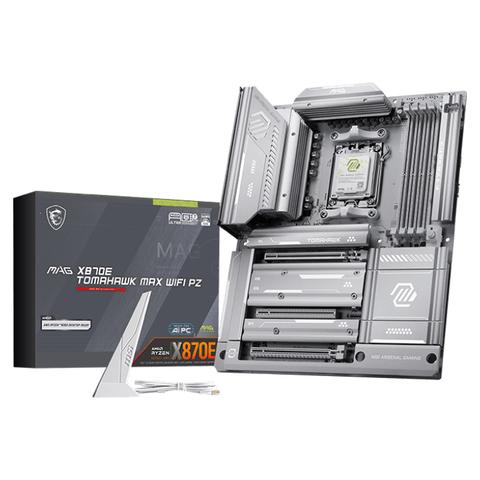

MSI MAG X870E Tomahawk MAX WiFi PZ Motherboard
Buy at PC Case GearWe may earn a commission if you buy; it doesn't change your price. Check the price at PC Case Gear before you buy. How we make money
Price history
Tracking since today
The price hasn't changed since we started tracking it. We'll show its history once it does.
Available at 3 stores
Stores may pay us a commission when you buy; it doesn't affect the order or your price. Learn more
- Mwave $649 Cheapest Out of stock Checked 3 days ago Buy
- PC Case Gear This page $649 Checked todayBuy
- PLE $699 Out of stock Checked yesterday Buy


About this product
- Brand
- MSI
- Store
- PC Case Gear
- Category
- Electronics > Circuit Boards & Components > Printed Circuit Boards > Computer Circuit Boards > Motherboards
- SKU
- MAG-X870E-TOMAHAWK-MAX-WIFI-PZ
The MSI MAG X870E Tomahawk MAX Wifi PZ Motherboard supports AMD Ryzen 9000, 8000 and 7000 series desktop processors on the AM5 CPU sockets, and features up to 4 x DDR5 memory slots. Including PCIe 4.0 and 5.0 compatible expansion slots, 4 x M.2 slots, 4 x SATA (6Gb/s) ports, offers extensive connectivity options with a USB 40Gbps Type-C port, USB 20Gbps Type-C port, multiple USB 10Gbps Type-A ports, USB 5Gbps Type-A ports and USB 2.0 ports, Realtek ALC4080 7.1 channel USB HD audio codec, Realtek 5G LAN, WiFi 7, Bluetooth 5.4 in an ATX motherboard form factor.
Warning: This product contains a button battery
- If swallowed, a lithium battery can cause severe or fatal injuries with 2 hours.
- Keep batteries out of reach of children.
- If you think batteries may have been swallowed or placed inside any of the body, seek immediate medical attention.
Features
MAG X870E TOMAHAWK MAX WIFI PZ
MAG X870E TOMAHAWK MAX WIFI PZ is designed for gamers with a stable, durable and DIY friendly foundation for their PC builds. Coming up with true Wi-Fi 7 solution, 5G LAN, USB 40Gbps, PCIe 5.0 solutions, Supplemental PCIe Power, and exclusive EZ DIY features, it's ready for the battlefield of AMD Ryzen™ 9000 series processors.
MSI's mainstream MAG series epitomises stability and durability and is built to withstand the most intense gaming sessions. The entire lineup features robust construction with metallic-like hardness and excellent heat dissipation, ensuring stability for all critical gaming components.
- Supports AMD Ryzen™ 9000 / 8000 / 7000 Series Desktop Processors
- Supports DDR5 Memory, Dual Channel DDR5 8400+ MT/s (OC)
- Ultra Performance: 14+2+1 Duet Rail Power System, dual 8-pin CPU power connectors, Core Boost, Memory Boost, 8-layer PCB made by 2oz thickened copper and server-grade level material
- Frozr Guard: Extended Heatsink, MOSFET thermal pads rated for 7W/mK, additional choke thermal pads and EZ M.2 Shield Frozr II are built for high performance system and non-stop experience
- EZ DIY: EZ PCIe Release, EZ M.2 Shield Frozr II, EZ M.2 Clip II and EZ Antenna
- Lightning Fast Game experience: PCIe 5.0 slot, Lightning Gen 5 x4 M.2
- Ultra Connect: USB4 and 5G LAN with Wi-Fi 7 Solution - the latest solution for professional and multimedia use, delivering secure, stable, and high-speed networking and data transmission
- Audio Boost 5: Reward your ears with studio-grade sound quality for the most immersive gaming experience
Ready for AI PC
MSI motherboards are designed with advanced hardware and technology, well-supporting the demanding computing usage of gaming and AI. Moreover, MSI also introduce AI to MSI Center and BIOS, making everything more effortless than before.
AI Engine
Provides several categories for you to sync the applications you want to perform and automatically optimising them to create a comfortable environment.
AI LAN MANAGER
Optimises networking performance and minimises latency, providing a seamless online experience.
Frozr AI Cooling
Automatically adjusts fan duty to make sure the system stays in cool, stable and high performance.
AI Boost
AI Boost is an MSI exclusive feature. It overclocks NPU to improve higher AI performance.
EZ DIY
Back-Connect Design
The MAG X870E TOMAHAWK MAX WIFI PZ features a back-connect design, which relocates the motherboard power, CPU power, fan pins, SATA, and other interfaces to the back of the motherboard. This allows for simpler cable management, while also providing a cleaner and more aesthetically pleasing appearance for the system.
One-Finger
Carefully developed by MSI, allows SSD installation and removal without the need for screws, greatly enhancing convenience.
EZ M.2 Installation
MSI's exclusive EZ M.2 Shield Frozr II and EZ M.2 CLIP II make M.2 installation seamless. Insert the SSD card into the slot and press it down to lock it in place with the clip. As fasten the SSD, flick the clip outwards and then the SSD is removed. The process is smooth, and you don't need to use your tools like before. One finger can give you perfect DIY experience.
EZ M.2 Clip Remover
Introducing MSI's EZ M.2 CLIP II Remover, a handy tool designed to simply switching or repositioning the EZ M.2 CLIP II on your motherboard. This tool allows users to effortlessly detach the EZ M.2 CLIP II from the motherboard and reattach it to any desired M.2 slot. It is included in the accessory kit that comes with MSI motherboards.
EZ PCIe Release
An easy-to-access physical button release mechanism that can help remove any PCIe card with a single tap, making it much easier to upgrade to a new GPU or other compatible device, streamlining the entire process and enhancing user experience.
EZ Button
Flash BIOS Button
Flash the BIOS with only a connected power supply by following a few steps. CPU and memory not required.
Clear CMOS Button
Restore the BIOS to the default settings - helpful in 99% of the cases to successfully boot again.
One Hand

Pre-Installed I/O Shield
The Pre-Installed I/O Shield offers a streamlined and hassle-free installation experience by eliminating the need to manually fit the I/O shield during motherboard setup. With its built-in design, it ensures proper alignment and a secure fit, providing both protection and convenience while enhancing the overall durability of your build.
EZ Mounting
MSI motherboards circuitry ensure the case standoff keep out zones are pure and clean. Moreover, the protective paint is printed around each screw hole to prevent parts from being scratched or damaged to the motherboard.
- Avoid Collision Notification
- Keep Out Zone
- Double ESD Protection
One Step
EZ Antenna
MSI EZ Antenna makes the process effortless by simply attaching fasteners to the motherboard without rotation.
Direct OC Jumper
The onboard dual 2-pin Direct OC Jumper enables simplified overclocking, allows for seamless, precise BCLK adjustments directly from your operating system. it’s even support greater customisation in the BIOS settings that enabling to change clock increments with each click.
EZ Conn-Design JAF2
MSI's EZ Conn header (JAF_2) allows users to easily connect MSI EZ series fans (7 pin) or MSI liquid cooling (11 pin). If you don't have the above products, MSI also provide a 1 to 3 EZ Conn-Cable, enabling you to connect ARGB light, system fan and USB device.
EZ Front Panel Cable
This cable takes care of the tedious part of the build process, makes motherboard front panel connections quickly and accurately.
EZ Driver Installation
MSI Driver Utility Installer automatically detects and presents suitable drivers and utilities once connected to the internet, install them with just a few clicks.
O