

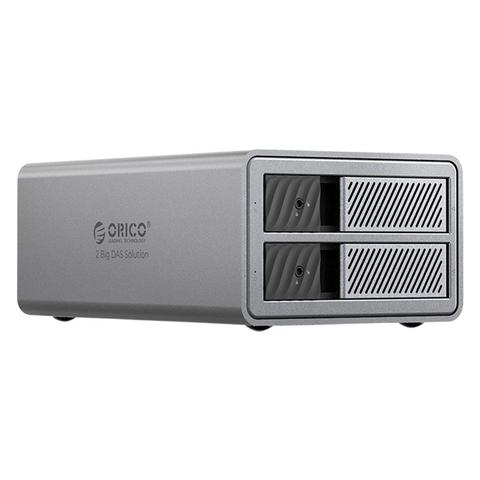

Orico RAID DAS Solution 2 Bay Hard Drive Enclosure
In stock at PC Case Gear
Price checked today
We may earn a commission if you buy; it doesn't change your price. Check the price at PC Case Gear before you buy. How we make money
Price history
Tracking since today
The price hasn't changed since we started tracking it. We'll show its history once it does.
About this product
- Brand
- Orico
- Store
- PC Case Gear
- Category
- Electronics > Electronics Accessories > Computer Components > Storage Devices > Hard Drives
- SKU
- ORICO-9828RU3-AU-GY-BP
Specifications
- Colour
- Bay
The Orico 2-Bay RAID DAS Hard Drive Enclosure features support for two 2.5 or 3.5 inch SATA HDDs/SSDs, offering multiple RAID modes (RAID 0, RAID 1, Span, JBOD) via a USB 3.0 or USB-C interface (5 Gbps). It has a durable aluminium alloy shell, tool-free drive installation, external power supply (12V-4A), blue LED indicators and works with Windows, Mac and Linux systems.
Features

2 Bay RAID DAS Solution (ProRAID)
- Enterprise video storage
- Security surveillance
- Editing materials

Enterprise Data Security Management
- Support 4 RAID mode
- 48W power supply
- Up to 22TB
- Safety locking
- 50mm silent fan
- Aluminium-alloy casing
| RAID Mode | Minimum Number of Discs | Available Capacity | RAID Usage Scenarios |
|---|---|---|---|
| RAID 0 | 2 - 5 | 22 TB x 2 | HD Movies/Photoshop/Video Editing |
| RAID 1 | 2 | 22 TB | Enterprise Files/Database Storage/Servers |
| JBOD | 2 - 5 | 44 TB | Server/Database Storage |
| Clear | 1 - 5 | 22 TB | Audio-Visual Collection, Security Monitoring |
Note
RAID combinations are based on the minimum capacity of the hard drive; please try to use hard drives of the same capacity.

Safety Lock Design
Prevent the hard drive from popping out and getting lost.

LED Light Design
Each tray is equipped with an LED indicator light, allowing you to check the working status at any time.

Intelligent Sleep
Automatically enter sleep mode after 10 minutes of inactivity to extend the lifespan of the hard drive.

External 48W Power Supply
Ensure smooth data flow during multi-disk reading.

Tips
The hard disk used for the first time needs to be repartitioned (formatted), if it cannot be recognised and the data is lost. Please contact online customer service If there is important data in your hard drive, it is recommended to make a backup in advance to prevent data loss
The product itself is an accessory device and will not cause damage to the hard drive under normal use. If there is important data in your hard drive, it is recommended to make a backup in advance to prevent data loss. Our company will not be responsible for data loss/loss
Hard Disk Partition Operation Steps
- Put the hard disk into the hard disk box and connect it to the computer
- Format/Partition the hard disk: Right-click My Computer-Manage-Disk Manager-Disk 1-Right-click-Format/Partition
Hard Drive Tips
The hard drive itself is a consumable item, and its service life is directly related to the working hours, working environment, etc. It is generally recommended to replace it after 3-5 years to prevent data loss and damage caused by the old hard drive