

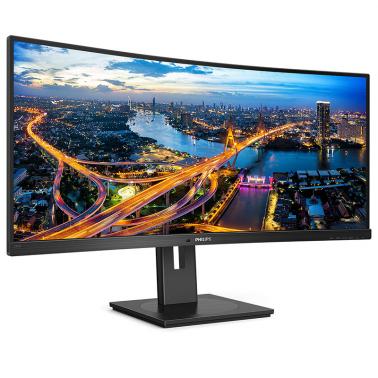

Philips 34in WQHD 100Hz Curved Monitor (346B1C)
Buy at UmartWe may earn a commission if you buy; it doesn't change your price. Check the price at Umart before you buy. How we make money
Price history
Tracking since today
The price hasn't changed since we started tracking it. We'll show its history once it does.
Available at 2 stores
Stores may pay us a commission when you buy; it doesn't affect the order or your price. Learn more
- MSY $649 Cheapest Out of stock Checked today Buy
- Umart This page $649 Out of stock Checked todayBuy
About this product
Specifications
- Screen size
- 34"
- Resolution
- UltraWide QHD (3440×1440)
- Refresh rate
- 100Hz
- Panel type
- VA
SPECIFICATIONS:
| LCD panel type | VA LCD |
| Backlight type | W-LED system |
| Panel Size | 34 inch / 86.36 cm |
| Display Screen Coating | Anti-Glare, 2H, Haze 25% |
| Effective viewing area | 797.2 (H) x 333.7 (V) - at a 1500 R curvature* |
| Aspect ratio | 21:9 |
| Optimum resolution | 3440 x 1440 @ 100 Hz |
| Pixel Density | 110 PPI |
| Response time(typical) | 5ms (Gray to Gray) |
| Brightness | 300 cd/m2 |
| Contrast ratio(typical) | 3000:1 |
| Smart Contrast | 80,000,000:1 |
| Pixel pitch | 0.23175 X 0.23175 mm |
| Viewing angle | 178º (H) / 178º (V) @ C/R > 10 |
| Flicker-free | Yes |
| Picture enhancement | Smart Image |
| Colour gamut (typical) | NTSC 100 %, sRGB 119%, Adobe RGB 90% |
| Display colours | 16.7 M |
| Scanning Frequency | 30-160 kHz (H) /48-100 Hz (V) |
| SmartUniformity | 93 ~ 105% |
| Delta E | <2 (sRGB) |
| sRGB | Yes |
| Low Blue Mode | Yes |
| Easy Read | Yes |
| Adaptive sync | Yes |
| Signal Input | DisplayPort 1.2 x 1, HDMI 2.0 x 1, USB-C 3.2 Gen 1 x 1 (upstream, power delivery up to 90 W) |
| HDCP | HDCP 1.4 (DP / USB-C), HDCP 2.2 (HDMI) |
| USB | USB-C x 1, USB-B x 1 (upstream), USB 3.2 x 4 (downstream with 1 fast charge B.C 1.2) |
| Audio (In/Out) | Headphone out |
| RJ45 | Ethernet LAN up to 1G |
| Sync Input | Separate Sync Sync on Green |
Disclaimers:
*Radius of the arc of the display curvature in mm
*The maximum resolution works for either HDMI, DP or USB-C input.
*The USB hub default setting of USB C input for this monitor is "USB 3.2". The resolution supported by USB 3.2 is 3440 x 1440 @ 60 Hz. When user switches to USB 2.0, the resolution supported will be 3440 x 1440 @ 100 Hz.
*Response time value equal to SmartResponse
*NTSC Area based on CIE1976
*sRGB Area based on CIE1931
*Adobe RGB Coverage based on CIE1976
*For Video transmission via USB-C, your Notebook/device must support USB-C DP Alt mode
*Activities such as screen sharing, on-line streaming video and audio over the Internet can impact your network performance. Your hardware, network bandwidth and its performance will determine overall audio and video quality.
*For USB-C power and charging function, your Notebook/device must support USB-C standard Power Delivery specifications. Please check with your Notebook user manual or manufacturer for more details.
*If your Ethernet connection seems slow, please enter OSD menu and select USB 3.0 or higher version which can support the LAN speed to 1G.
*Cannot support USB-C vs HDMI for PIP/PBP at the same time
*The monitor may look different from feature images.