

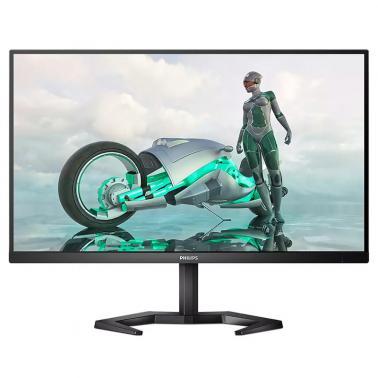
Philips Evnia 27in FHD W-LED IPS 165Hz FreeSync G-Sync Compatible Gaming Monitor (27M1N3200Z)
Out of stock at MSY
Price checked yesterday
We may earn a commission if you buy; it doesn't change your price. Check the price at MSY before you buy. How we make money
Price history
Tracking since yesterday
The price hasn't changed since we started tracking it. We'll show its history once it does.
About this product
Specifications
- Screen size
- 27"
- Resolution
- Full HD (1080p)
- Refresh rate
- 165Hz
- Panel type
- IPS
SPECIFICATIONS
PICTURE/ DISPLAYLCD panel typeIPS technology Backlight typeW-LED system Panel Size27 inch / 68.5 cm Effective viewing area597.888 (H) x 336.312 (V) Display Screen CoatingAnti-Glare, 3H, Haze 25% Aspect ratio16:9 Response time (typical)4 ms (Gray to Gray)* Brightness250 cd/m Contrast ratio (typical)1100:1 Pixel pitch0.3114 x 0.3114 mm Viewing angle178 (H) / 178 (V); @ C/R > 10 Display colors16.7 M Scanning FrequencyHDMI: 30 - 160 kHz (H) / 48 - 165 Hz (V); DP: 30 - 200 kHz (H) / 48 - 165 Hz (V) sRGBYes Picture enhancementSmartImage game Pixel Density81.59 PPI Flicker-freeYes LowBlue ModeYes EasyReadYes AMD FreeSync technologyPremium Maximum resolution1920 x 1080 @ 165 Hz* Low Input LagYes MPRT1 ms G-SYNCCompatible* SmartContrastMega Infinity DCR Color gamut (typical)NTSC 107%, sRGB 122%, Adobe RGB 90.4%* CONNECTIVITYSync InputSeparate Sync Audio (In/Out)Audio out HDCPHDCP 1.4 (HDMI / DP), HDCP 2.2 (HDMI / DP) Signal InputHDMI 2.0 x 2, DisplayPort 1.2 x 1 CONVENIENCEUser conveniencePower On/Off; Menu/OK; Input/Up; Game Settings/Down; SmartImage game/Back OSD LanguagesBrazil Portuguese; Czech; Dutch; English; Finnish; French; German; Greek; Hungarian; Italian; Japanese; Korean; Polish; Portuguese; Russian; Spanish; Simplified Chinese; Swedish; Turkish; Traditional Chinese; Ukrainian Other convenienceKensington lock; VESA mount (100x100mm)Plug & Play CompatibilityDDC/CI; Mac OS X; sRGB; Windows 10 / 8.1 / 8 / 7 STANDHeight adjustment130 mm Tilt-5/20 degree Pivot-/+ 90 degree Swivel-/+ 45 degree POWEROn mode28.2 W (typ.) Standby mode0.5 W (typ.) Off mode0.3 W (typ.) Power LED indicatorOperation - White; Standby mode- White (blinking) Power supplyInternal; 100-240VAC, 50-60Hz DIMENSIONSProduct with stand(max height)612 x 543 x 236 mm Product without stand (mm)612 x 365 x 55 mm Packaging in mm (WxHxD)780 x 521 x 224 mm WEIGHTProduct with stand (kg)5.30 kg Product without stand (kg)3.70 kg Product with packaging (kg)9.96 kg OPERATING CONDITIONSTemperature range (operation)0C to 40 C Temperature range (storage)-20C to 60 C Relative humidity20%-80 % AltitudeOperation: +12,000ft (3,658m), Non-operation: +40,000ft (12,192m) MTBF50,000 (Excluded backlight) SUSTAINABILITYEnvironmental and energyRoHS Recyclable packaging material100 % Specific SubstancesMercury free; PVC / BFR free housing CABINETColorBlack FinishTextured COMPLIANCE AND STANDARDSRegulatory ApprovalsCB; CE Mark; FCC Class B; ICES-003; MEPS; RCM OTHERSNotes* The maximum resolution works for either HDMI input or DP input.* For best output performance, please always ensure that your graphic card is capable of achieving the maximum resolution and refresh rate of this Philips display.* Response time value equal to SmartResponse* MPRT is to adjust brightness for blur reduction, so cannot adjust brightness while MPRT is turned on. To reduce motion blur, LED backlight will strobe synchronously with screen refresh, which may cause noticeable brightness change.* MPRT is gaming-optimized mode. Turn on MPRT may cause noticeable screen flickering. It is recommended to turn off when you are not using the gaming function.* NTSC Area based on CIE1976* sRGB Area based on CIE1931* Adobe RGB Coverage based on CIE1976* 2020 Advanced Micro Devices, Inc. All rights reserved. AMD, the AMD Arrow logo, AMD FreeSync and combinations thereof are trademarks of Advanced Micro Devices, Inc. Other product names used in this publication are for identification purposes only and may be trademarks of their respective companies.* NVIDIA G-SYNC support interface: DisplayPort* Make sure to update NVIDIA G-SYNC driver to the latest version, see more information on NVIDIA website: https://www.nvidia.com/* Make sure your graphic card supports NVIDIA G-SYNC