

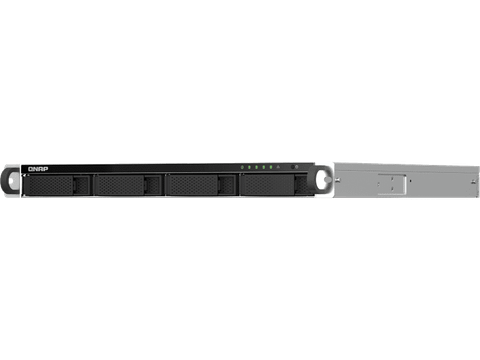

QNAP 1U 4-Bay rackmount Celeron N5105/N5095 NAS Diskless
In stock at PC LAN
Price checked today
We may earn a commission if you buy; it doesn't change your price. Check the price at PC LAN before you buy. How we make money
Price history
Tracking since today
The price hasn't changed since we started tracking it. We'll show its history once it does.
About this product
Powered by an Intel® Celeron® N5105/N5095 quad-core processor (burst up to 2.9GHz), the TS-464U-RP features two 2.5GbE RJ45 ports and Port Trunking for up to 5Gbps combined bandwidth. The built-in 4K HDMI™ output allows for multimedia and virtual machine display. With a PCIe Gen 3 slot, the TS-464U-RP provides flexibility in extending NAS functionality, allowing you to install various cards: a 10GbE/5GbE network card, QM2 card for M.2 SSD caching, or Edge TPU for AI image recognition. The TS-464U-RP also supports AES 256-bit encryption to ensure the confidentiality of sensitive business data without affecting system performance. The TS-464U-RP also features a redundant power supply to ensure maximum system uptime.
2.5GbE connectivity
Up to 5 Gbps transfer speeds can be achieved by setting port trunking with the two built-in 2.5GbE (2.5G/1G/100M) ports.
PCIe expandability
Install a PCIe Gen3 x2 card to expand the core functionality of the TS-464U-RP, including a Multi-Gig 10GbE/5GbE/2.5GbE network card, a QM2 card, or a USB 3.2 Gen 2 (10Gbps) card.
Snapshots
Protect your files and data from accidental deletion and malware attacks with snapshots that fully record the system status and data.
License-free virtualized environment
Host multiple containerized apps to run a wide range of applications and services.
Drives Auto-Tiering
Qtier™ auto-tiering technology and SSD caching enable constant storage optimization.
Flexible expansion
Scale your storage capacity to fit growing data needs by connecting QNAP’s expansion units.
Quad-core high performance
The TS-464U-RP is powered by an Intel Celeron N5105 / N5095 quad-core processor and supports 8GB DDR4 memory, two 2.5GbE ports and SATA 6 Gb/s drives. The integrated Intel® AES-NI encryption engine also helps protect confidential data without impacting system performance.
Streamline large file transfers and video editing with 2.5GbE
The TS-464U-RP comes with two 2.5GbE RJ45 (2.5G/1G/100M) LAN ports that allow you to use existing CAT5e cables to upgrade network speeds from 1 Gigabit to 2.5 Gigabit. The dual 2.5GbE ports also support Port Trunking for up to 5 Gbps transmission speeds, improving the efficiency of bandwidth-hungry business applications such as large file transfers, fast backup/restore, and multimedia transfer & editing.
Future-proof your IT infrastructure for high-speed networks
The TS-464U-RP is ideally matched with QNAP’s managed and unmanaged 2.5GbE/10GbE switches to form high-speed, secure, and scalable network environments without going over budget. QNAP also provide 2.5GbE/5GbE/10GbE PCIe cards and USB 5GbE adapters for Windows®/Linux® workstations, allowing you to easily build a high-speed network environment for productive team collaboration.
Enhance productivity with multiple USB ports
With two USB 3.2 Gen 2 (10Gbps) ports and two USB 2.0 (480Mbps) ports, you can quickly backup and transfer large files to/from the TS-464U-RP. UPS, and other compatible USB devices can also be connected for greater functionality and application potential.
Abundant I/O capabilities with PCIe expansion
The TS-464U-RP has one PCIe Gen 3 x2 slot that allow for installing various expansion cards for expanding application potential.
SSD Caching and Auto Tiering for Optimized Storage Efficiency
The TS-464U-RP supports SSD caching to improve the workflow of random IOPS demanding applications such as virtualization. Qtier™ Technology empowers the TS-464U-RP with auto tiering that continuously optimizes storage utilization across high-performance SSD and high-capacity SATA drives. Qtier™ 2.0 features IO-awareness that empowers SSD tiered storage with a cache-like reserved space to handle burst I/O in real time, greatly maximizing the advantages of SSD.
Direct 4K HDMI™ output for multimedia and virtual machine display
The TS-464U-RP features Intel® UHD Graphics that supports dual-channel hardware decoding and real-time transcoding*. The HDMI™ 1.4b output supports up to 4K (3840 x 2160p) @60Hz, providing great benefits for applications like video production/editing or industrial design that demands high resolution and color realism as well as intensive media storage, transfer, and display. By connecting the TS-464U-RP to an HDMI™ display, you can directly watch multimedia content saved on the NAS, or use the TS-464U-RP as a versatile workstation by directly outputting virtual machines from Virtualization Station or Ubuntu Linux Station.
*Note: The TS-464U-RP’s hardware provides hardware decoding, encoding and transcoding capabilities. However, playback quality may vary due to factors including playback software, file formats, system usage, and available bandwidth.
QTS 5, Fast, smooth, and easy-to-use!
The TS-464U-RP comes with the QTS 5 operating system as standard, providing a next-generation usage experience with an updated system kernel, optimized user interface, and advanced security features.
Brighter. Smoother. You’ll like it.
When navigating QTS 5, you will notice a finer attention to detail for a superior browsing experience. Enjoy a smoother NAS experience, comfortable visual design, and find your favorite apps quicker.
Get started with the notice board
When performing first-time installation, the notice board guides you through the setup process. Simply follow the step-by-step instructions for a quick and easy setup.
Smooth and reactive user interface
Whether clicking buttons, switching between apps, expanding/collapsing windows – every action is much smoother. The search bar in the main menu also assists in quickly finding desired apps.
Comprehensive backup and disaster recovery solution
The TS-464U-RP supports various apps that cover all your backup needs. Practice safe IT habits by regularly backing up files and device content, allowing them to be easily restored when needed.
PC/Laptop backup
For Windows®, install NetBak Replicator to back up your PC to QNAP NAS. In macOS®, just set up the built-in Time Machine® to secure your data.
Remote backup for NAS
Hybrid Backup Sync makes it easy to back up data from a TS-464U-RP to another QNAP NAS or remote server to fulfill your 3-2-1 backup strategy.
VM backup
Enjoy license-free VMware® and Hyper-V VM backup with source-side incremental backup, global deduplication, and recovery compression.
SaaS backup
Safeguard enterprise cloud data by backing up/syncing files, emails, calendars, and contacts from Google™ Workspace and Microsoft® Office 365® to the NAS.
Cloud backup for NAS
Hybrid Backup Sync supports mainstream cloud storage for NAS data backup. For backup to object cloud storage, VJBOD Cloud is especially useful to reduce bandwidth usage and backup time.
QuDedup technology
Hybrid Backup Sync eliminates redundant data at the source and then backs up the deduplicated data, helping to save time and storage costs while providing efficient multi-version backups.
Multi-version snapshots mitigate ransomware threats
The TS-464U-RP supports block-based snapshots that record the state of the system at any time. It helps protect data, which can be restored back to a specific point of time, greatly helping in mitigating the threat of ransomware.
Volume and LUN snapshots
Take snapshots in seconds and revert the entire volume/LUN back to a specific point in time to prevent loss of important data.
Instantly restore snapshots
Snapshot content can be quickly restored to a local NAS, or restored on a folder/file basis to a local/remote NAS or cloud storage. You can also conveniently view and restore snapshots from the client side.
Back up snapshots
Multiply data protection by backing up snapshot files! Replicate volume/LUN snapshots in the TS-464U-RP to a remote NAS (Snapshot Replica) by copying only the changes made. This helps save time & bandwidth, and can be run manually or on a scheduled basis.
All-in-one solution for hosting virtual machines and containers
By running multiple virtual machines and containers on the TS-464U-RP, you can deploy multi-tenant environments and applications to increase management efficiency and save hardware costs. Coupled with the Network & Virtual Switch app that boosts interoperability between virtual machines, containers, QNAP NAS, and other physical devices on the network, you can flexibly allocate physical and virtual network resources to simplify network deployment.
Virtualization Station
Run multiple Windows®, Linux®, UNIX®, Android™, and QuTScloud virtual machines and access them via a web browser or Virtual Network Computing (VNC). Businesses can run virtualized server applications on a single NAS without needing additional physical servers.
Container Station
Experience Docker®, LXD, and Kata Containers lightweight virtualization technologies, download apps from the built-in Docker Hub Registry®, import/export containers, and create abundant microservices.
Linux Station
Run Linux® applications (including apps from the Software Center) directly on the NAS and remotely access the Linux® desktop from a web browser. The open-source Linux® platform is also ideal for Internet of Things development.
Comprehensive security and privilege settings
The TS-464U-RP is loaded with flexible privilege settings and security measures. Besides IP blocking, QNAP Authenticator, HTTPS connection, there are more apps that help ensure optimal NAS protection against threats like malware and hackers.
myQNAPcloud secures remote access
myQNAPcloud allows convenient connection to the TS-464U-RP through the Internet without any complex DDNS settings. To ensure your remote access service is secure, myQNAPcloud strengthens keys on SSL Certificates to 2048-bits.
Simplified privilege settings
The TS-464U-RP supports comprehensive access right settings for shared folders, Azure Active Directory Domain Services (Azure AD DS), LDAP, and Windows ACL to help IT staff efficiently manage user accounts and access rights for multiple NAS systems.
QuFirewall protection
Supports IPv6, firewall access lists, and GeoIP filtering to restrict access based on geographical locations for higher NAS network security.
Superior security with QVPN
A virtual private network (VPN) allows secure access to network resources and services across public networks. QVPN supports creating a VPN client, using the TS-464U-RP as a VPN server, and WireGuard® VPN service with an easy-to-use interface for setting up a secure connection.
QuWAN SD-WAN
To facilitate digital transformation, multi-site expansion and remote working, QuWAN SD-WAN helps automatically mesh multi-site VPN. It features IPsec encryption and cloud-centric management, allowing secure multi-site network including QNAP NAS and VMware ESXi platforms.
Security Counselor
A security portal for the TS-464U-RP to check for weaknesses and offer recommendations for enhancing NAS security. It also integrates anti-virus and anti-malware scanning software.
Malware Remover
Regularly scan your TS-464U-RP using the latest malware definitions. If infected files are detected, they will be immediately removed to ensure NAS data security.
The best file storage and collaboration center
The TS-464U-RP integrates rich apps for storing, managing, synchronizing, searching, and archiving files. It supports SMB/CIFS, AFP, and NFS protocols for streamlined file sharing across Windows®, Mac®, and Linux®/UNIX®, and provides the smartest NAS solution for professionally managing your files.
File Station
Manage, access, and share all the files in the TS-464U-RP and view snapshots files – all from your web browser. You can also easily mount remote NAS folders and cloud storage.
Qsync
Make any file uploaded to a TS-464U-RP available to linked devices, such as computers, laptops and mobile devices. You can sync shared folders and team folders for group file sharing to enhance the flexibility of team projects and collaboration.
Qsirch
QNAP’s powerful, Google-like search tool helps you quickly find images, music, videos, documents, and emails by keywords, color, and more search conditions. It also supports Qfiling to perform one-time or automatic archival tasks based on your search criteria.
Qfiling
Automate your file organization ─ all you need to do is categorize files, set a schedule, and Qfiling will do the rest. Qfiling also enables smart recycling that instantly moves filtered files to the Recycle Bin.
Smart surveillance solution for 24/7 security
QVR Elite is QNAP’s subscription-based smart surveillance solution, allowing you to easily build a surveillance system with lower TCO and higher scalability. Recordings are saved as MP4 files, allowing playback on nearly every device. QVR Elite also integrates QNAP AI-based solutions to build smart facial recognition for retail and door access systems with QNAP NAS. You can arrange a dedicated, independent storage space for surveillance data on the TS-464U-RP and enjoy simplified camera management, storage space allocation, camera live viewing and playback.
Free embedded channels
2 IP camera channels
Total camera channels
Scalable with optional licenses
Subscription-based
Monthly US $1.99 /channel
Video format
MP4
Mobile app
QVR Pro Client and mobile app
Scalable storage
NAS expansion units
Flexible and economical storage expansion
QNAP provides easy ways to expand your storage capacity. Here are several ways to expand your TS-464U-RP storage as needed to accommodate data and business growth.
Attach QNAP expansion enclosures
Connect expansion enclosures to the TS-464U-RP, and manage NAS storage expansion with the user-friendly Storage & Snapshots Manager app.
Mount cloud storage or remote file servers
Mount cloud storage or remote file servers to expand the capacity of the TS-464U-RP while also centrally managing files on the NAS, cloud storage, and remote devices.
Migrate to a new NAS
Install your NAS hard drives into a larger QNAP NAS and retain all your existing data and configurations.
Upgrade RAID capacity
Hot-swap lower-capacity drives with larger-capacity drives to expand your NAS capacity so it can grow with your business.
