

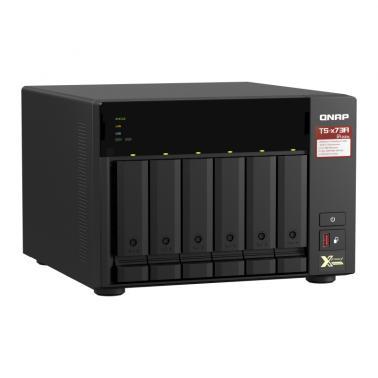
QNAP TS-673A 6 Bay Ryzen Quad Core 8GB NAS
Out of stock at MSY
Price checked today
We may earn a commission if you buy; it doesn't change your price. Check the price at MSY before you buy. How we make money
Price history
Tracking since today
The price hasn't changed since we started tracking it. We'll show its history once it does.
About this product
- Brand
- QNAP
- Store
- MSY
- Category
- Electronics > Electronics Accessories > Computer Components > Storage Devices > Network Storage Systems
- SKU
- 58764
Specifications
- Capacity
- 8GB
- Colour
- Bay
QNAP TS-673A 6 Bay Ryzen Quad Core 8GB NASFeaturing an AMD Ryzen V1000 series V1500B quad-core processor that delivers great system performance with up to quad-core / 8 threads and Turbo Core up to 2.2 GHz. The TS-673A features two 2.5GbE RJ45 ports and two PCIe Gen 3 slots for you to flexibly deploy 5GbE/10GbE networks. Two M.2 NVMe SSD slots for Qtier Technology and SSD Caching enable constant storage optimization. The TS-673A supports QTS and QuTS hero, allowing users to flexibly switch operating system based on their requirements.SPECIFICATIONS:Hardware SpecificationsCPUAMD Ryzen Embedded V1500B quad-core 2.2 GHz processorCPU Architecture64-bit x86Graphic ProcessorsOptional via a PCIe adapterFloating Point UnitEncryption Engine (AES-NI)Hardware-accelerated TranscodingOptional via a PCIe adapterSystem Memory8 GB SO-DIMM DDR4 (1 x 8 GB)Maximum Memory64 GB (2 x 32 GB)Memory Slot2 x SO-DIMM DDR4 Support ECC memoryFor dual-DIMM configurations, you must use a pair of identical DDR4 modules.Flash Memory5GB (Dual boot OS protection)Drive Bay6 x 3.5-inch SATA 6Gb/s, 3Gb/sDrive Compatibility3.5-inch SATA hard disk drives 2.5-inch SATA hard disk drives 2.5-inch SATA solid state drivesHot-swappableThe following are not hot-swappable: M.2 SSDs, SSD cache drives, SSDs using PCIe expansion slots.M.2 SSD Slot2 x M.2 2280 PCIe Gen3 x1 slotsThe M.2 SSD is not included as standard. M.2 SSD operations can easily generate excessive heat. It is recommended to install a heatsink (from QNAP or a third-party provider) on the M.2 SSD.SSD Cache Acceleration Support2.5 Gigabit Ethernet Port (2.5G/1G/100M)25 Gigabit Ethernet Port (5G/2.5G/1G/100M)Optional via a PCIe adapter10 Gigabit Ethernet PortOptional via a PCIe adapterWake on LAN (WOL)Jumbo FramePCIe Slot2 Slot 1: PCIe Gen 3 x4 Slot 2: PCIe Gen 3 x4USB 3.2 Gen 2 (10Gbps) Port3 x Type-A USB 3.2 Gen 2 10Gbps 1 x Type-C USB 3.2 Gen 1 5GbpsIR Sensor (QNAP RM-IR004)HDMI OutputOptional via a PCIe adapterForm FactorTowerLED IndicatorsStatus/Power, USB, LAN, Drive 1-6, M.2 SSD 1-2ButtonsPower, Reset, USB Auto CopyDimensions (HxWxD)188.2 264.3 280.8 mmWeight (Net)5.78 kgWeight (Gross)7.35 kgOperating temperature0 - 40 C (32F - 104F)Storage Temperature-20 - 70C (-4F - 158F)Relative Humidity5-95% RH non-condensing, wet bulb: 27C (80.6F)Power Supply Unit250W, 100-240V AC, 50-60Hz, 3.5APower Consumption: HDD Sleep Mode21.891 WPower Consumption: Operating Mode, Typical45.898 WTested with drives fully populated.FanSystem fan: 2 x 92mm CPU fan: 1 x 60mmSound Level20.3 db(A)System WarningBuzzerKensington Security SlotMax. Number of Concurrent Connections (CIFS) - with Max. Memory2000 Software Specifications:Operating SystemQTS 4.5.2 (embedded Linux)Supported Client Operating SystemsApple Mac OS 10.10 or laterUbuntu 14.04 , CentOS 7, RHEL 6.6, SUSE 12 or later LinuxIBM AIX 7, Solaris 10 or later UNIXMicrosoft Windows 7, 8, and 10Microsoft Windows Server 2008 R2, 2012, 2012 R2 and 2016, 2019 Supported BrowsersApple Safari 7 or laterGoogle ChromeMozilla FirefoxSupported LanguagesChinese (traditional and simplified), Czech, Danish, Dutch, English, Finnish, French, German, Greek, Hungarian, Italian, Japanese, Korean, Norwegian, Polish, Portuguese (Brazil), Romanian, Russian, Spanish, Swedish, Thai, and TurkishSupported File SystemsInternal hard drive (EXT4)External hard drive (EXT3, EXT4, NTFS, FAT32, HFS+, and exFAT) Note: To use exFat you must purchase an exFAT driver license from License Center.Network & Virtual SwitchTCP/IP: Dual stack (IPv4 and IPv6)Jumbo framePort trunking (Link aggregation)FailoverLoad balancingDHCP server and clientRADVDUSB Wi-Fi adapter Note: This feature does not support ad hoc networks because of security considerations.Virtual switchNetwork Address Translation (NAT)Spanning Tree Protocol (STP)Software-Defined Switch modeStatic RouteNCSI (Network Connectivity Status Indicator)DDNS settings (Customize & Multiple Service ) Storage ManagementSupported RAID typesRAID 0, 1, 5, 6, 10, 50, JBOD, SingleRAID Hot Spare and Global Hot SpareRAID Rebuild Speed CustomizationOnline RAID capacity expansionOnline RAID level migrationSSD RAID Over-provisioning Note: RAID 0 and JBOD Data RAID does not support Over-provisioning.SSD RAID Performance evaluation (with SSD Profiling Tool)SSD TRIM for RAID 0,1,10Bitmap supportDisk auto S.M.A.R.T. data migrationDisk bad block scan and S.M.A.R.T testDisk bad block recoveryDisk secure data eraseIronwolf Health ManagementStorage poolsThe maximum single storage pool size is 308 TBThe maximum storage pool number is 128Qtier Data Tiering TechnologyAutomatic or scheduled data tieringIO-aware auto tieringShared folder tiering on demandFlexible volumes and LUNs with thin provisioning and space reclaimingThe maximum single volume capacity is 250 TBThe maximum volume number is 128Online volume expansionVolume type conversionVolume shrinkStorage space utilizationSnapshotsVolume and LUN snapshotsSnapshot DashboardSnapshot ManagerSnapshot local restore and revertSnapshot CloneSnapshot Replica and Snapshot VaultSnapshot remote restore and revertUnified Snapshot DirectorySupport for Windows Previous Versions (CIFS/SMB)Snapshot Agent for Microsoft Windows and VMware vSphereThe maximum number of snapshots varies depending on installed memory. https://docs.qnap.com/nas/QTS4.3.5/en/GUID-00FC4DB6-F3F3-4A39-B117-BCE39787F09B.htmlStorage expansion using QNAP expansion unitsJBOD enclosure roamingSSD read-only and read-write cacheSSD write-only cacheSSD Cache supports Single, RAID 0, RAID 1, RAID 5, RAID 6, RAID 10 configuration. The maximum cache size depends on installed memory. Cache capacity and RAM requirement512GB 1GB1TB 4GB2TB 8GB4TB 16GB iSCSI (IP SAN)iSCSI targets with multiple LUNs per target Note: The maximum number of targets+LUN is 256.LUN mapping (LUN can be moved between iSCSI and FC if supported)LUN maskingOnline LUN capacity expansionSPC-3 persistent reservationMPIO & MC/SiSCSI Extensions for RDMA (iSER) with VMware ESXi Note: This feature requires a compatible Mellanox network card.iSCSI LUN backup, one-time snapshot, and restorationVirtual disks using iSCSI initiator Note: The maximum number of virtual disks is eightStack chaining master Fibre Channel (FC SAN)Support of Fibre Channel protocol (Optional Fibre Channel adapter required, please check the compatibility list) Note: The maximum number of FC Port+LUN is 256.LUN Mapping (LUN can be moved between iSCSI and FC)LUN MaskingWWPN Aliases Import/ExportFC Port GroupFC Port BindingMultipath IO (MPIO)Online LUN capacity expansionLUN snapshotLUN snapshot replication and clone VJBOD CloudVJBOD Cloud is a block-based storage gateway solution that allows you to backup the storage space (LUN/Volume) on your local NAS using cloud space from cloud services providers such as Amazon, Azure, and Google CloudVJBOD Cloud now supports one-to-one pairing between cloud volumes/LUNs and local stored spacesVJBOD Cloud now supports Amazon S3 Azure, BackBlaze, HuaWei Cloud, Alibaba Cloud, HKT, Google Cloud, OpenStack, RackSpace, Wasabi cloud, IBM cloud object storage serviceVJBOD Cloud now supports local stored mode, which means that data can be stored on the NAS and the data can be backed up to the cloudVJBOD Cloud now supports 20 recovery points for recovering volumes/LUNsThe maximum VJBOD Cloud session is 9 File ServerFile sharing across Windows, Mac, and Linux/UNIXMicrosoft networking (CIFS/SMB)Apple networking (AFP)NFS version 3/4 servicesWindows ACL (CIFS/SMB)Advanced folder permissions (AFP, CIFS/SMB, and FTP)Shared folder aggregation (CIFS/SMB)The maximum number of shared folder is 512 FTP ServerFTP, SFTP and TFTP protocolsFTP over SSL/TLS (explicit FTPS)FXP supportThe maximum FTP connection is 1024File StationIntegrate with HybridMount which supports File Cloud Gateway and File Station Mount mode. File Station Mount mode supports:Cloud drive mounting for Google Drive, Dropbox, Microsoft OneDrive, Microsoft OneDrive for Business, HiDrive, Amazon Cloud…