

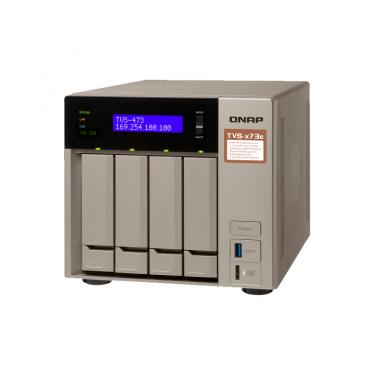

QNAP TVS-473e-8G 4 Bay Diskless NAS, AMD RX-421ND 2.1-3.4 GHz, 8G
Buy at UmartWe may earn a commission if you buy; it doesn't change your price. Check the price at Umart before you buy. How we make money
Price history
Tracking since today
The price hasn't changed since we started tracking it. We'll show its history once it does.
Available at 2 stores
Stores may pay us a commission when you buy; it doesn't affect the order or your price. Learn more
- MSY $1,642.50 Cheapest Out of stock Checked today Buy
- Umart This page $1,642.50 Out of stock Checked todayBuy
About this product
- Brand
- QNAP
- Store
- Umart
- Category
- Electronics > Electronics Accessories > Computer Components > Storage Devices > Network Storage Systems
- SKU
- 48427
Specifications
- Colour
- Bay
QNAP TVS-473e-8G 4 Bay Diskless NAS, AMD RX-421ND 2.1-3.4 GHz, 8G
The TVS-473e is powered by a high-end AMD R-Series APU that incorporates an exceptional CPU with AMD Radeon™ R7
Graphics performance, delivering a high-performance and energy-efficient NAS solution. Built with a state-of-the-art metal design
and topped off with a stylish gold finish, the highly-capable TVS-473e provides PCIe expandability, the unique USB QuickAccess
port, HDMI 4K@ 30Hz output, and 4K H.264 video decoding and encoding acceleration for an optimum audiovisual experience.
Specifications
| CPU | Processor: AMD R-Series RX-421BD quad-core 2.1 GHz processor, Turbo Core up to 3.4 GHz Architecture: 64-bit Graphics: Embedded Radeon™ R7 graphics processor Encryption Engine: AES-NI |
| System Memory | 8 GB DDR4 (2 x 4 GB) |
| Maximum Memory | 64 GB (4 x 16 GB) |
| Memory Slot | 4 x SODIMM DDR4 (For dual- or quad-DIMM configurations, you must use a pair of identical DDR4 modules.) |
| Flash Memory | 512MB DOM |
| Drive Bay | 4 x SATA 6 Gbps |
| Drive Compatibility | • 3.5-inch SATA hard disk drives • 2.5-inch SATA hard disk drives • 2.5-inch SATA solid state drives |
| M.2 SSD Slot | 2 x M.2 2260/2280 SATA 6Gb/s SSDs Note: 1. The M.2 SSD is not included as standard. 2. M.2 SSD operations can easily generate excessive heat. It is recommended to install a heatsink (from QNAP or a third-party provider) on the M.2 SSD. |
| SSD Cache Acceleration Support | • Drive bays 1 to 4 • M.2 slots 1 to 2 • Optional: SSD using PCIe expansion slot |
| Hot-swappable | Yes The following are not hot-swappable: M.2 SSDs, SSD cache drives, SSDs using PCIe expansion slots. |
| Gigabit Ethernet Port | 4 x RJ45 |
| USB QuickAccess Port | USB Micro-B |
| PCIe Slot | 2 x PCIe 3.0 x4 Note: Support 10GbE LAN card, USB 3.1 Gen2 (10Gb/s) expansion card, QM2 card, or PCIe wireless network card. |
| USB Port | 4 x USB 3.0 (Front: 1; Back: 3) |
| HDMI Output | 2 x HDMI 1.4b (up to 3840 x 2160 resolution at 30 Hz) |
| Audio | • 2 x 3.5 mm dynamic microphone jacks • 1 x 3.5 mm line-out jack • 2 x speakers Note: You cannot use the speakers and the line-out jack simultaneously. |
| Display Panel | Monochrome backlit LCD display with Enter and Select buttons |
| USB One Touch Copy | Front: USB 3.0 |
| IR sensor | QNAP RM-IR004 remote control (MCE compatible) |
| Form Factor | Tower |
| Dimensions (H x W x D) | 188.2 x 199.3 x 279.6 mm 7.41 x 7.85 x 11.01 inch |
| Net Weight | 4.9 kg (10.80 lbs) |
| Power Supply Unit | ATX 250W, 100-240V AC, 50/60Hz |
| Fan | System: 1 x 120 mm CPU: 1 x 60 mm |
| Operating Temperature & Relative Humidity | 0 ~ 40˚C ( 32˚F ~ 104˚F ), 5 ~ 95% RH non-condensing, wet bulb: 27˚C (80.6˚F) |
| Security Slot | Kensington security slot |
Note: Use only QNAP memory modules to maintain system performance and stability. For NAS devices with more than one memory slot, use QNAP modules with identical specifications. Warning: Using unsupported modules may degrade performance, cause errors, or prevent the operating system from starting.
* Sound Level Test Environment: Refer to ISO 7779; Maximum HDD loaded; Bystander Position; Average data from 1 meter in front of operating NAS.
Designs and specifications are subject to change without notice.
Operating System · QTS 4.3 (embedded Linux)
Supported Client Operating Systems
- Apple Mac OS 10.7 or later
- Linux and UNIX
- Microsoft Windows 7, 8, and 10
- Microsoft Windows Server 2003, 2008 R2, 2012, 2012 R2 and 2016
Supported Browsers
- Apple Safari 7 or later
- Google Chrome
- Microsoft Internet Explorer 10 or later
- Mozilla Firefox
Supported Languages
Chinese (traditional and simplified), Czech, Danish, Dutch, English, Finnish, French, German, Greek, Hungarian, Italian, Japanese, Korean, Norwegian, Polish, Portuguese (Brazil), Romanian, Russian, Spanish, Swedish, Thai, and Turkish
Supported File Systems
- Internal hard drive (EXT4)
- External hard drive (EXT3, EXT4, NTFS, FAT32, HFS+, and exFAT)
Note: You can purchase exFAT driver licenses on the License Center.
Networking
- TCP/IP: Dual stack (IPv4 and IPv6)
- Jumbo frame (failover, multi-IP settings, port trunking, and NIC teaming)
- Service binding based on network interfaces
- Squid web caching proxy
Network & Virtual Switch
- TCP/IP: Dual stack (IPv4 and IPv6)
- Jumbo frame (failover, multi-IP settings, port trunking/NIC teaming)
- DHCP server and client
- USB Wi-Fi adapter
Note: This feature does not support ad hoc networks because of safety considerations.
Security
- Network access protection with auto-blocking (SSH, Telnet, HTTP(S), FTP, CIFS/SMB, and AFP)
- Host access control for shared folders (CIFS/SMB)
- AES 256-bit volume-based and shared folder data encryption
- 256-bit external drive encryption (AES)
Storage Management
- Storage space utilization monitoring
- Flexible volumes and LUNs with thin provisioning and space reclaiming
- Disk volume types: RAID 0,1, 5, 6, 10, single, JBOD
- RAID hot spare and global hot spare
iSCSI (IP SAN)
- iSCSI targets with multiple LUNs
Note: The maximum total number of targets is 256. - LUN mapping and masking
- Online LUN capacity expansion
- SPC-3 persistent reservation
Power Management
- Wake on LAN
- Standby mode for internal drives
- Scheduled power on and off
- Automatic power on after power recovery
Access Rights Management
- Multiple user creation
- User data importing and exporting
- User quota management
- Local user access control (AFP, CIFS/SMB, FTP, and WebDAV)
Domain Authentication
- Microsoft Active Directory (AD) and domain controller
- LDAP server and client
- Domain user login (AFP, CIFS/SMB, FTP, and File Station)
myQNAPcloud
- Free host name registration (DDNS)
- Optional myQNAPcloud SSL certificates (DDNS)
- Auto router configuration through UPnP
- Web-based file manager with HTTPS 2048-bit encryption
Qsync
- File syncing across multiple devices with SSL secure connection
- Selective synchronization for specific folders or subfolders
- Team folders as file center for better collaboration
Note: The maximum number of sync tasks is 32. - File sharing through email links
Resource Monitor
- Monitoring of NAS system resources such as CPU, memory and network
- Monitoring of NAS storage resources such as volumes, RAID, and disk activity
- Monitoring of resource usage by NAS applications
- Creation of extra swap space when SSDs are installed
Helpdesk
- Reporting of issues to the QNAP support team, including automatic collection of system information
- Remote connection between QNAP support engineers and NAS for issue resolution (with user permission)
Web Administration
- Smart toolbar and dashboard for system status display
- Dynamic DNS (DDNS)
- SNMP versions 2 and 3
- Resource monitor
File Server
- File sharing across Windows, Mac, and Linux/UNIX
- Microsoft networking
- Windows ACL
- Advanced folder permissions (AFP, CIFS/SMB, and FTP)
FTP Server
- FTP over SSL/TLS (explicit)
- FXP support
File Station
- Cloud drive mounting for Google Drive, Dropbox, Microsoft OneDrive, Microsoft OneDrive for Business, HiDrive, Amazon Cloud Drive, Yandex Disk and Box
- Remote shared folder mounting (CIFS/SMB, FTP, and WebDAV)
- Document viewing using Office Online, Google Docs, and Chrome extension
- Microsoft Office file editing using Google Docs, Sheets, and Slides
Qfiling
- Auto filing
- Recipe function
- Archiving through iSCSI, USB, DVD and remote NAS
- Advanced settings
Transcode Management
- Video transcoding (240p, 360p, 480p, 720p and 1080p resolution)
- Automatic video transcoding for watched folders
- Hardware-accelerated transcoding
- Embed subtitles into videos for background transcoding
Hybrid Backup Sync
- Cloud storage backup to Amazon S3, Amazon Glacier, Microsoft Azure, Google Cloud Storage, Openstack Swift, WebDAV, and HKBN
- Cloud storage syncing with Microsoft OneDrive, Google Drive, Dropbox, Amazon Drive, Yandex Disk, Box, hubiC, BackBlaze B2, Amazon S3, and HiDrive
- RTRR server & client with bandwidth control
- Rsync server with download bandwidth control
Photo Station
- Photo organization by thumbnail, list, timeline, or folder
- Virtual and smart albums
- Validity control for album sharing
- Photo tagging with text, colors, and ratings
Music Station
- Music playing and sharing through web browsers
- Music streaming to multiple devices
- Changing of album covers through Google search or by uploading photos
- Internet radio (MP3)
iTunes Server
Audio and video sharing for Windows & Mac iTunes
Video Station
- Video organization by thumbnails, list, timeline, or folder
- Virtual and smart collections
- Video tagging with text, colors, and ratings
- Video link sharing through social media and email
Virtualization Station
- Virtual machine creation (Windows, Linux, Unix, and Android)
- Virtual machine importing, exporting, cloning, snapshot capturing, backup, and restoration
- Console display using HDMI output (QVM)
- HTML5-based shared remote console
Container Station
- Support for LXC and Docker
Note: Docker containers support Bridge, NAT, and Host mode. Linux containers (LXC) support only NAT. - Application downloading from the built-in Docker Hub Registry
- One-click installation
- Container importing and exporting
Qsirch
- Full-text search
- Data distribution using a bar chart
- Previews for photos, music, videos, PDFs, Gmail, and others
- Advanced search operators and search scope
Surveillance Station
- Support for over 3,000 IP cameras
- 4 free camera licenses
Note: The application supports a maximum of 72 camera channels. You can purchase additional licenses on the QNAP website. - Instant playback for checking of recent events
- Visual aid using e-map
QVPN Service
- QVPN combines an integrated VPN Server, a VPN client, and L2TP/IPSec VPN services.
- VPN server
- Secure remote access with PPTP, L2TP/IPSec, and OpenVPN services
- Support for a maximum of 100 clients
DLNA Server
- Support for DLNA/UPnP TVs and players such as PlayStation 4 and Xbox One
- Support for CUE indexing file for APE and FLAC
Q’center (NAS CMS)
- Monitoring of multiple NAS devices
- Utilization history reports
- Unified configuration management
- Monitoring of NAS devices behind NAT routers with Connect to Q’center
Note: The application is available in the App Center and in virtual appliance marketplace (VMware vSphere ESXi and Microsoft Hyper-V).
OceanKTV
- YouTube video streaming
- Sorting by artist, language, and favorites
- Effects such as tuning echo, key, and applause
- Playlist control with a mobile application
Qfinder Pro
- QNAP NAS location on the same local network
- NAS shared folders mounting
- Basic setting configuration (firmware, SMTP server, and network settings)
- Direct connection with USB QuickAccess
App Center
- Official and community software add-ons
- Automatic updates and notifications for new versions
- Repository for imported third-party content
- User-specified volume for storing applications
AirPlay & Chromecast
- Video, photo and music streaming to Apple TV or Chromecast using the following:
- NAS applications: File Station, Music Station, Photo Station, and Video Station
- Mobile applications: Qfile, Qmusic, Qphoto, and Qvideo
Note: You must install the Media Streaming add-on app from the QTS App Center.
Download Station
- PC-less downloads (BitTorrent, FlashGet, FTP/FTPS, HTTP/HTTPS, QQDL, and Thunder)
Note:
- The application supports a maximum of 500 tasks
- The maximum number of concurrent downloads is: 90 (30 BT/PT, 30 HTTP, 30 FTP)
- BitTorrent: Support for search, magnet links, private trackers, and proxy
Notes Station 3
- Multi-user text editing using the collaborative editor
- Table creation using the spreadsheet editor
- Online quick preview of multimedia attachments
- Smart snapshot for version control
HD (HybridDesk) Station 3.13
- Photo, video, and music playback on TV through HDMI
- Support for Chrome and Firefox
- Support for international keyboards and mouse input
- User login permissions
Note: The decoding capability of the CPU and graphics card may affect playback of some video files.
Linux Station
- Ubuntu and Kylin installation and usage of the NAS as a Linux-based computer
- Application downloading and usage from the Ubuntu Software Center
- Remote desktop for remote monitoring and accessing of Ubuntu
Note: The application requires at least 4 GB of memory and installation of Container Station.
Qcontactz
- One-way scheduled sync of contacts from multiple Google accounts
- Contact importing from CSV or vCard 3.0 files
- Contact exporting to CSV or vCard 3.0 files
- Duplicate contact searching and merging
IFTTT Agent
- Daily task automation
- Social media data archiving
- File synchronization between the NAS and various cloud services
- System event notifications on Line, Skype, Gmail, and mobile phones
General Notes
- Designs and specifications are subject to change without notice.
- Some features may vary by model.
- QTS does not support DRM content, Dolby, DTS, and some IPv6 services.
- Some data encryption features may be unavailable because of country-specific legislative restrictions.