

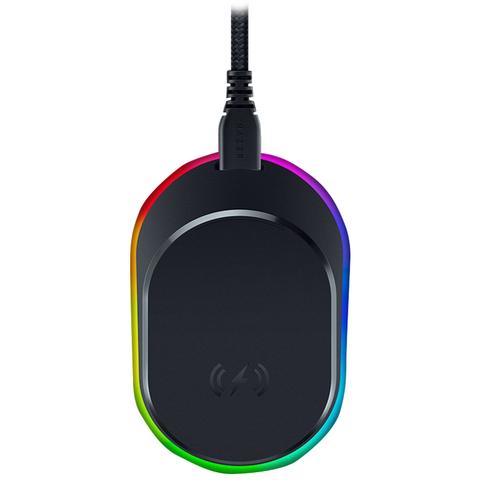

Razer Mouse Dock Pro with Wireless Charging Puck
Buy at PC Case GearWe may earn a commission if you buy; it doesn't change your price. Check the price at PC Case Gear before you buy. How we make money
Price history
Tracking since yesterday
The price hasn't changed since we started tracking it. We'll show its history once it does.
Available at 2 stores
Stores may pay us a commission when you buy; it doesn't affect the order or your price. Learn more
- JB Hi-Fi $129 Cheapest In stock Checked yesterday Buy
- PC Case Gear This page $129 In stock Checked yesterdayBuy

About this product
- Brand
- Razer
- Store
- PC Case Gear
- Category
- Electronics > Electronics Accessories > Computer Components > Input Devices > Mice & Trackballs
- SKU
- RZ81-01990100
The Razer Mouse Dock Pro features a magnetic wireless charging base and an included wireless charging puck that fits supported Razer mice for easy cable free charging. It includes a built in 4000Hz HyperPolling transceiver out of the box, with support for an 8000Hz polling rate unlocked through a Razer software update. The dock also offers Chroma RGB lighting and a stable non slip base for clean desk integration.
Features
Overview
Wireless Mouse Charging Dock with Integrated 4KHz Transceiver
- Magnetic Wireless Charging
- Integrated Razer HyperPolling 4KHz Transceiver (support for 8000Hz via Razer Software)
- Only compatible with the Basilisk V3 Pro
Magnetic Wireless Charging
Seamless And Convenient
Charging has never been this intuitive or easy. Simply install the wireless charging puck on a compatible Razer mouse and place it onto the dock—a fit that stays secure while charging.
How to Install
Step 1
Unlock the cover puck at the bottom of your compatible Razer mouse
Step 2
Replace the cover puck with the Razer Wireless Charging Puck
Step 3
Lock the Razer Wireless Charging Puck in place
Step 4
Place the mouse on the Razer Mouse Dock Pro to begin charging

Integrated Razer Hyperpolling 4k Hz Transceiver
True 4000 HZ Wireless Polling Rate
Pair the dock with a compatible Razer mouse to unlock an insane level of responsiveness and precision designed for top-tier competitive gaming.
How to Pair
Step 1
Ensure the Razer Mouse Dock Pro is connected to a USB Type A port and select the dock on Razer Synapse.
Step 2
Select ‘Open Pairing Utility’, then ‘Add Compatible Device’ and remove the mouse dongle.
Step 3
Select ‘Pair’ and ensure your mouse is on 2.4GHz mode.
Step 4
Once paired to the dock, you can store the inactive mouse dongle back to the bottom on the mouse.

Powered by Razer Chroma™ RGB
Customizable Style With Charge Status Lighting
Customize the dock’s underglow from over 16.8 million colours and a suite of effects. Sync it with your setup to experience dynamic lighting for hundreds of integrated games. When charging, the mouse and dock will light up to reflect battery level—from full (green) to mid (yellow) to low (red).