

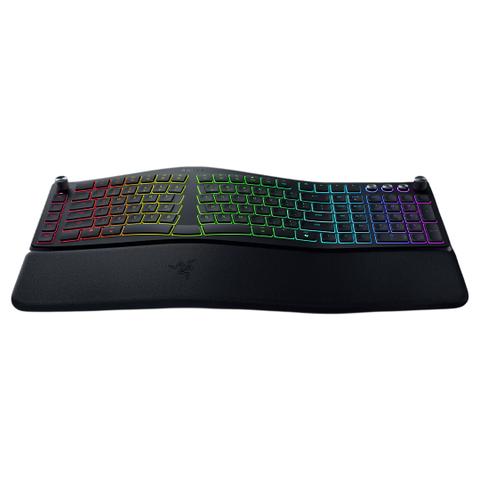

Razer Pro Type Ergo Wireless Split Ergonomic RGB Keyboard
Buy at PC Case GearWe may earn a commission if you buy; it doesn't change your price. Check the price at PC Case Gear before you buy. How we make money
Price history
Tracking since today
The price hasn't changed since we started tracking it. We'll show its history once it does.
Available at 3 stores
Stores may pay us a commission when you buy; it doesn't affect the order or your price. Learn more
- JB Hi-Fi $299 Cheapest In stock Checked today Buy
- Mwave $299 In stock Checked 3 days ago Buy
- PC Case Gear This page $299 In stock Checked todayBuy


About this product
- Brand
- Razer
- Store
- PC Case Gear
- Category
- Electronics > Electronics Accessories > Computer Components > Input Devices > Keyboards
- SKU
- RZ03-05440100
The Razer Pro Type Ergo Wireless RGB Keyboard features a split ergonomic layout with adjustable tilt, ultra low-profile fingertip-shaped keycaps, and a built-in plush wrist rest for long-lasting typing comfort. Featuring Razer HyperSpeed Wireless connectivity, 19-zone RGB lighting, a customisable Razer Command Dial, and five dedicated macro keys, the Razer Pro Type Ergo delivers flexible productivity and multi-device control with up to 3 months of battery life.
Features

Razer Pro Type Ergo Wireless Split Ergonomic RGB Keyboard
Split Ergonomics. Untethered Performance.
Experience typing at its most natural with Razer's first wireless split ergonomic keyboard powered by Razer Chroma™ RGB. Shaped to fit your hands’ natural resting position, go all day for work without strain or fatigue, as you expand your control with the Razer Command Dial, 5 macro keys, and more.
- Split Ergonomic Layout with Adjustable Tilt
- Ultra Low-Profile Fingertip-Shaped Keycaps
- Razer™ Command Dial and 5 Dedicated Macro Keys
Split Ergonomic Layout with Fully Adjustable Typing Angle
Enjoy satisfying, strain free typing with an ergonomic design and adjustable tilt that supports your hands’ natural posture—seated or standing.
Sculpted for Ergonomics
Sculpted with a 10° slope to support optimal wrist posture for maximum comfort over extended periods of typing.
Split Ergonomic Layout
Designed with a split ergonomic layout to support a more natural hands resting position, reduce lateral movement, and experience a satisfying, strain-free typing experience.
Fully Adjustable Typing Angle
With both forward and backward tilt options of 4° or 7°, finetune how you work at different heights.

Ultra Low-Profile Fingertip-Shaped Keycaps
Greater Typing Comfort and Precision
Sculpted with spherical indents, the keycaps guide your fingertips for greater comfort and precision, complemented by a lower profile to ensure faster typing with reduced strain.

Built-In Plush Wrist Rest
Long-Lasting Support and Comfort
Whether you’re pulling a work all-nighter or tackling back-to-back deadlines, keep your hands feeling fresh with a cushioned wrist rest that minimises wrist pressure and fatigue.

Dual “B” Keys
Reduce Finger Crossover and Supports a More Natural Typing Posture
From reducing strain to enabling a natural typing flow, Razer's dual “B” key design makes typing faster and more comfortable. It’s a small change with a big impact.
AI Prompt Master
Boost Your Productivity
Summarise text, draft emails and more with just one press. Unlock powerful shortcuts via Razer Synapse, save them to the keyboard and streamline your workflow instantly for AI tools.

One-Touch Access
Access AI Prompt Master with just one press.
Compose Emails
Use AI Prompt Master to craft emails quickly, efficiently, and concisely—turning ideas into polished messages in seconds.
Summarise
Prompt Master empowers users to generate clear, concise summaries of emails or notes with ease, streamlining communication workflows.

Razer™ Command Dial and 5 Dedicated Macro Keys
All-Around Control at Your Fingertips
Assign up to 8 custom functions to the dial and create up to 100 via Razer Synapse. Further streamline your work by mapping your most frequently used keybinds to an extra column of macro keys.
Razer Synapse Profile Adobe Illustrator
- M5: Artboard Tool
- M4: Send Backward
- M3: Bring Forward
- M2: Redo
- M1: Undo
Razer Synapse Profile Adobe Photoshop
- M5: Fit on Screen
- M4: Duplicate Layer
- M3: New Layer
- M2: Redo
- M1: Undo
Razer Synapse Profile Adobe After Effect
- M5: Toggle Layer Controls
- M4: Trim Layer Out to Current Time
- M3: Trim Layer In to Current Time
- M2: Split Layer
- M1: Pre-compose
Razer Synapse Profile Adobe Premiere Pro
- M5: New Sequence
- M4: Extract Clip
- M3: Lift Clip
- M2: Ripple Delete
- M1: Undo
Razer Synapse Profile Davinci Resolve
- M5: Switch to Fairlight Page
- M4: Switch to Colour Page
- M3: Switch to Fusion Page
- M2: Switch to Edit Page
- M1: Switch to Media Page
Razer Synapse Profile Microsoft Excel
- M5: Delete Cells (Row/Column)
- M4: Insert Cells (Row/Column)
- M3: Format Cells
- M2: Fill Down
- M1: AutoSum
Razer Synapse Profile Microsoft Word
- M5: Insert Hyperlink
- M4: Add Comment
- M3: Remove Paragraph Formatting
- M2: Add Hanging Indent
- M1: Indent Paragraph
Razer Synapse Profile Microsoft PowerPoint
- M5: Switch to Slide Sorter View
- M4: Ungroup Objects
- M3: Group Objects
- M2: Duplicate Slide
- M1: Insert New Slide
Razer Synapse Profile Google Chrome
- M5: Reopen Closed Tab
- M4: Close Current Tab
- M3: Open New Tab
- M2: Cycle to Previous Tab
- M1: Cycle to Next Tab
Razer Synapse Profile Microsoft Edge
- M5: Reopen Closed Tab
- M4: Close Current Tab
- M3: Open New Tab
- M2: Cycle to Previous Tab
- M1: Cycle to Next Tab
Razer Synapse Profile Firefox
- M5: Reopen Closed Tab
- M4: Close Current Tab
- M3: Open New Tab
- M2: Cycle to Previous Tab
- M1: Cycle to Next Tab
Razer Synapse Profile Microsoft Teams
- M5: Open Settings
- M4: Raise Hand
- M3: Open 3rd App on App Bar
- M