

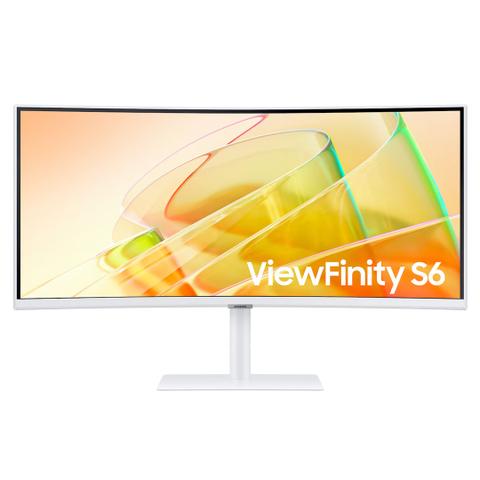

Samsung ViewFinity S65TC WQHD Thunderbolt 4 100Hz HDR Curved 34in Monitor
Buy at PC Case GearWe may earn a commission if you buy; it doesn't change your price. Check the price at PC Case Gear before you buy. How we make money
Price history
Tracking since today
The price hasn't changed since we started tracking it. We'll show its history once it does.
Available at 3 stores
Stores may pay us a commission when you buy; it doesn't affect the order or your price. Learn more
- PLE $599 Cheapest In stock Checked yesterday Buy
- Mwave $699 In stock Checked 3 days ago Buy
- PC Case Gear This page $699 In stock Checked todayBuy


About this product
- Brand
- Samsung
- Store
- PC Case Gear
- Category
- Electronics > Video > Computer Monitors
- SKU
- LS34C650TAEXXY
Specifications
- Screen size
- 34"
- Resolution
- UltraWide QHD (3440×1440)
- Refresh rate
- 100Hz
- Panel type
- VA
The Samsung ViewFinity S6 34 inch Ultra WQHD Monitor is an ultra-wide curved monitor designed for productivity, multitasking, content creation and immersive everyday computing, combining a spacious 34 inch display with Ultra WQHD 3440 x 1440 resolution and a 21:9 aspect ratio. Featuring a 1000R curved VA panel, 100Hz refresh rate, 5ms response time and HDR10 support, the ViewFinity S6 delivers detailed visuals, smooth motion and enhanced contrast across work, entertainment and multimedia applications. AMD FreeSync technology helps minimise screen tearing, while Eye Saver Mode and Flicker Free technology provide added comfort during extended viewing sessions. The ultra-wide screen provides ample desktop space for working with multiple applications side by side, making this Samsung 34 inch monitor a practical choice for office work, spreadsheets, creative workflows and home productivity. Connectivity includes HDMI, DisplayPort and USB-C, with USB-C supporting up to 90W power delivery for compatible laptops, while the integrated USB hub provides convenient peripheral connectivity. The ergonomic stand offers height, tilt and swivel adjustment, with VESA mounting support for flexible installation. With its combination of Ultra WQHD resolution, 100Hz refresh rate, 1000R curved display, USB-C connectivity and wide 21:9 workspace, the Samsung ViewFinity S6 34 inch monitor is a versatile ultra-wide display for modern professional and home setups.
Features
34" ViewFinity S65TC Thunderbolt™ 4 WQHD Monitor
Expand Your Creative Realm
- 1000R
- HDR10
- Thunderbolt™ 4

Ultra Wide Immersion
Ultra-WQHD in 1000R Curvature
Immerse yourself in games, movies or design projects. A 34" 1000R curved display surrounds you with a 21:9 aspect ratio. The curve closely matches the human field of sight, so you can maximise your screen real estate and reach new levels of productivity with less eye strain.

Enhanced Realism Through More Colour
1 Billion Colours with HDR101
See a wider gamut of colours for stunning accuracy and detail. HDR10 provide near limitless hues and true-to-life colour representation, with darker darks and the brighter brights. Content is a joy to look at and can be experienced as intended. (Screen image simulated. HDR mode must be activated through PC settings.)

Connect to More
Thunderbolt™ 4 and More
Ditch the clutter with multiple ports. Power devices with 90W charging and transmit data at the same time with Thunderbolt™ 4 connectivity. The HDMI, DisplayPort and USB3 Hub keep you connected to your devices, while a LAN port lets laptops without a port to connect to the monitor for Ethernet use.
- Thunderbolt4
- DP
- HDMI
- LAN
- USB SS 3.0 Hub - USB Hub

Sound Without Taking Up Space
Built-In Speaker
Work, learn and play without the need for additional peripherals. With built-in speakers, you can free up desk space by minimising the connections needed for a more efficient working environment, while ensuring you can listen to your favourite content with added ease.
Master Multiple Sources in Harmony
KVM Switch, PBP/PIP and Easy Setting Box
Remove multi-device hassle. A built-in KVM switch lets you control two sources on your monitor with one keyboard and mouse. And it's up to you how you see everything: split screen, Picture in Picture or Picture by Picture (100Hz refresh rate unavailable in Picture by Picture mode). Partition the screen in a variety of ways with Easy Setting Box software (Requires the Easy Setting Box programme on each PC, available for download at samsung.com.).
Adjustable to Meet Your Needs
An Ergonomic Design
Stay focused and comfortable, even when work runs long. Position the monitor to your fit your ergonomics, with a height-adjustable stand, along with swivel and tilt functions to get your ideal angle.
- Tilt
- Swivel
- Height Adjustable Stand

Relieve Your Eyes From Strain
TUV Certified Intelligent Eye Care
Keep your eyes fresh with less screen strain. For those late-night projects, brightness and colour temperature automatically optimise for your environment. TUV-certified for intelligent eye care, the ViewFinity S65TC reduces screen flickering and its eye saver mode helps protects eyes against excessive blue light (Screen image simulated. Screen brightness does not adjust when the surrounding lighting is greater than 200 lux).

Smooth, Stutterless Gameplay
100HZ Refresh Rate and AMD FreeSync™
A 100Hz refresh rate and AMD FreeSync™ work together to keep your screen smooth across your favourite applications, with less screen stuttering and image tearing (Screen image simulated. AMD FreeSync™ support available only when connected via HDMI or DisplayPort.)

Connection Ports
- Power
- HDMI IN
- DisplayPort IN
- USB-B(Upstream)
- LAN
- USB 3.0
- USB/SERVICE
- USB 3.0
- Headphone IN
- Thunderbolt™4 Downstream
- Thunderbolt™4 Upstream