

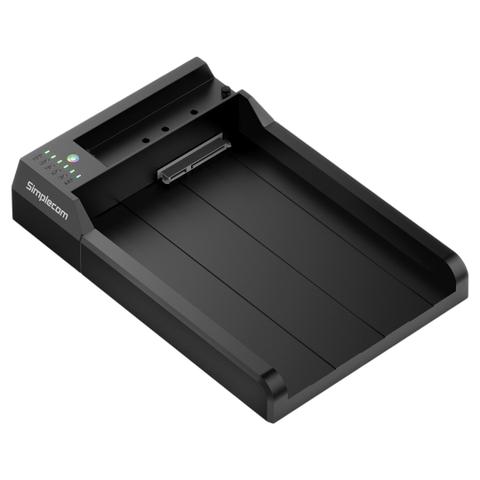

Simplecom SD570 Dual Bay NVMe M.2 plus SATA HDD and SSD Docking Station
Buy at PC Case GearWe may earn a commission if you buy; it doesn't change your price. Check the price at PC Case Gear before you buy. How we make money
Price history
Tracking since today
The price hasn't changed since we started tracking it. We'll show its history once it does.
Available at 3 stores
Stores may pay us a commission when you buy; it doesn't affect the order or your price. Learn more
- PLE $79 Cheapest In stock Checked yesterday Buy
- Mwave $81.95 In stock Checked 3 days ago Buy
- PC Case Gear This page $99 In stock Checked todayBuy

About this product
- Brand
- Simplecom
- Store
- PC Case Gear
- Category
- Electronics > Electronics Accessories > Computer Accessories > Laptop Docking Stations
- SKU
- SD570
Specifications
- Colour
- Bay
The Simplecom SD570 Dual Bay Docking Station supports NVMe M.2 SSDs and 2.5in or 3.5in SATA HDD/SSDs with USB-C connectivity delivering transfer rates up to 10Gbps. Featuring two-way offline cloning, multi-LUN support and UASP, the SD570 provides a convenient solution for data access, backup and migration without requiring a host computer.
Note: Images are for illustrative purposes only, hard drive and SSD not included.
Features

Simplecom SD570 NVMe M.2 + SATA HDD and SSD Dual Bay Docking Station USB 3.2 Gen 2 10Gbps Offline Clone
SD570 is an all-in-one USB docking station that supports both NVMe M.2 and SATA drives. The M.2 slot supports NVMe SSD, and SATA slot support 3.5" or 2.5" SATA HDD/SSD. USB 3.2 Gen 2 interface support up to 10Gbps data transfer rate and can be easily attached to computer USB-C port.
SD570 is designed for easy and fast access to NVMe M.2 and SATA HDD/SSD. With multi-LUN (logical unit number) support, it will show two separate drive letters for NVMe M.2 and SATA slots, so you can access data from NVMe M.2 and SATA drive simultaneously, and copy files from one drive to another easily.
Save and tidy your desktop space, SD570 is a perfect all-in-one device for NVMe M.2 and SATA drives, so you don’t need separate devices to read different types of SSD or HDD. In addition, SATA M.2 and mSATA SSDs also can be supported with an optional SATA to M.2 and mSATA adaptor.
It also can be used as a standalone duplicator dock when not connecting USB to a computer. It has a clone direction switch that allows two-way clone between NVMe M.2 and SATA drives. Ideal for data backup and migration, this docking station provides a simple and fast solution for backup data, batch processing data, formatting, file transfers, data recovery, and more.
- One M.2 slot for NVMe M.2 SSD
- One SATA slot for 3.5" or 2.5" SATA HDD/SSD
- USB 3.2 Gen2 interface support up to 10Gbps data transfer rate
- Support multi-LUN (logical unit number), each slot has a separate drive letter
- Access data from NVMe M.2 and SATA slots simultaneously
- Support offline clone, standalone duplicating without host computer
- Clone direction switch allows two-way clone between NVMe M.2 and SATA drives
- Supports UASP for faster data transfer speed and maximum performance
- Supports TRIM command for improved data writing to extend SSD life
- Plug and play, no additional driver software required
- LED light indicates Power and Activity status

Wide Support for Multiple Types of HDD and SSD
*M.2 slot is for NVMe M.2 SSD only, SATA M.2 and mSATA SSDs can be supported with an optional SATA to M.2 and mSATA adaptor (sold separately)

Bidirectional Offline Clone for Easy Data Migration
Important Notes
- M.2 slot is for NVMe M.2 SSD only, SATA M.2 and mSATA SSDs also can be supported with an optional SATA to M.2 and mSATA adaptor (SA207, sold separately)
- Please do not plug or unplug SSD or HDD when another slot is accessing by PC, it will interrupt data transfer and may corrupt the data
- Do not touch the SSD during operation. Be careful of hot surface of M.2 SSD, M.2 drives temperature can reach up to 70°c during operation
- Please double check the Clone Direction Switch before starting duplication to avoid data loss
- For 10Gbps data transfer rate, the USB 3.2 Gen2 or Thunderbolt 3 interface is required, USB 3.2 Gen2 is formerly known as USB 3.1 Gen2
- For new SSD or HDD drives, it has to be initialised and partitioned before use