

Brand:StarTech
StarTech 2-Port Hybrid USB-C HDMI KVM Switch
At Mwave In stock

Same price since 29 Oct
Unchanged since we started tracking
We may earn a commission at no cost to you. How it works
Price history
Tracking since 29 Oct · 20 days
The price hasn't changed since we started tracking it. We'll show its history once it does.
About this product
- Brand
- StarTech
- Category
- Electronics > Electronics Accessories > Computer Components > Input Devices > KVM Switches
Hassle-Free Setup
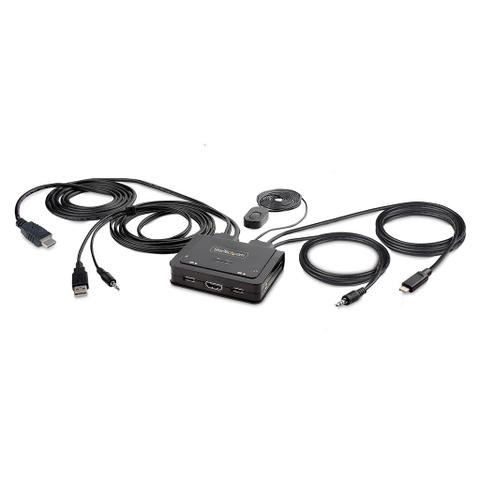
The KVM switch is bus powered and features built-in HDMI, USB-A, USB-C, and 3.5mm Audio Input/Output cables. This ensures compatibility and performance between the KVM switch, monitors, and peripherals - without the need to select and purchase the cables required for those connections.
Compatibility
The 2-port KVM switch is compatible with all operating systems, including Windows, macOS, ChromeOS, and Linux. The KVM works with all hardware platforms including Intel, AMD, and Apple M1/M2. The USB-C host port works with USB-C, USB4, Thunderbolt 3, and Thunderbolt 4 laptops. If the desktop does not have a 4-position 3.5mm port the included 3.5mm Headset Adapter ensures compatibility out of the box.
Intuitive Control
The KVM switch offers two options to switch between hosts - a remote push button or hotkey commands. The remote push button includes a 1.5m cable for optimal placement in the setup. Independent audio switching can be achieved through the software, ensuring uninterrupted audio when switching between host devices.
Enhance Productivity and Device Management with the StarTech.com Connectivity Tools Application
Developed to improve performance and security, StarTech.com Connectivity Tools is the only software suite on the market that works with a wide range of IT connectivity accessories. The software suite includes:
- Advanced Windows Layout Utility: Setup and save custom windows layouts.
- MAC Address Pass-Through Utility: Improve network security.
- USB Event Monitoring Utility: Track and log connected USB devices.
- Wi-Fi Auto Switch Utility: Enable users to quickly access faster network speeds via wired LAN
For more information and to download the StarTech.com Connectivity Tools application, please visit: www.startech.com/connectivity-tools
Applications
- Ideal for sharing peripherals between home and office
- Great for CAD/CAM, video editing, and content creation applications
- Switch a display, mouse, keyboard, and audio peripherals between two computers