

Brand:StarTech
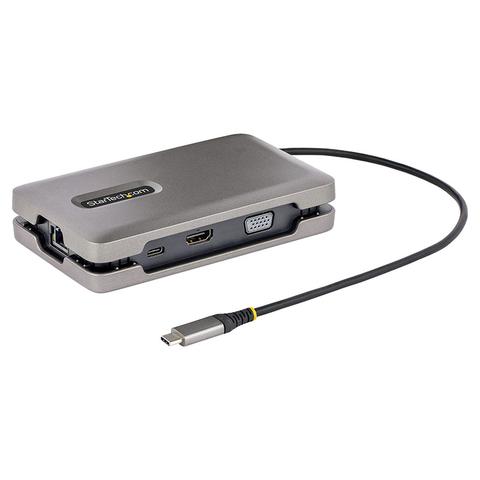
StarTech USB-C Multiport Adapter Docking Station
At Mwave In stock

Same price since 29 Oct
Unchanged since we started tracking
We may earn a commission at no cost to you. How it works
Price history
Tracking since 29 Oct · 21 days
The price hasn't changed since we started tracking it. We'll show its history once it does.
About this product
- Brand
- StarTech
- Category
- Electronics > Electronics Accessories > Computer Accessories > Laptop Docking Stations
Versatile, High-Performance Video via MST
The compact USB Type-C Docking Station features three video output options to turn your laptop into a single or multi-monitor workstation.
HDMI Port
Provides HDR video with resolutions up to 4K 60Hz.
VGA Port
Provides analog video with resolutions up to 1080p 60Hz.
USB-C Port
Provides the industry's first downstream full featured video or data (10Gbps) USB-C port that supports DP Alt Mode video or peripheral connection, on a non-Thunderbolt adapter.
The advanced video versatility of this Multiport Adapter, makes it suitable for a wide variety of applications:
Connect a portable USB-C monitor as an extended display, to obtain a high resolution external monitor during on-the-go travel between an office desk, home office, hot desk, or the boardroom.
Connect a USB-C peripheral to the downstream 10Gbps USB-C port, while using the HDMI and/or VGA ports to connect external monitor(s) as extended display(s).
Connect multiple external monitors as extended displays, using any combination of the two video ports, to create a high-productivity workstation. USB-C video adapters (sold separately) can be used to connect HDMI, DVI, VGA, or DisplayPort monitors to the USB-C video port.
This Docking Station utilizes MST to obtain video versatility. Video performance is based upon the number of attached monitors and the host computer's video controller. Consult the manufacturer of the host computer to determine MST video performance. StarTech.com performs rigorous performance benchmarks with all major host computer video controllers. The video performance results of our testing are listed below:
| HDMI or USB-C DP Alt Mode Port Single Monitor | VGA Port Single Monitor | HDMI and USB-C DP Alt Mode Dual Display | |
| DisplayPort 1.2 Alt Mode Intel 10th Gen and Previous Processors |
4K 30Hz | 1080p 60Hz | 1 x 4K 30Hz + 1 x 1080p 60Hz Or 2x 1080p 60Hz |
| DisplayPort 1.4 Alt Mode Intel 11th Gen and Later Processors |
4K 60Hz | 1080p 60Hz | 1 x 4K 30Hz + 1x 1440p 60Hz Or 2x 1440p 60Hz |
Notes:
- This chart displays maximum performance capabilities with Intel Integrated Graphics (performance may vary depending on system configuration)
Connect Your Devices
The USB 3.2 Gen 2 (10Gbps) hub features two USB-A ports and one USB-C port, for connecting your USB devices. The downstream USB-C port can be used to connect a monitor, or USB-C peripheral with up to 10W (5V/2A) of power, to power or charge your peripherals.
Multiple Use Cases
A versatile docking solution for use at an office desk, home office, hot desk, or in the boardroom. It's portable enough to be carried in a bag / backpack for mobile use. The USB-C dock can operate with bus-power alone, or with a USB-C power adapter connected to the USB Power Delivery pass-through port - for full laptop and USB-C peripheral charging. The lightweight docking station features a built-in 10 in (25 cm) USB-C host cable for added setup flexibility and to reduce port strain with laptop connection elevated off desktop surface.
Charge Your Laptop and Peripherals
With support for USB PD 3.0 (100W - 80W charging, 20W reserved for multiport adapter), the Multiport Adapter enables charging of the host computer and peripherals connected to the USB-C port. USB PD is only available when a USB-C power adapter is connected to the PD pass-through port. PD 3.0 features Fast Role Swap (FRS) which prevents USB data disruption when switching power sources (e.g., USB-C power adapter to bus power).
Reliable Network Connectivity
The Gigabit Ethernet port ensures reliable wired network access. Support for Wake-on-LAN (WoL) enables remote booting of the host computer.
Enhance Productivity and Device Management with the StarTech.com Connectivity Tools Application
Developed to improve performance and security, StarTech.com Connectivity Tools is the only software suite on the market that works with a wide range of IT connectivity accessories. The software suite includes:
Advanced Windows Layout Utility: Setup and save custom windows layouts.
MAC Address Pass-Through Utility: Improve network security.
USB Event Monitoring Utility: Track and log connected USB devices.
Wi-Fi Auto Switch Utility: Enable users to quickly access faster network speeds via wired LAN.
Applications
Home office IT deployment, ideal for traveling between the home and office
Connect a portable USB-C monitor as an extended display during on-the-go travel between your office desk, home office, hotel desk, or the boardroom
Connect a USB-C peripheral to the downstream 10Gbps USB-C port, while using the HDMI and/or VGA port(s) to connect external monitor(s)
Charge your tablets and smartphones from the 10W USB-C port
?