

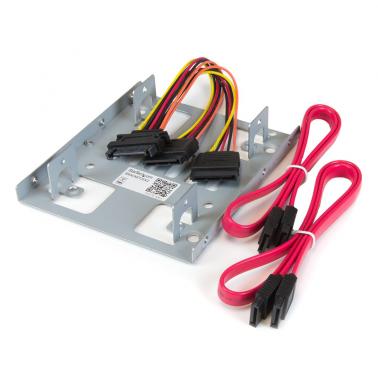

StarTech Dual 2.5in SATA HDD to 3.5in Bay Mounting Bracket Adapter
Out of stock at Umart
Price checked today
We may earn a commission if you buy; it doesn't change your price. Check the price at Umart before you buy. How we make money
Price history
Tracking since today
The price hasn't changed since we started tracking it. We'll show its history once it does.
About this product
- Brand
- Startech
- Store
- Umart
- Category
- Electronics > Electronics Accessories > Computer Components > Storage Devices > Hard Drive Accessories > Hard Drive Enclosures & Mounts > Hard Drive Enclosures
- SKU
- 73966
Specifications
- Colour
- Bay
StarTech Dual 2.5in SATA HDD to 3.5in Bay Mounting Bracket Adapter
The BRACKET25X2 Dual hard drive mounting bracket kit lets you install two 2.5in SATA hard drives (HDD) or solid state drives (SSD) into a single 3.5in mounting bay -- enabling you to significantly increase the performance of your desktop by adding the speed of a 2.5in SSD.
Maximize the internal mounting space of your computer, by installing two 2.5in hard drives in the same 3.5in bay. The bracket can be used with SATA hard drives and solid states
For a hassle-free installation, the hard drive mounting kit includes all required data and power cabling for both SATA drives. Plus, the bracket can support IDE drives when using our 2.5in to 3.5in IDE Hard Drive cable adapter (IDE4044).
SPECIFICATIONS:
| Interface | SATA |
| Package Height | 1.5 in [3.8 cm] |
| Package Length | 6.5 in [16.5 cm] |
| Shipping (Package) Weight | 6.7 oz [190.0 g] |
| Package Width | 5.5 in [14.0 cm] |
| Package Quantity | 1 |
| Weight of Product | 2.6 oz [73.0 g] |
| Color | Silver |
| Material | Steel |
| Product Length | 4.6 in [11.6 cm] |
| Product Width | 4.0 in [10.2 cm] |
| Product Height | 0.9 in [2.2 cm] |
| Included in Package | 1 - Dual 2.5" mounting bracket 1 - Drive mounting screw kit 4 - Flat screws and washers (bottom drive) 4 - M3x5mm screws (top drive) 4 - 6-32 Screws (case mount) 2 - SATA data cables 1 - SATA Power Y cable 1 - quick-start guide |