

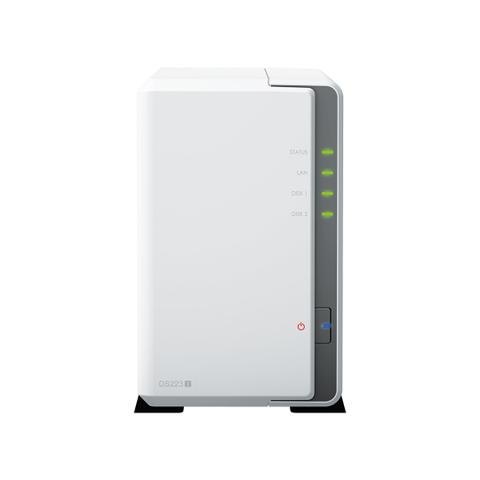

Synology DiskStation DS223j 2 Bay NAS
Buy at PC Case GearWe may earn a commission if you buy; it doesn't change your price. Check the price at PC Case Gear before you buy. How we make money
Price history
Tracking since 2 days ago
The price hasn't changed since we started tracking it. We'll show its history once it does.
Available at 3 stores
Stores may pay us a commission when you buy; it doesn't affect the order or your price. Learn more
- PLE $339 Cheapest In stock Checked yesterday Buy
- PC Case Gear This page $349 In stock Checked 2 days agoBuy
- PC LAN $351 In stock Checked yesterday Buy


About this product
- Brand
- Synology
- Store
- PC Case Gear
- Category
- Electronics > Electronics Accessories > Computer Components > Storage Devices > Network Storage Systems
- SKU
- DS223J
Specifications
- Colour
- Bay
The Synology DiskStation DS223j 2 Bay NAS features a quad core 1.7 GHz processor, 1 GB DDR4 memory, and two bays for 2.5 or 3.5 inch drives. It supports RAID 0, RAID 1, Hybrid, JBOD and Basic storage modes and includes one Gigabit Ethernet port plus two USB 3.2 ports. The DS223j runs quietly and uses Synology DiskStation Manager for file sharing, backup and cloud storage.
Features

Diskstation DS223j
Compact, Quiet, And Energy-Efficient Storage
All-In-One Platform to Organise Your Data
Secure Private Cloud
Anywhere, anytime secure access to all your data.
Easy Sharing and Syncing
Safely access and share files and media from anywhere.
Comprehensive Data Protection
Hardware and software engineered to protect your data — trusted by millions.
Built for Sharing
DS223j is designed for small teams to share, sync, and collaborate more efficiently.

Multi-Platform File Access
Manage your files and media from anywhere with synology drive. Available on pc, mac, linux, chromebook, android, ios, or any device equipped with a browser.

Real-Time Collaboration
Stay productive while working in a team or with your clients. Work together across different platforms using synology office.
Sync Across Sites
Keeping data synced between different sites has never been easier. Synology drive sharesync keeps files and folders synchronised across synology systems.
Seamless Synchronisation to Clouds
Sync files between your private cloud and public cloud storage platforms, including google drive, dropbox, microsoft onedrive, and more with synology cloud sync. Retain local copies of your cloud data to centralise management and achieve data ownership.
Your Data in Safe Hands with Btrfs
The advanced btrfs file system helps safeguard data against corruption through file self-healing and allows for the reversal of unintentional or malicious changes through fast snapshot technology. (Feature available from DSM 7.2.)
Store, Share, And Protect
Configure your DS223j to manage all your documents, photos, and other files, or protect your physical assets with professional video surveillance.
Photo Management

Manage Your Photo Collection
Organise your photos and videos with smart and intuitive features. Browse automatically generated albums using facial recognition, geolocation, tags, and more.
Sharing Made Safer and Easier
Securely share media with colleagues or clients while leveraging privacy-focused options for your peace of mind. Collaborate with selected users on a folder-based media library by creating a shared space.
Data Protection

Automated Media Backup
Automatically upload photos and videos taken on your mobile device to your private cloud with synology photos or synology drive.
Protection Against Cyberattacks
Leverage synology drive to protect data from ransomware attacks or accidental deletion with real-time or scheduled backup of your pc folders.
Video Surveillance
Wide Compatibility
Choose from over 8,300 IP cameras or onvif devices compatible with synology surveillance station to keep your premises secure. (surveillance station includes 2 free licences. Connecting more cameras and devices requires additional licences.)

Universal Access
Watch live camera streams through web browsers, desktop clients, or mobile apps. Get notified of events and take immediate action.
Add an Extra Layer of Protection
Perform Full Synology System Backups
Back up your entire synology device, including system settings and applications, or select specific folders. Transfer all backup data to multiple destinations using hyper backup. (c2 storage for hyper backup requires purchase of an eligible annual or monthly subscription. A free trial is available for each newly registered synology account.)
Keep Your Data Safe With Snapshots
Take your data protection to the next level by creating automatic point-in-time snapshots of shared folders that can be copied off-site and rapidly restored using snapshot replication. (feature available from dsm 7.2.)
Extra Protection with Extended Warranty Plus
Extend the standard 2-year hardware warranty (extended warranty plus must be purchased within 90 days of the device purchase date, or if none is available, 180 days of the device manufacturing date. A synology account is required for the purchase. The starting date of the extended warranty plus additional coverage is calculated based on the purchase date of your synology nas. If you cannot provide proof of purchase, the device manufacturing date applies.) of your DS223j with 2 more years of synology-certified support and premium services to help you recover faster in the event of disaster.

Hardware Overview
1.Status indicator
2. Lan indicator
3. Drive status indicators
4. Power button and indicator
5. Fan
6. 1GbE RJ-45 port
7. USB 3.2 gen 1 ports
8. Reset button
9. Power port
10. Kensington security slot
More Ways to Harness Your NAS
File Management
Store, access, and share files securely and efficiently with the native solutions available in synology dsm.
Productivity Solutions
Bring teams together, communicate, and collaborate in real time on a protected and private platform.
Ransomware Prevention and Protection
Minimise the threat posed by increasingly sophisticated malware with synology.