

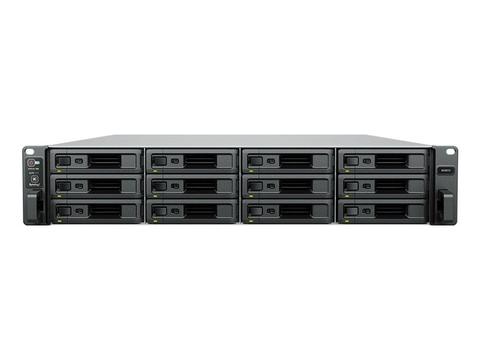
Synology RackStation SA3410 12-Bay Xeon D-1541 Scalable NAS
In stock at PC LAN
Price checked today
We may earn a commission if you buy; it doesn't change your price. Check the price at PC LAN before you buy. How we make money
Price history
Tracking since today
The price hasn't changed since we started tracking it. We'll show its history once it does.
About this product
When scalability meets performance
The Synology SA3610 and SA3410 are designed for on-demand scalability and offer up to 1.7 PB of storage when fully expanded.1 They let enterprise data centers, studios, and growing businesses store large data volumes without sacrificing speed and performance.
Fast and reliable
Over 6,200/3,000 MB/s seq. read/write,2 built-in 10GbE, and hardware and software redundancy.
Expand and adjust
Add up to 84 extra drive bays,1 40GbE or Fibre Channel,3 and SSD cache volumes4 whenever needed.
Host core applications
Back up 1,000+ endpoints, manage 128 IP cameras,5 or provide mailboxes for up to 1,600 users.
Flexibly expand storage capacity
Scale up your SA3610 and SA3410 flexibly to meet growing data demands whenever needed. Increase your storage capacity by adding up to seven 12-bay RX1222sas expansion units as your deployment grows.
Networking capabilities
Built-in dual 10GbE RJ-45 ports allow for high-speed network transmission right out of the box. Users can also boost network redundancy and bandwidth by adding optional 10/25/40GbE and Fibre Channel adapter cards into the two available PCIe 3.0 expansion slots.3
Reliable and dependable
Protect your data and leverage hardware and software safeguards to ensure data and service availability in the face of disasters or malicious attacks.
Reliable and dependable
Protect your data and leverage hardware and software safeguards to ensure data and service availability in the face of disasters or malicious attacks.
Data mirroring
Create a Synology High Availability (SHA) cluster on your servers to minimize data loss and enjoy minute-level failover with two SA3610 or SA3410 to act as active and passive servers.
Dual power supply
Reduce the possibility of power disruptions with redundant PSUs and reduce single points of hardware failure with redundant system fans.
Remote management
Take charge of your device, even if your primary networks are down. With out-of-band (OOB) management, you remotely troubleshoot your device.
Data resiliency
Set up near-instantaneous snapshot and replication tasks for file and folder level restoration to ensure business continuity and leverage Btrfs for file self-healing.
Versatile data storage
Consolidate business data, backup data, and more in a highly scalable server.
File server
Utilize SA3610 and SA3410’s storage capacity and flexible expansion capabilities to host large amounts of data on a central repository.
Share and sync files with an all-in-one private cloud solution
Empower employees across your organization to access, edit, and share corporate files securely and conveniently from desktop, mobile, or web browser platforms. Leverage powerful admin tools to track and set file permissions and control access to documents and files.
Enforce company policies with Windows AD and SMB/NFS
Configure and implement group policies for groups of users using access control lists (ACL) through Windows Active Directory/LDAP integration. Enable user access to files or folders via SMB or NFS protocols.
Sync files across business sites
Synology Drive ShareSync enables one or two-way syncing between multiple Synology servers so that all team members can access the same set of data on their nearest file server.
Reduce storage footprint
Cut bandwidth use, boost sync speeds, and reduce storage footprint by intelligently syncing the bulk of your data to the cloud with Hybrid Share,6 while deploying Synology devices locally to give teams fast access to all their frequently used data at local network speeds.
Backup repository
Back up PCs, servers, Synology systems, SaaS data, and VMs, and back up your backup servers themselves with a scalable central storage solution.
Bare-metal PC, server, and VM backup
Securely back up Windows clients and servers, Linux endpoints, Synology systems, and VMware® and Hyper-V® virtual machines to the SA3610 and SA3410 with Active Backup for Business. Manage all tasks through a centralized management console and choose between bare-metal or file-level restoration. Built-in data deduplication maximizes storage efficiency.
Protect company SaaS accounts
Protect Microsoft 365 and Google Workspace accounts by maintaining complete offline copies of your crucial information and configurations with Active Backup for Microsoft 365 and Active Backup for Google Workspace.
Flexible off-site backup for shares and LUNs
Use Hyper Backup to back up shared folders, LUNs, system settings, and software packages from your Synology system to a secondary server, external device, or Synology C2 Storage. Set up backup schedules, multi-versioning, and flexible backup rotation, protect data with fine-grained permissions and encryption, and reduce backup sizes with built-in deduplication.
Snapshot Replication enables configurable point-in-time snapshots of shared folders and LUNs with an RPO as low as 5 minutes and recovery within seconds.
Bare-metal backup for Synology systems
Perform bare-metal backups and use multi-versioning and data deduplication to store backup copies of Synology systems, while drastically reducing the amount of space needed to store mission-critical data.
Business application platform
Boost team efficiency by utilizing Synology productivity solutions to work and communicate across teams or test out new software in company-hosted containers or virtual machines.
Collaborative tools for team productivity
Create, edit, and share documents, slides, and spreadsheets with teams in real time. Store files in a secure private cloud to take ownership of your data.
Send and receive emails on Synology’s private email server using powerful webmail tools and experience full data ownership, transparent total cost of ownership, and robust security features.
Stay connected with team members by using secure one-on-one chats, public channels, encrypted private channels, and group conversations for efficient workplace communication.
Test out applications in a contained environment
Safely test out new packages, software, and applications in an isolated environment using Docker and Synology Virtual Machine Manager7 (VMM) — a hypervisor for Windows®, Linux®, and Virtual DSM.
Centralized monitoring and management
Monitor and manage your Synology fleet from a central interface, on-prem or in the cloud.
Central Management System (CMS)
Manage Synology servers from a central console using group policies, task delegation, batch updates, and more.
Active Insight
Monitor your global Synology fleet’s performance, backup status, login activity and more with the power of the cloud.
Backed by Synology hard drives
Engineered to handle high-intensity workloads, Synology hard drives consistently deliver top-grade performance.
Specifications
Hardware Specifications · SA3410
CPU · CPU Model · Intel Xeon D-1541
CPU Quantity · 1
CPU Architecture · 64-bit
CPU Frequency · 8-core 2.1 (base) / 2.7 (turbo) GHz
Hardware Encryption Engine (AES-NI)
Memory · System Memory · 16 GB DDR4 ECC RDIMM
Memory Module Pre-installed · 16 GB (16 GB x 1)
Total Memory Slots · 4
Maximum Memory Capacity · 128 GB (32 GB x 4)
Notes
- Synology reserves the right to replace memory modules with the same or higher frequency based on supplier's product life cycle status. Rest assured that the compatibility and stability have been strictly verified with the same benchmark to ensure identical performance.
- Please select Synology memory modules for optimum compatibility and reliability. Synology will not provide complete product warranty or technical support if non-Synology memory modules are used for memory expansion.
- Installing memory modules with differing capacities is not recommended. Check the Hardware Installation Guide of your Synology product for recommended memory configurations.
Storage · Drive Bays · 12
Maximum Drive Bays with Expansion Unit · 96 (RX1222sas x 7)
Compatible Drive Type* (See all supported drives)
- 3.5" SAS HDD
- 2.5" SAS SSD
- 3.5" SATA HDD
- 2.5" SATA SSD
Hot Swappable Drive*
Notes
- It is strongly recommended that you only install drives listed on your device's compatibility list. Storage pool and volume creation processes may fail when using unverified drives. Synology is unable to provide technical support for devices using unsupported components.
- "Compatible drive type" indicates drives that have been tested to be compatible with Synology products. This term does not indicate the maximum connection speed of each drive bay.
External Ports · RJ-45 1GbE LAN Port · 4 (with Link Aggregation / Failover support)
RJ-45 10GbE LAN Port · 2 (with Link Aggregation / Failover support)
Out-of-Band Management LAN Port · 1
Max. number of LAN ports · 15
USB 3.2 Gen 1 Port* · 2
Expansion Port · 1
Notes
- This device's 1GbE LAN ports have a maximum transmission unit (MTU) size of 1,500 bytes.
- The USB 3.0 standard was renamed to USB 3.2 Gen 1 by the USB Implementers Forum (USB-IF) in 2019.
PCIe · PCIe Expansion · 2 x Gen3 x8 slots (x8 link)
File System
Internal Drives
- Btrfs
- EXT4
External Drives
- Btrfs
- EXT4
- EXT3
- FAT
- NTFS
- HFS+
- exFAT
Appearance · Form Factor (RU) · 2U
Size (Height x Width x Depth) · 88 mm x 482 mm x 724 mm
Weight · 14.5 kg
Rack Installation Support* · 4-post 19" rack (Synology Rail Kit - RKS-02)
Notes · The rail kit is sold separately
Others · System Fan · 80 mm x 80 mm x 4 pcs
Fan Speed Mode
- Full-Speed Mode
- Cool Mode
- Quiet Mode
Easy Replacement System Fan
Power Recovery
Noise Level* · 49.8 dB(A)
Scheduled Power On / Off
Wake on LAN / WAN
Power Supply Unit / Adapter · 550 W
Redundant Power Supply
AC Input Power Voltage · 100V to 240V AC
Power Frequency · 50/60 Hz, Single Phase
Power Consumption
136.15 W (Access)
58.48 W (HDD Hibernation)
British Thermal Unit
464.56 BTU/hr (Access)
199.54 BTU/hr (HDD Hibernation)
Notes
- For more information on how power consumption is measured, refer to this article.
- Noise testing was conducted with the Synology system fully installed with Synology SATA SSDs and in an idle state. Two G.R.A.S. type 40AE microphones were placed at a 1 m distance from the front and rear of the device. Background noise: 16.49-17.51 dB(A); Temperature: 24.25-25.75˚C; Humidity: 58.2-61.8%.
Temperature · Operating Temperature · 0°C to 35°C (32°F to 95°F)
Storage Temperature · -20°C to 60°C (-5°F to 140°F)
Relative Humidity · 5% to 95% RH
Certification
- FCC
- CE
- BSMI
- VCCI
- RCM
- UKCA
- EAC
- CCC
- KC
- UL
Warranty · 5 Years
Notes · The warranty period starts from the purchase date as stated on your purchase receipt. (Learn more)
Environment · RoHS Compliant
Packaging Content
- Main Unit X 1
- Accessory Pack X 1
- AC Power Cord X 2
- Quick Installation Guide X 1
Optional Accessories
- DDR4 ECC RDIMM: D4ER01-16G*/D4ER01-32G
- Expansion Units: RX1222sas
- 3.5" SAS HDD: HAS5300
- 3.5" SATA HDD: HAT5300
- 2.5" SATA SSD: SAT5210
- M.2 SSD & 10GbE Combo Adapter Card: E10M20-T1
- M.2 SSD Adapter Card: M2D20
- 25GbE Network Interface Card: E25G21-F2
- 10GbE Network Interface Card: E10G21-F2/E10G18-T2/E10G18-T1
- Rail Kit Sliding: RKS-02
- Surveillance Device License Pack
Notes · Installing memory modules with differing capacities is not recommended. Check the Hardware Installation Guide of your Synology product for recommended memory configurations.