

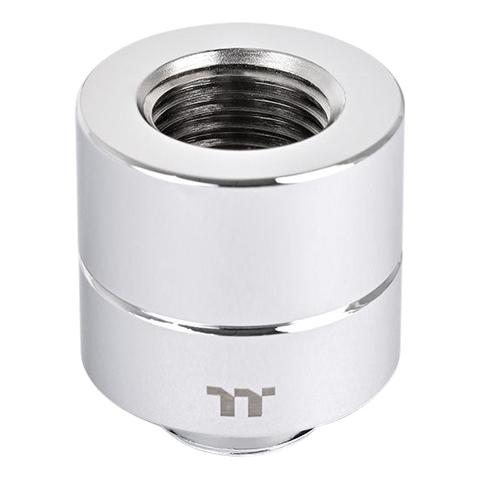

Thermaltake Pacific F-Pro Female to Male 20mm extender Chrome
- 20mm
- 30mm $25
In stock at PC Case Gear
Price checked today
We may earn a commission if you buy; it doesn't change your price. Check the price at PC Case Gear before you buy. How we make money
Price history
Tracking since today
The price hasn't changed since we started tracking it. We'll show its history once it does.
About this product
- Brand
- Thermaltake
- Store
- PC Case Gear
- Category
- Electronics > Electronics Accessories > Computer Components > Computer System Cooling Parts > Water Cooling Components
- SKU
- CL-W440-CU00SL-A
Specifications
- Colour
- Chrome
The Thermaltake Pacific F-Pro Female to Male 20mm Extender Chrome features a mirror-polished copper finish, enhancing the aesthetics of custom liquid cooling systems. Its G1/4 threading and O-ring design ensure leak-free connections, while the 20mm length provides flexibility in tight spaces.
Features

Pacific F-Pro Female to Male 20mm Extender - Chrome

Sleek Mirror Polished Design
The Pacific F-Pro Fittings undergo a meticulous treatment, resulting in a flawless mirror-polished surface. This premium design enhances visual appeal, elevating custom liquid cooling configurations aesthetics with a stylish and concise look.

Simplify Your Build with a Little Help
The Pacific F-Pro Female to Male 20mm Extender comes in handy when you need a 90-degree angle in a tiny space or extend the length of a tube for any reason.

Easy and Reliable Installation
The Pacific F-Pro Extender is compatible with G1/4 screw threads, offering excellent component compatibility. Its O-ring leak-free design ensures a secure, sealed connection for your custom liquid cooling configurations.
Caution: For added convenience during installation, consider wearing non-slip gloves to ensure secure grip while tightening and adjusting fittings.
Cautions
Thermaltake recommends the following steps to be taken before using the Pacific series radiators and water blocks
- To ensure a clean loop, flush and rinse your radiators and water blocks with distilled water prior to use.
- Do not use tap water or distilled water as your coolant, it may harm your loop and reduce performance.
- It is strongly recommended to use market proven pre-mix coolant, such as
- Thermaltake Coolant 1000. It offers great performance while protecting the entire liquid loop from corrosion.
- Before storing your water cooling components, please clean, rinse and dry. This will ensure a longer lifespan for your components.
Thermaltake recommends the following steps to be taken after completing your water loop setup
- It is strongly recommended to use market proven pre-mix coolant, such as Thermaltake Coolant 1000. It offers great performance while preventing the entire cooling system – copper, brass, nickel, aluminium, and steel – from corrosion.
- Fill the reservoir with coolant and cycle the power on and off several times while the pump pushing the coolant into the loop.
- DO NOT let the pump run dry, when there is no liquid entering the pump turn off your power immediately
- Fill the reservoir to the top as it will prevent air from going into the pump
- If necessary tilt the system slightly from side to side to bleed the air out of the loop.
- Place some paper towels under fittings and joining points to test for leaks.
- Run the loop with the fill port open for about 24 hours to completely bleed the air out of the loop.
- Before starting, flush out your system correctly to prevent any coolant or unwanted particles sticking to your tubes, radiators and other cooling components.
- Coolant might fade over time.