

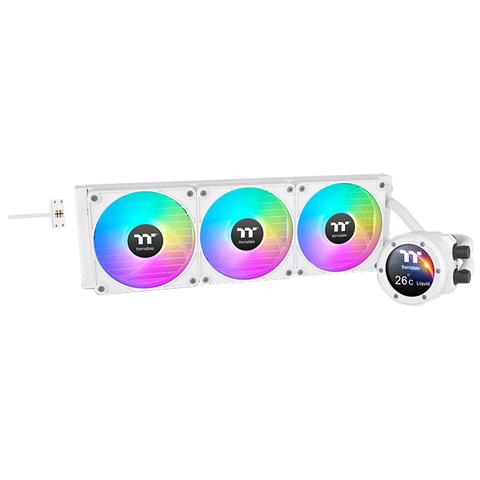

Thermaltake TH420 V2 Ultra EX ARGB LCD AIO Liquid Cooler Snow
In stock at PC Case Gear
Price checked today
We may earn a commission if you buy; it doesn't change your price. Check the price at PC Case Gear before you buy. How we make money
Price history
Tracking since today
The price hasn't changed since we started tracking it. We'll show its history once it does.
About this product
- Brand
- Thermaltake
- Store
- PC Case Gear
- Category
- Electronics > Electronics Accessories > Computer Components > Computer System Cooling Parts > All-in-One Liquid CPU Coolers
- SKU
- CL-W428-PL14SW-A
Specifications
- Colour
- Snow
The Thermaltake TH420 V2 Ultra EX ARGB Snow White Liquid Cooler features a 2.1 inch LCD display with a 480 x 480 resolution, bringing Ultra EX to the TH series. Equipped with three CT140 EX ARGB fans, the TH420 V2 Ultra EX ARGB is suitable for medium to large chassis' that fits 420mm AIOs and for those who want to try the latest Ultra EX series.
Features
TH420 V2 Ultra EX ARGB Sync All-In-One Liquid Cooler - Snow Edition
The TH420 V2 Ultra EX ARGB Sync Snow is equipped with three CT140 EX ARGB Sync White Fans, providing an enhanced PC Building experience with the new MagForce 2.0, enabling quicker fan assembly and a more stable connection. This AIO also features a full modular design, allowing the fans to be used on the AIO by connecting with one single cable or as individual fans that power up with three different cables provided. Additionally, the TH420 V2 Ultra EX ARGB Sync Snow has an industrial cap design with a 480 x 480 resolution LCD display and is suitable for medium to large chassis that accommodate 420mm AIOs, offering both Ultra aesthetics and MagForce 2.0 functionality.
Full Modular Design
The CT EX ARGB Fans come with the new MagForce 2.0 which allows you to easily connect AIO fans with only one cable. Alternatively, you may also use them as individual fans with the three different cables in the package.
Steady Connection with MagForce 2.0
Evolved from SWAFAN EX’s Magnetic Force Design, the new MagForce 2.0 Pogo pin contact pads are TWO times larger for greater tolerance. This enhancement significantly reduces the potential faulty alignment no matter you are daisy-chaining fans together or connecting fans with cable, further boosting the installation efficiency and streamlining the Building experience.

Say Goodbye to Excessive Cables
Connect your fans with CT EX’s MagForce 2.0 Quick Connect Design and be free from messy cables!

Sync with CT140 EX ARGB Sync Fans
Utilising the CT140 EX ARGB Sync White Fans on this model, not only you can match up some of our chassis’ pre-installed fans, but you can unify your fans with your Built! The CT140 EX ARGB Sync White provides an 90.3 CFM of air flow with 3.07 mm-H2O static pressure while maintaining 30.7 dB-A noise levels.
Note: CT Fans requires motherboard sync software to control ARGB lighting effects.

Enhanced Cooling Surface With A Compact Design
The TH V2 Ultra EX ARGB Sync Snow Series has a 27mm slim radiator with a thickened 20mm copper chamber, ensuring the same easy installation but with even better cooling performance.

Keep it COLD with Copper
The high-performance copper base plate accelerates heat conductivity. The high-quality and reliable pump enables maximum water circulation, keeping the copper plate continuously cool. The low evaporation tube effectively decreases the loss of coolant; therefore, no refill is required.

Personalise Your LCD Display
The TH V2 Ultra EX ARGB Sync Snow Series features an industrial-inspired design to freshen up its 2.1” LCD display. The highly customisable LCD display has a 480*480 high resolution, allowing you to showcase 16.8M colour videos or photos effortlessly, enhancing the visual aesthetics of your Built.
Fully Customisable with TT RGB Plus 2.0
Monitor frequency and real-time temperature directly from the 2.1” LCD display, or customise start-up and standby screens by uploading images or GIFs to add extra flair with the TT RGB Plus 2.0 software.
Caution
- The Ultra Series products are only supported by the TT RGB Plus 2.0. Software.
- File size is restrict to 20 MB
Quick Upload Visuals with TT Play Link App
With the TT Play Link app, customising your LCD displays is much easier through a smartphone.
Whether uploading pictures and videos from your gallery or capturing live moments with the camera or streaming functions, personalising your screen is more convenient than ever!
TT RGB PLUS Ecosystem
Light up your system with almost limitless possibilities and synchronise your TT RGB PLUS compatible products to create a RGB ecosystem that is truly unique to you.
- AIO Liquid Coolers
- Fans
- Power Supply Units
- CPU Water Block
- VGA Water Blocks
- Distro Plate & Pump Kit
- Radiator
- Pump + Reservoir
- Mousepads
- Headset
- Mice
- Headsets Stand
- Chassis
- Memory Lighting Kit
- DDR5 Memory
- Gaming Desk
- Keyboards
TT RGB PLUS 2.0 Software
The new version of Thermaltake’s TT RGB PLUS patented software, providing more lighting effects and PC monitoring functions.
Caution
TT RGB PLUS 2.0 and TT RGB PLUS 1.0 will overwrite one another; users can only install one version of TT RGB PLUS.
TT Play Link Mobile App
TT Play Link is a new mobile application that simplifies the customisation of PC LCD screens, enabling quick visual uploads and live streaming from a smartphone.
Sync with Motherboard RGB Software
Designed to synchronise with ASUS Aura Sync, GIGABYTE RGB Fusion, MSI Mystic Light Sync, and ASRock Polychrome. It supports motherboards with a 5V addressable RGB header, allowing you to control the lights directly from the software mentioned above without installing any extra lighting software or controllers. For more details, please visit ASUS, GIGABYTE, MSI, and ASRock official websites.
Caution
Chassis, ARGB Fan, ARGB AIO
- The motherboard signal connector only supports a 5V header.
- Make sure your motherboard software is the latest version.
RGB Memory, VGA Water block, Distro Plate
- This product can only be used with either the TT RGB PLUS software or the dedicated motherboard software. Having more than two applications open may cause conflicts.
- The motherboard signal connector only supports a 5V header.
- Make sure your motherboard software is the latest version.