

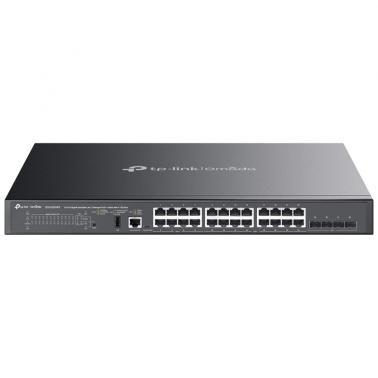
TP-Link Omada 24-Port Gigabit Stackable Lite L3 Managed PoE++ Switch with 4 10G Slots (SG5428XMPP)
Out of stock at MSY
Price checked today
We may earn a commission if you buy; it doesn't change your price. Check the price at MSY before you buy. How we make money
Price history
Tracking since today
The price hasn't changed since we started tracking it. We'll show its history once it does.
About this product
TP-Link Omada 24-Port Gigabit Stackable Lite L3 Managed PoE++ Switch with 4 10G SlotsOmada SG5428XMPP is a dependable entry-level L3 managed PoE++ switch tailored for the access layer, featuring L3 routing, fast 10 Gbps wired speeds, and stacking options. It boasts a 500W PoE budget,* 24 gigabit RJ45 ports (8 PoE++, 16 PoE+), 4 10 Gbps SFP+ slots, physical stacking ability, and centralised management. Integrated with strong security and extensive management features, the SG5428XMPP offers a reliable networking solution for SMEs, and ISPs.SPECIFICATIONS:HARDWARE FEATURESInterface 24 10/100/1000 Mbps RJ45 Ports (8 PoE++, 16 PoE+) 4 1/10 Gbps SFP+ Slots** 1 USB 2.0 Port 1 RJ45 Console Port 1 USB Type-C Console Port ** Only one 10G RJ45 SFP+ module can be inserted at a time.Fan Quantity 3Power Supply 100-240 V~ 50/60 HzPoE Ports (RJ45) Standard: 802.3af/at/bt compliant PoE++ Ports: Ports 18 (up to 90W per Port) PoE+ Ports: Ports 924 (up to 30W per Port) Power Budget: 500W* Fast PoE Perpetual PoE * PoE budget calculations are based on laboratory testing. The actual PoE power budget is not guaranteed and will vary due to client limitations and environmental factors. The maximum power output of every single PoE++ port is 90W.Dimensions ( W x D x H ) 17.3 13.0 1.7 in (440 330 44 mm)Mounting RackmountableMax. Power Consumption 587.7 W (220V/50Hz) (with 500 W PD connected @ 25 C) 615.8 W (110V/60Hz) ( with 500 W PD connected @ 25 C) Max. Heat Dissipation 2004.06 BTU/hr (220V/50Hz) (with 500 W PD connected @ 25 C) 2099.88 BTU/hr (110V/60Hz) (with 500 W PD connected @ 25 C) PERFORMANCESwitching Capacity 128 Gbps per UnitStacking Stacking Number: 4 Stacking Port: 10G SFP+ Slot (all uplink ports can be used as stacking ports) Stacking Bandwidth: Up to 80 Gbps (4 stacking ports) Packet Forwarding Rate 95.23 MppsMAC Address Table 16 KPacket Buffer Memory 12 MbitJumbo Frame 9 KBSOFTWARE FEATURESQuality of Service Class of Service- 8 Queues of Priority - Port Priority - IEEE 802.1p Priority - DSCP Priority - Queue Min-Bandwidth - Schedule Mode (SP, WRR, SP+WRR) Bandwidth Control - Rate Limit - Storm Control Voice VLAN User-Defined OUI Smoother Performance Action for Flows - QoS remark (802.1P Remark, DSCP Remark) L3 Features IP Interfaces:- IPv4: Max 128, IPv6: Max 128 Static Routing - IPv4 Max 512, IPv6: Max 128 Host Route Table: Max 1,024 entries RIP: Version v1/v2, Max 1,796 OSPF: Version v2/v3; v2: Max 1,796, v3: Max 450 Static ARP: 512 static entries Dynamic ARP: 3,600 dynamic entries Proxy ARP DHCP Server: - Max 64 IP Pools - Max 1,000 Manual Binding Entries DHCP Relay: - Relayed Interface - Relayed VLAN L2 and L2+ Features Link Aggregation Spanning Tree Protocol Port-based and VLAN-based Loopback Detection 802.3x Flow Control ERPS Mirroring RSPAN MAC Address Table Multicast - IGMP Snooping - MLD Snooping - L2 Multicast Table: Max 2,000 - Fast Leave - Multicast VLAN Registration (MVR)- Static Multicast Groups - Multicast Filtering Advanced Features Automatic Device Discovery* Batch Configuration* Batch Firmware Upgrading* Intelligent Network Monitoring* Abnormal Event Warnings* Unified Configuration* Reboot Schedule* ISP Features: 802.3ah Ethernet Link OAM L2PT (Layer 2 Protocol Tunneling) Device Link Detect Protocol (DLDP) DDM sFlow * These functions require the use of the Omada Controller. Zero-Touch Provisioning requires the use of the Omada Cloud-Based Controller (Omada Cloud Standard or Omada Cloud Essentials). Go to the Omada Cloud-Based Controller (Omada Cloud Standard) Product List or Omada Cloud Essentials Product List to find all the supported models.VLAN Max 4K VLAN Group (802.1q VLAN) 802.1Q Tagged VLAN MAC VLAN Entries: 60 Multicast VLAN Management VLAN VLAN VPN (QinQ): Max 256 entries GVRP Protocol VLAN: Protocol Template 16, Protocol VLAN 12 entries Voice VLAN Private VLAN Security Port Isolation CPU-Defend ARP Inspection (Dynamic ARP Inspection) DoS Defend IP-MAC-Port Binding -1,024 Entries - DHCP Snooping - ARP Inspection - IPv4 Source Guard IPv6-MAC -Port Binding -1,024 Entries - DHCPv6 Snooping - ND Detection - ND Snooping - IPv6 Source Guard DHCP Filter Static/Dynamic Port Security - Up to 64 MAC addresses per port Broadcast/Multicast/Unknown-unicast Storm Control - kbps/ratio control mode 802.1X - Port base authentication - Mac base authentication - VLAN Assignment - MAB - Guest VLAN - RADIUS authentication and accountability support AAA (including TACACS+) Secure web management through HTTPS with SSLv3/TLS 1.2 Secure Command Line Interface (CLI) management with SSHv2 IP/Port/MAC-based access controlMANAGEMENT FEATURESOmada App Yes. Requiring the use of the Omada Hardware Controller, Omada Cloud-Based Controller, or Omada Software Controller.Centralized Management Omada Cloud-Based Controller Omada Hardware Controller Omada Software Controller Cloud Access Yes. Requiring the use of the Omada Hardware Controller, Omada Cloud-Based Controller, or Omada Software Controller.Zero-Touch Provisioning Yes. Requiring the use of the Omada Cloud-Based Controller.Management Features Web-based GUI Command Line Interface (CLI) through console port, telnet SNMPv1/v2c/v3 - Trap/Inform - RMON (1, 2, 3, 9 groups) SDM Template DHCP/BOOTP Client 802.1ab LLDP/LLDP-MED DHCP Auto Install Dual Image, Dual Configuration CPU Monitoring Cable Diagnostics Password Recovery SNTP System Log IEEE 802.3az Energy Efficient Ethernet (EEE) OTHERSPackage Content SG5428XMPP Switch Power Cord Console Cable Rackmount Kits Rubber Feet Quick Installation Guide System Requirements Microsoft Windows 98SE, NT, 2000, XP, Vista or Windows 7/8/10/11, MAC OS, NetWare, UNIX or Linux.Environment Operating Temperature: -5 C to 45 C (23 F to 113 F) Storage Temperature: -40 C to 70 (-40 F to 158 ) Operating Humidity: 1090% RH non-condensing Storage Humidity: 590% RH non-condensing