

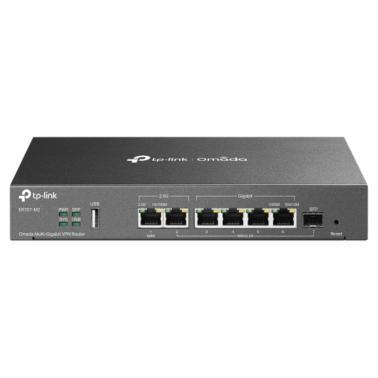
TP-Link Omada Multi WAN Router (ER707-M2)
In stock at MSY
Price checked today
We may earn a commission if you buy; it doesn't change your price. Check the price at MSY before you buy. How we make money
Price history
Tracking since today
The price hasn't changed since we started tracking it. We'll show its history once it does.
About this product
- Brand
- TP-Link
- Store
- MSY
- Category
- Electronics > Networking > Bridges & Routers > Wireless Routers
- SKU
- 72665
Specifications
- Colour
- Multi
SPECIFICATIONS:HARDWARE FEATURESStandards and Protocols IEEE 802.3, IEEE802.3u, IEEE802.3ab, IEEE802.3z, IEEE 802.3x, IEEE 802.1q TCP/IP, DHCP, ICMP, NAT, PPPoE, NTP, HTTP, HTTPS, DNS, IPSec, PPTP, L2TP, OpenVPN, SNMP Interface 1 2.5G RJ45 WAN Port 1 2.5G RJ45 WAN/LAN Port 1 Gigabit SFP WAN/LAN Port 4 Gigabit RJ45 WAN/LAN Ports 1 USB 2.0 Port (Supports USB storage, and LTE backup with LTE dongle) Network Media 10BASE-T: UTP category 3, 4, 5 cable (Max 100 m) EIA/TIA-568 100 STP (Max 100 m) 100BASE-TX: UTP category 5, 5e cable (Max 100 m) EIA/TIA-568 100 STP (Max 100 m) 1000BASE-T: UTP category 5, 5e, 6 cable (Max 100 m) 2500BASE-T: UTP category 5, 5e, 6 cable (Max 100 m) Fan Quantity FanlessButton Reset ButtonPower Supply 12V/1.5A AdapterPoE Budget -Flash 128MB NANDDRAM 1 GB DDR4LED PWR, SYS, SFP, USB, WAN (Speed, Link/Act), LAN (Speed, Link/Act)Dimensions ( W x D x H ) 8.9 5.2 1.4 in (226 131 35 mm)Protection 4 kV surge protectionEnclosure SteelMounting Desktop/Wall MountingMax Power Consumption 14.2 W (with USB2.0 connected)7.1 W (without USB2.0 connected) PERFORMANCEConcurrent Session 500,000New Sessions /Second 4,200NAT (Static IP) 2364.45 Mbps / 2343.28 MbpsNAT(DHCP) 2364.24 Mbps / 2326.21 MbpsNAT(PPPoE) 2350.93 Mbps / 2125.83 MbpsNAT (L2TP) 1249.04 Mbps / 831.12 MbpsNAT (PPTP) 1169.23 Mbps / 1175.52 MbpsIPsec VPN Throughput ESP-MD5-AES256: 537.12 MbpsESP-SHA1-AES256: 754.65 Mbps L2TP VPN Throughput Unencrypted: 1442.65 MbpsEncrypted: 346.43 Mbps SSL VPN Throughput 142.99 Mbps66 Byte Packet forwarding rate 1832.69 Mbps / 1741.84 Mbps1,518 Byte Packet forwarding rate 2461.18 Mbps / 2457.32 MbpsBASIC FUNCTIONSWAN Connection Type IPv4_Static IP IPv4_Dynamic IP IPv4_PPPOE IPv4_L2TP IPv4_PPTP IPv6_PPP IPv6_DHCPv6 IPv6_Static IP IPv6_6in4 IPv6_Pass-Through Mobile Broadband: 4G/3G modem for backup via USB port MAC Clone Modify WAN/LAN MAC AddressDHCP DHCP Server/Client DHCP Address Reservation Multi-IP Interfaces* Multi-Net DHCP* IPv6 WAN ConnectionVLAN 802.1Q VLANIPTV IGMP v2/v3 ProxyADVANCED FUNCTIONSAdvanced Routing Static Routing Policy Routing Bandwidth Control IP/Port-based Bandwidth Control Guarantee & Limited Bandwidth Load Balance Intelligent Load Balance Application Optimized Routing Link Backup (Timing, Failover) Online Detection NAT One-to-One NAT Multi-Net NAT Virtual Server Port Triggering NAT-DMZ FTP/H.323/SIP/IPSec/PPTP ALG UPnP Security Attack Defense:TCP/UDP/ICMP Flood Defense Block TCP Scan (Stealth FIN/Xmas/Null) Block Ping from WAN Filtering Web Group Filtering URL Filtering Web Security ARP Inspection: Sending GARP Packets ARP Scanning IP-MAC Binding Access Control Source/Destination IP Based Access Control Session Limit IP-based Session LimitVPNIPsec VPN 100 IPSec VPN Tunnels LAN-to-LAN, Client-to-LAN Main, Aggressive Negotiation Mode DES, 3DES, SHA1, AES128, AES192, AES256 Encryption Algorithm IKEv1/v2 MD5, SHA1 Authentication Algorithm NAT Traversal (NAT-T) Dead Peer Detection (DPD) Perfect Forward Secrecy (PFS) PPTP VPN PPTP VPN Server PPTP VPN Clients (12) 60 Tunnels (Shared with L2TP) PPTP with MPPE Encryption L2TP VPN L2TP VPN Server L2TP VPN Clients (12) 60 Tunnels (Shared with PPTP) L2TP over IPSec OpenVPN OpenVPN Server OpenVPN Clients (6) 66 OpenVPN Tunnels* SECURITYFiltering WEB Group FilteringURL Filtering Web Security ARP Inspection Sending GARP Packets ARP Scanning IP-MAC Binding Attack Defense TCP/UDP/ICMP Flood Defense Block TCP Scan (Stealth FIN/Xmas/Null) Block Ping from WAN Access Control Source/Destination IP Based Access ControlAUTHENTICATIONWeb Authentication No Authentication Simple Password* Hotspot (Local User/Voucher* /SMS*/Radius*) External Radius Sever External Portal Sever* Facebook* MANAGEMENTOmada App Yes. Requiring the use of OC300, OC200, Omada Cloud-Based Controller, or Omada Software Controller.Centralized Management Omada Cloud-Based Controller Omada Hardware Controller (OC300) Omada Hardware Controller (OC200) Omada Software Controller Cloud Access Yes. Requiring the use of OC300, OC200, Omada Cloud-Based Controller, or Omada Software Controller.Service Dynamic DNS (Dyndns, No-IP, Peanuthull, Comexe)Maintenance Web Management Interface Remote Management Export & Import Configuration SNMP v1/v2c/v3* Diagnostics (Ping & Traceroute) NTP Synchronize Syslog Support Zero-Touch Provisioning Yes. Requiring the use of Omada Cloud-Based Controller.Management Features Automatic Device Discovery Intelligent Network Monitoring Abnormal Event Warnings Unified Configuration Reboot Schedule Captive Portal Configuration ZTP (Zero-Touch Provisioning) OTHERSCertification CE, FCC, RoHSPackage Contents ER707-M2 Power Adapter Quick Installation Guide System Requirements Microsoft Windows 98SE, NT, 2000, XP, Vista or Windows 7/8/8.1/10, MAC OS, NetWare, UNIX or LinuxEnvironment Operating Temperature: 040 (32104 ); Storage Temperature: -4070 (-40158 ) Operating Humidity: 1090% RH non-condensing Storage Humidity: 590% non-condensing Notes*These functions require the use of an Omada Hardware Controller, Software Controller, or Cloud-Based Controller.**Zero-Touch Provisioning requires the use of Omada Cloud-Based Controller. Go to https://www.tp-link.com/en/omada-cloud-based-controller/product-list/ to confirm which models are compatible with Omada Cloud-Based Controller. LAN MAC Address can be modified only in Standalone Mode. These functions are supported only in Standalone Mode.At least one WAN/LAN port needs to function as a LAN port.